跳转到主要内容
OAuth 授权示例
本指南将教你如何为工具插件构建 OAuth 支持。 OAuth 是为需要访问第三方服务(如 Gmail 或 GitHub)用户数据的工具插件提供授权的更好方式。OAuth 允许工具在用户明确同意的情况下代表用户执行操作,而无需用户手动输入 API 密钥。

背景

Dify 中的 OAuth 涉及两个独立的流程,开发者需要理解并为其进行设计。

流程 1:OAuth 客户端设置(管理员/开发者流程)

在 Dify Cloud 上,Dify 团队会为热门工具插件创建 OAuth 应用并设置 OAuth 客户端,省去用户自行配置的麻烦。自托管 Dify 实例的管理员必须完成此设置流程。
Dify 实例的管理员或开发者首先在第三方服务上将 OAuth 应用注册为受信任的应用程序,由此获取将 Dify 工具提供者配置为 OAuth 客户端所需的凭证。 以下是为 Dify 的 Gmail 工具提供者设置 OAuth 客户端的步骤示例:
  1. 前往 Google Cloud Console 创建新项目,或选择现有项目。
  2. 启用所需的 API(例如 Gmail API)。
  1. 导航至 APIs & Services > OAuth consent screen
  2. 为公共插件选择 External 用户类型。
  3. 填写应用名称、用户支持邮箱和开发者联系方式。
  4. 如需要,添加授权域名。
  5. 测试阶段:在 Test users 部分添加测试用户。
  1. 前往 APIs & Services > Credentials
  2. 点击 Create Credentials > OAuth 2.0 Client IDs
  3. 选择 Web application 类型。
  4. 将生成 client_idclient_secret。保存这些凭证。
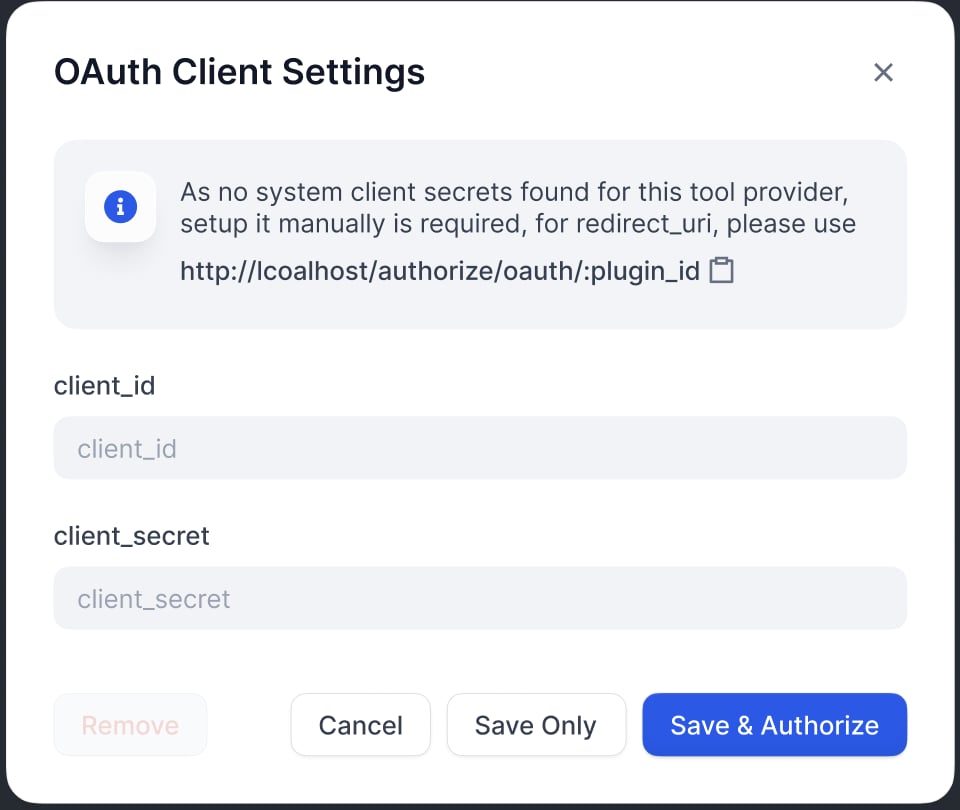
在 OAuth 客户端配置弹窗中输入 client_idclient_secret,以将工具提供者设置为客户端。
OAuth 客户端设置对话框
在 Google OAuth 客户端页面上注册 Dify 生成的重定向 URI:
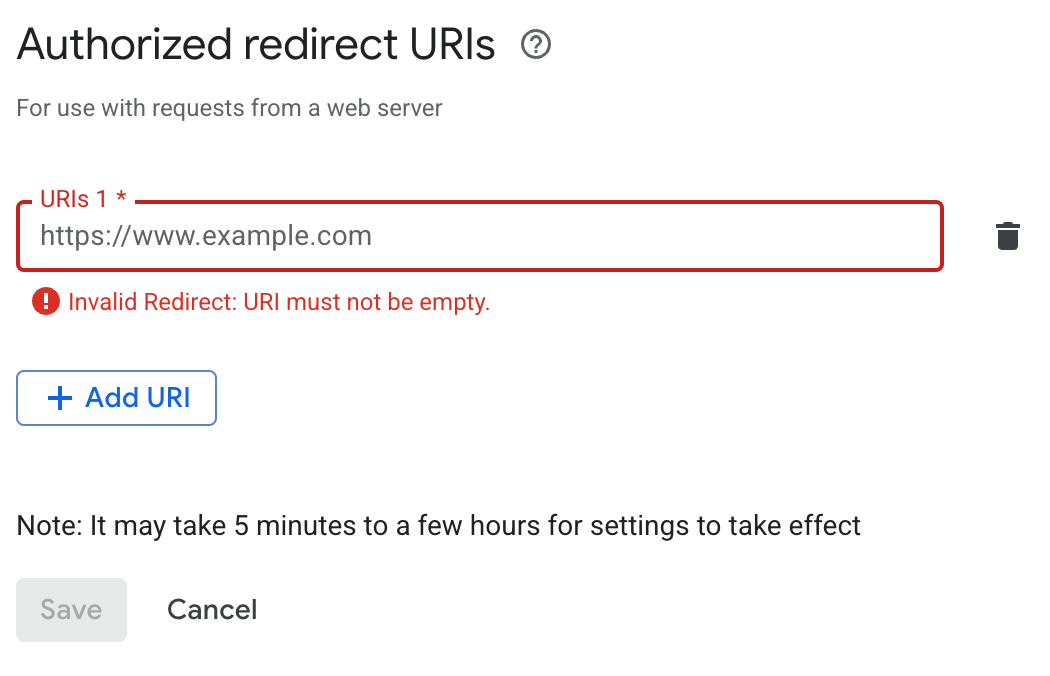
OAuth Google 重定向 URI
Dify 在 OAuth 客户端配置弹窗中显示 redirect_uri。它通常遵循以下格式:
https://{your-dify-domain}/console/api/oauth/plugin/{plugin-id}/{provider-name}/{tool-name}/callback
对于自托管 Dify,your-dify-domain 应与 CONSOLE_WEB_URL 保持一致。
每个服务都有独特的要求,因此请务必查阅你所集成服务的具体 OAuth 文档。

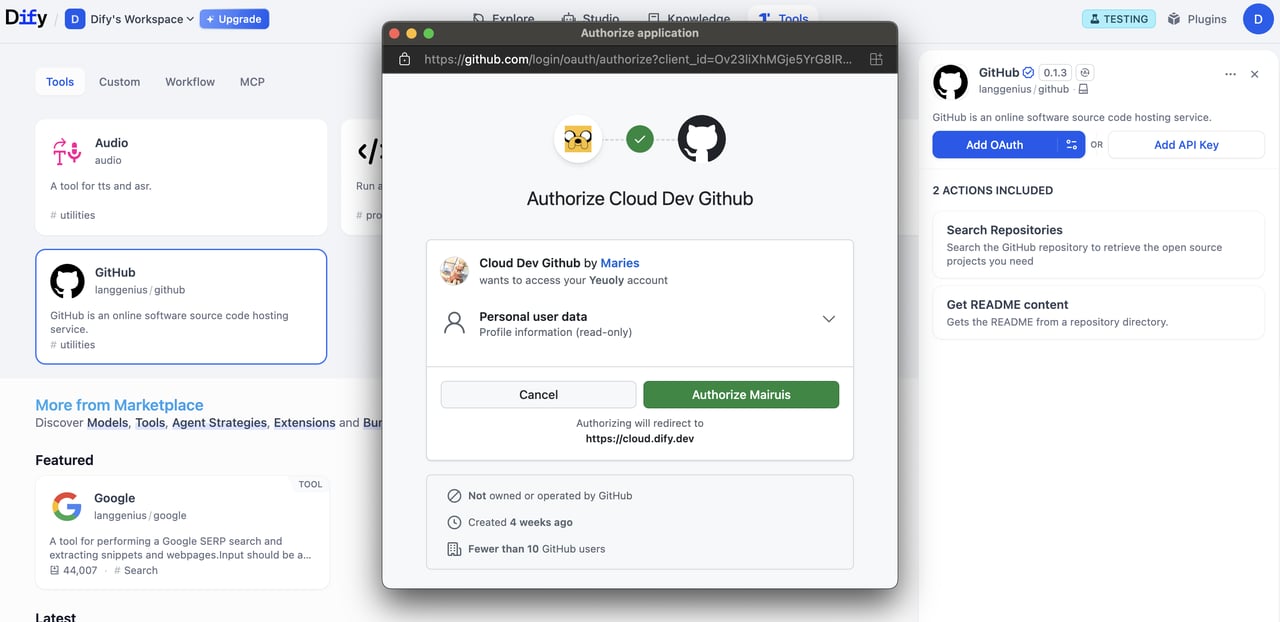
流程 2:用户授权(Dify 用户流程)

配置 OAuth 客户端后,Dify 用户可以授权你的插件访问他们的个人账户。
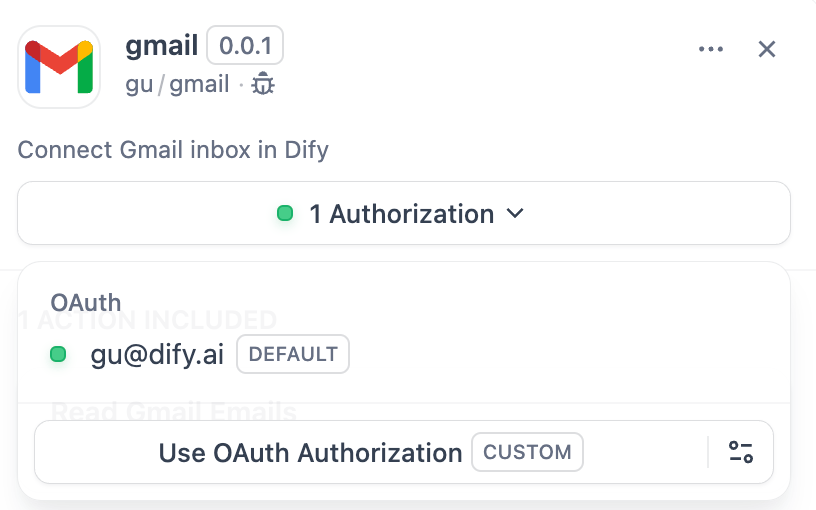
OAuth 用户授权

实现

1. 在提供者清单中定义 OAuth Schema

提供者清单中的 oauth_schema 部分告诉 Dify,插件的 OAuth 设置需要哪些凭证,以及 OAuth 流程会产生什么。设置 OAuth 需要两个 schema:

client_schema

定义 OAuth 客户端设置的输入:
gmail.yaml
oauth_schema:
  client_schema:
    - name: "client_id"
      type: "secret-input"
      required: true
      url: "https://developers.google.com/identity/protocols/oauth2"
    - name: "client_secret"
      type: "secret-input" 
      required: true
url 字段链接到第三方服务的帮助文档,为管理员和开发者在设置过程中提供参考。

credentials_schema

指定用户授权流程产生的内容(Dify 自动管理这些):
# also under oauth_schema
  credentials_schema:
    - name: "access_token"
      type: "secret-input"
    - name: "refresh_token"
      type: "secret-input"
    - name: "expires_at"
      type: "secret-input"
同时包含 oauth_schemacredentials_for_provider,可同时提供 OAuth 和 API 密钥两种认证选项。

2. 在工具提供者中完成必需的 OAuth 方法

在实现 ToolProvider 的位置添加以下导入:
from dify_plugin.entities.oauth import ToolOAuthCredentials
from dify_plugin.errors.tool import ToolProviderCredentialValidationError, ToolProviderOAuthError
你的 ToolProvider 类必须实现以下三个 OAuth 方法(以 GmailProvider 为例):
切勿在 ToolOAuthCredentials 的凭证中返回 client_secret,否则可能导致安全问题。
def _oauth_get_authorization_url(self, redirect_uri: str, system_credentials: Mapping[str, Any]) -> str:
	"""
	Generate the authorization URL using credentials from OAuth Client Setup Flow. 
    This URL is where users grant permissions.
    """
    # Generate random state for CSRF protection (recommended for all OAuth flows)
    state = secrets.token_urlsafe(16)
    
    # Define Gmail-specific scopes - request minimal necessary permissions
    scope = "read:user read:data"  # Replace with your required scopes
    
    # Assemble Gmail-specific payload
    params = {
        "client_id": system_credentials["client_id"],    # From OAuth Client Setup
        "redirect_uri": redirect_uri,                    # Dify generates this - DON'T modify
        "scope": scope,                                  
        "response_type": "code",                         # Standard OAuth authorization code flow
        "access_type": "offline",                        # Critical: gets refresh token (if supported)
        "prompt": "consent",                             # Forces reauth when scopes change (if supported)
        "state": state,                                  # CSRF protection
    }
    
    return f"{self._AUTH_URL}?{urllib.parse.urlencode(params)}"
def _oauth_get_credentials(
    self, redirect_uri: str, system_credentials: Mapping[str, Any], request: Request
) -> ToolOAuthCredentials:
    """
    Exchange authorization code for access token and refresh token. This is called
	to create ONE credential set for one account connection.
    """
    # Extract authorization code from OAuth callback
    code = request.args.get("code")
    if not code:
        raise ToolProviderOAuthError("Authorization code not provided")
    
    # Check for authorization errors from OAuth provider
    error = request.args.get("error")
    if error:
        error_description = request.args.get("error_description", "")
        raise ToolProviderOAuthError(f"OAuth authorization failed: {error} - {error_description}")
    
    # Exchange authorization code for tokens using OAuth Client Setup credentials

	# Assemble Gmail-specific payload
    data = {
        "client_id": system_credentials["client_id"],        # From OAuth Client Setup
        "client_secret": system_credentials["client_secret"], # From OAuth Client Setup
        "code": code,                                        # From user's authorization
        "grant_type": "authorization_code",                  # Standard OAuth flow type
        "redirect_uri": redirect_uri,                        # Must exactly match authorization URL
    }
    
    headers = {"Content-Type": "application/x-www-form-urlencoded"}
    
    try:
        response = requests.post(
            self._TOKEN_URL,
            data=data,
            headers=headers,
            timeout=10
        )
        response.raise_for_status()
        
        token_data = response.json()
        
        # Handle OAuth provider errors in response
        if "error" in token_data:
            error_desc = token_data.get('error_description', token_data['error'])
            raise ToolProviderOAuthError(f"Token exchange failed: {error_desc}")
        
        access_token = token_data.get("access_token")
        if not access_token:
            raise ToolProviderOAuthError("No access token received from provider")
        
        # Build credentials dict matching your credentials_schema
        credentials = {
            "access_token": access_token,
            "token_type": token_data.get("token_type", "Bearer"),
        }
        
        # Include refresh token if provided (critical for long-term access)
        refresh_token = token_data.get("refresh_token")
        if refresh_token:
            credentials["refresh_token"] = refresh_token
        
        # Handle token expiration - some providers don't provide expires_in
        expires_in = token_data.get("expires_in", 3600)  # Default to 1 hour
        expires_at = int(time.time()) + expires_in
        
        return ToolOAuthCredentials(credentials=credentials, expires_at=expires_at)
        
    except requests.RequestException as e:
        raise ToolProviderOAuthError(f"Network error during token exchange: {str(e)}")
    except Exception as e:
        raise ToolProviderOAuthError(f"Failed to exchange authorization code: {str(e)}")
def _oauth_refresh_credentials(
    self, redirect_uri: str, system_credentials: Mapping[str, Any], credentials: Mapping[str, Any]
) -> ToolOAuthCredentials:
    """
    Refresh the credentials using the refresh token. 
	Dify calls this automatically when tokens expire.
    """
    refresh_token = credentials.get("refresh_token")
    if not refresh_token:
        raise ToolProviderOAuthError("No refresh token available")

    # Standard OAuth refresh token flow
    data = {
        "client_id": system_credentials["client_id"],       # From OAuth Client Setup
        "client_secret": system_credentials["client_secret"], # From OAuth Client Setup
        "refresh_token": refresh_token,                     # From previous authorization
        "grant_type": "refresh_token",                      # OAuth refresh flow
    }

    headers = {"Content-Type": "application/x-www-form-urlencoded"}

    try:
        response = requests.post(
            self._TOKEN_URL,
            data=data,
            headers=headers,
            timeout=10
        )
        response.raise_for_status()

        token_data = response.json()

        # Handle refresh errors
        if "error" in token_data:
            error_desc = token_data.get('error_description', token_data['error'])
            raise ToolProviderOAuthError(f"Token refresh failed: {error_desc}")

        access_token = token_data.get("access_token")
        if not access_token:
            raise ToolProviderOAuthError("No access token received from provider")

        # Build new credentials, preserving existing refresh token
        new_credentials = {
            "access_token": access_token,
            "token_type": token_data.get("token_type", "Bearer"),
            "refresh_token": refresh_token,  # Keep existing refresh token
        }

        # Handle token expiration
        expires_in = token_data.get("expires_in", 3600)

        # update refresh token if new one provided
        new_refresh_token = token_data.get("refresh_token")
        if new_refresh_token:
            new_credentials["refresh_token"] = new_refresh_token

        # Calculate new expiration timestamp for Dify's token management
        expires_at = int(time.time()) + expires_in

        return ToolOAuthCredentials(credentials=new_credentials, expires_at=expires_at)

    except requests.RequestException as e:
        raise ToolProviderOAuthError(f"Network error during token refresh: {str(e)}")
    except Exception as e:
        raise ToolProviderOAuthError(f"Failed to refresh credentials: {str(e)}")

3. 在工具中访问令牌

Tool 实现中使用 OAuth 凭证发起经过身份验证的 API 调用:
class YourTool(BuiltinTool):
    def _invoke(self, user_id: str, tool_parameters: dict[str, Any]) -> ToolInvokeMessage:
        if self.runtime.credential_type == CredentialType.OAUTH:
            access_token = self.runtime.credentials["access_token"]
        
        response = requests.get("https://api.service.com/data",
                              headers={"Authorization": f"Bearer {access_token}"})
        return self.create_text_message(response.text)
self.runtime.credentials 自动提供当前用户的令牌。Dify 自动处理刷新。 对于同时支持 OAuth 和 API_KEY 认证的插件,可使用 self.runtime.credential_type 来区分这两种认证类型。

4. 指定正确的版本

OAuth 需要较新版本的 SDK 和 Dify。在 requirements.txt 中固定插件 SDK 版本:
dify_plugin>=0.5.0
manifest.yaml 中,添加最低 Dify 版本:
meta:
  version: 0.0.1
  arch:
    - amd64
    - arm64
  runner:
    language: python
    version: "3.12"
    entrypoint: main
  minimum_dify_version: 1.7.1

编辑此页面 | 报告问题