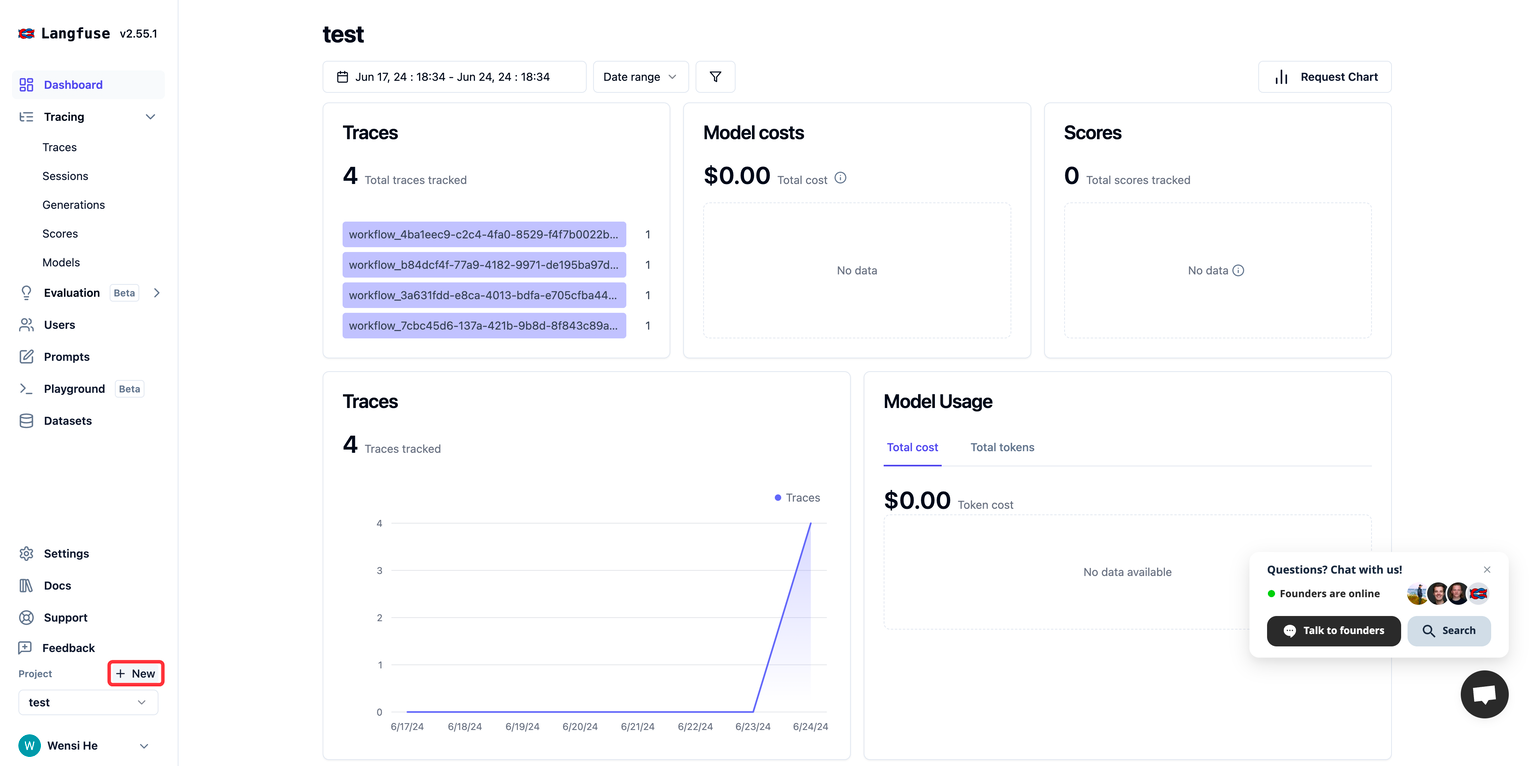
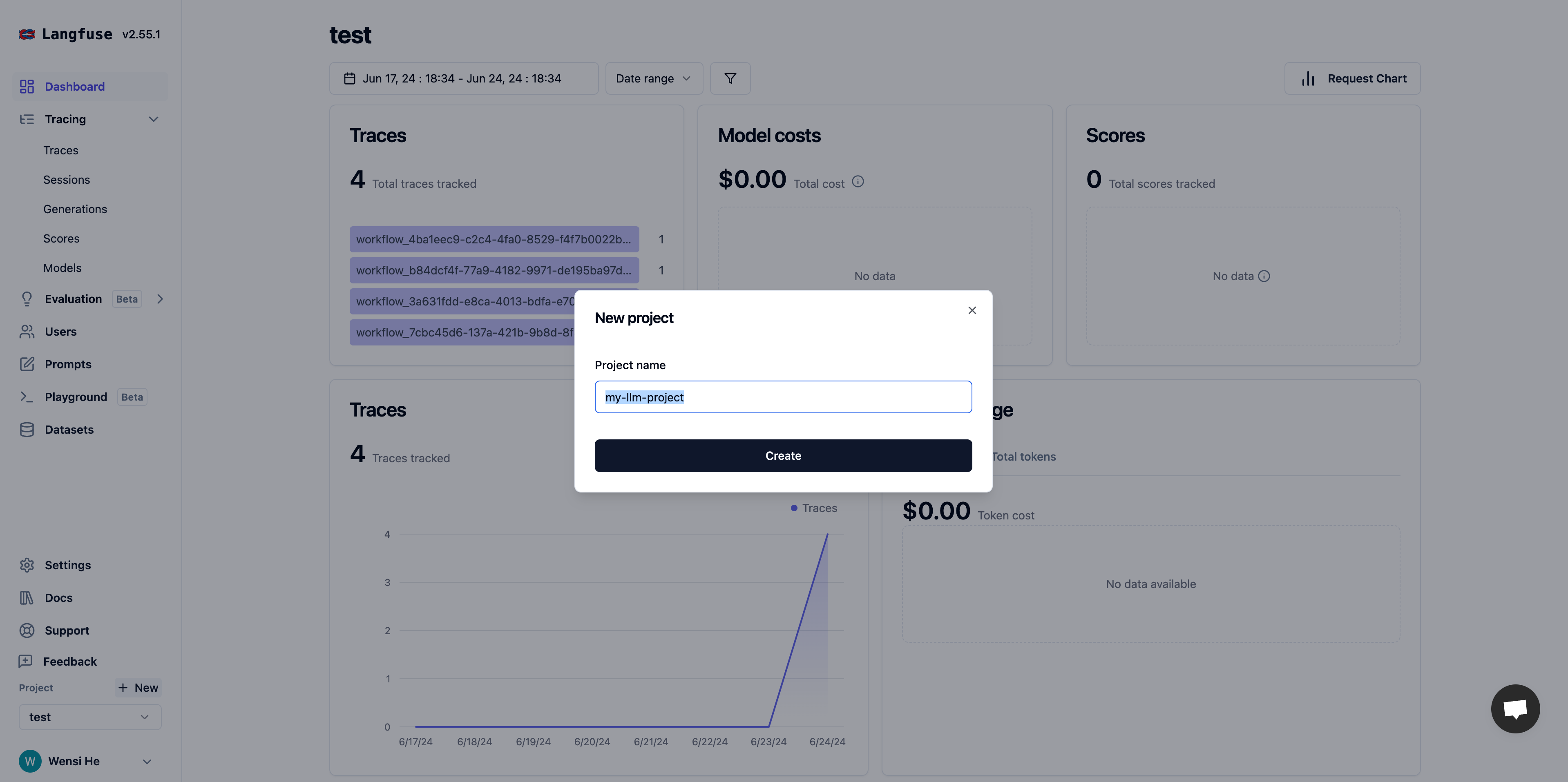
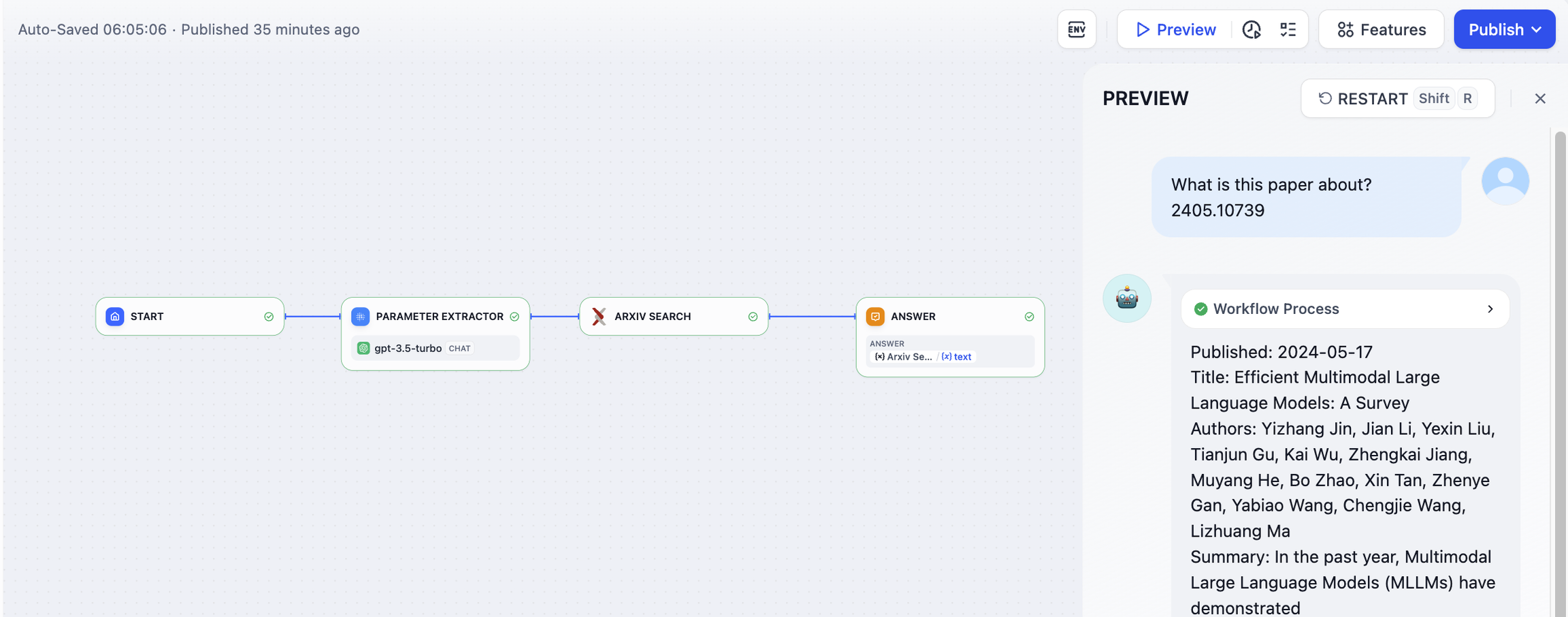
Create a project in Langfuse. After logging in, click New on the homepage to create your own project. The project will be used to associate with applications in Dify for data monitoring.
Edit a name for the project.
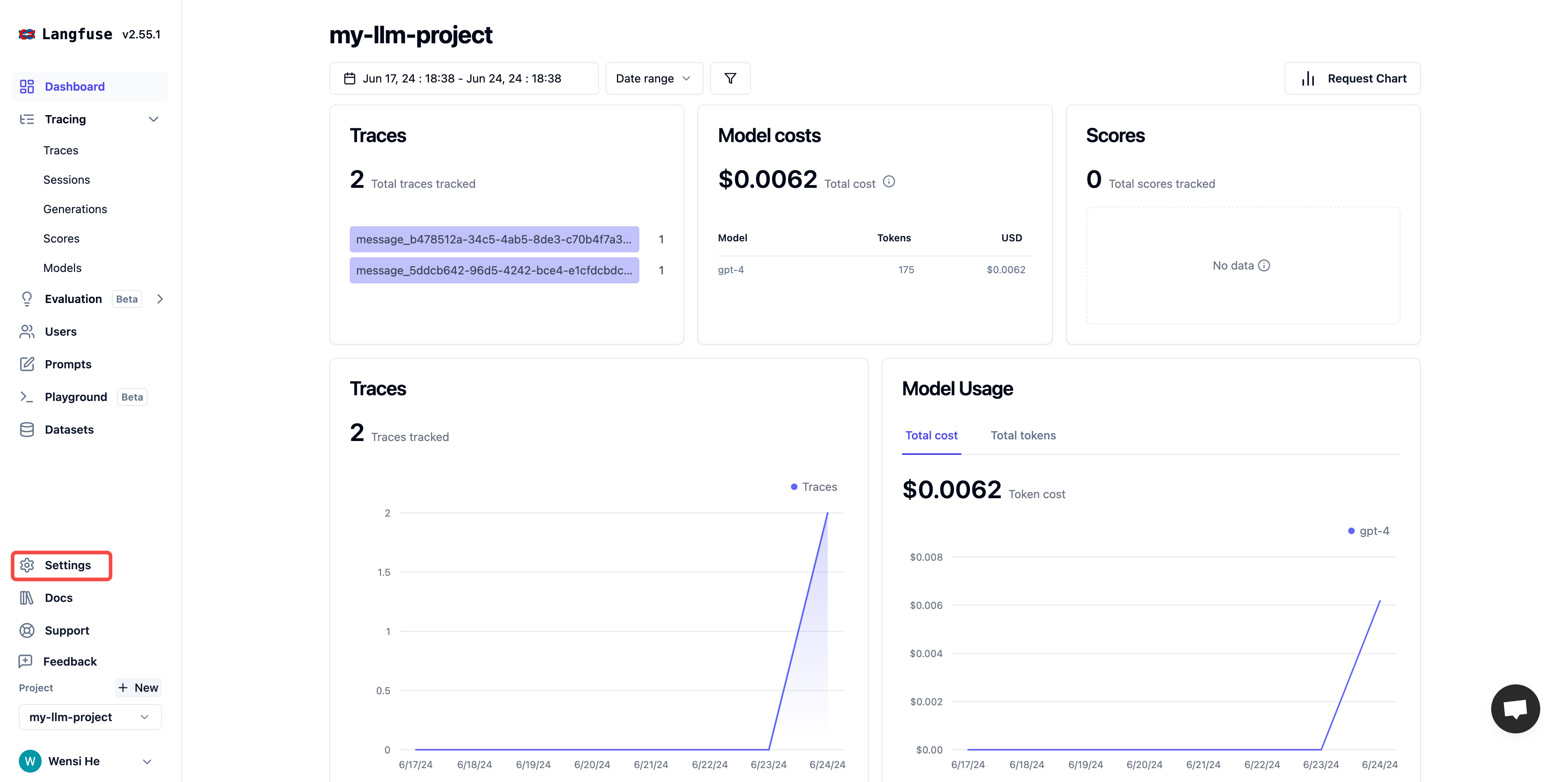
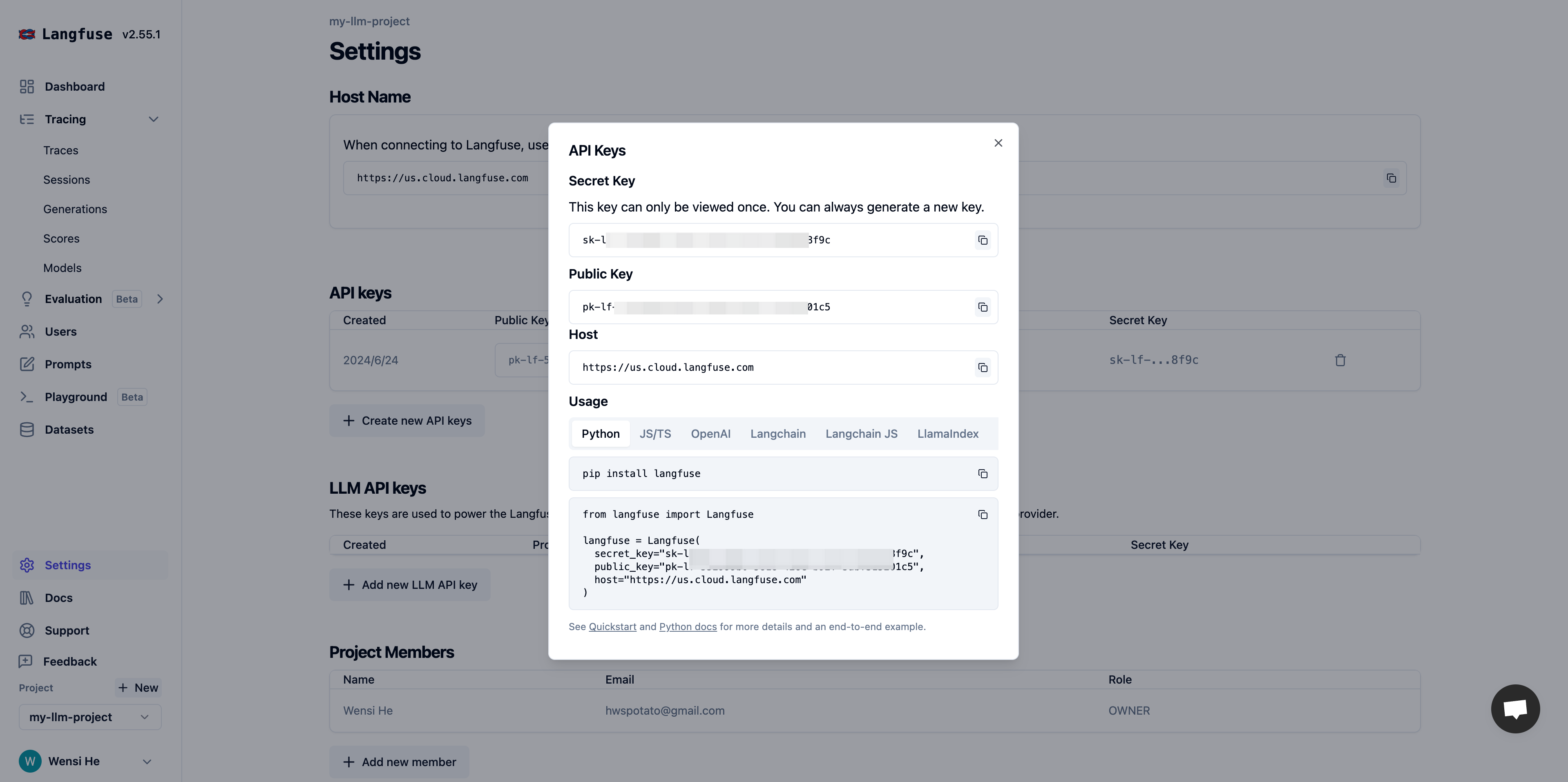
Create project API credentials. In the left sidebar of the project, click Settings to open the settings.
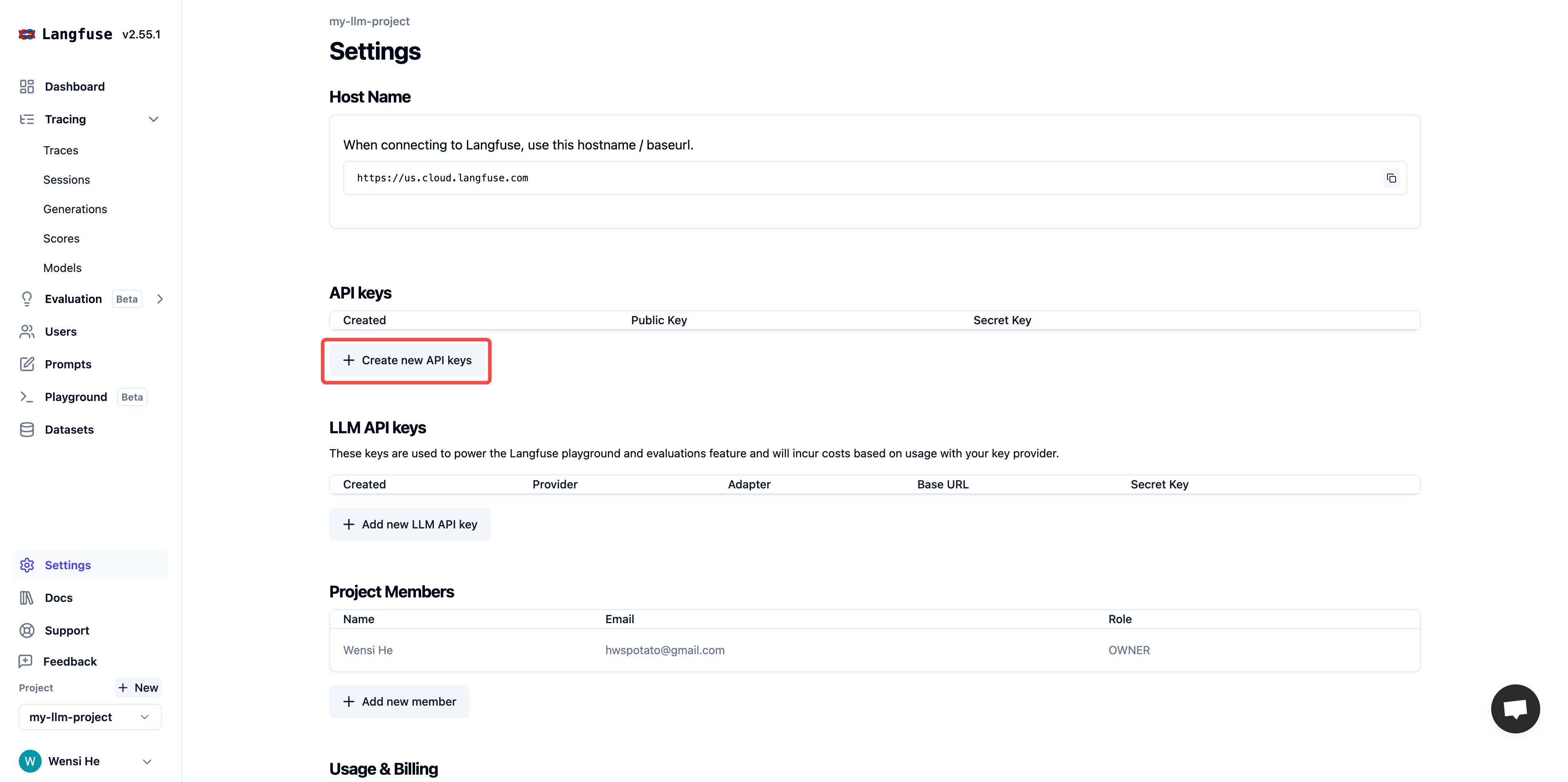
In Settings, click Create API Keys to create project API credentials.
Copy and save the Secret Key, Public Key, and Host.
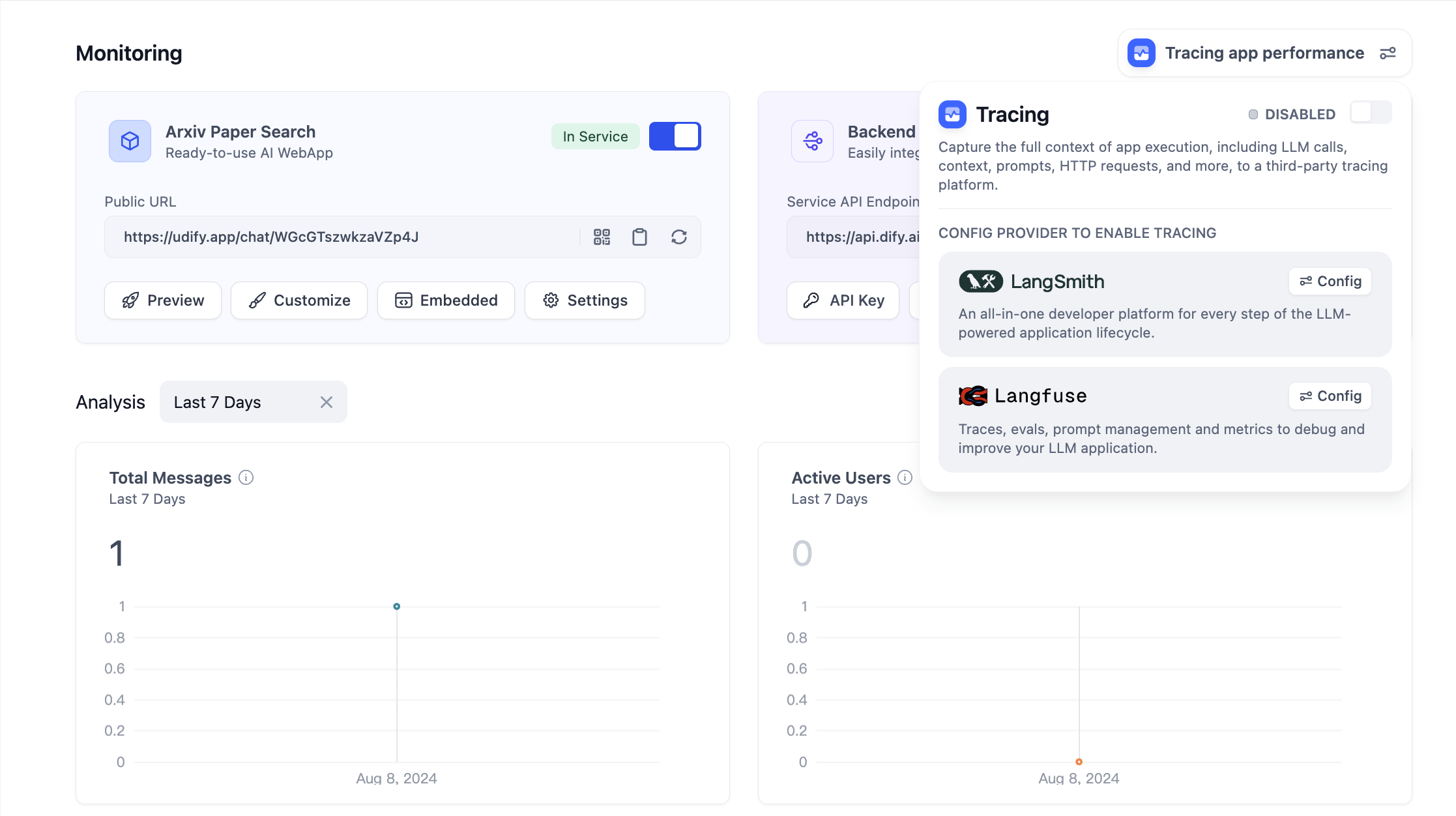
Configure Langfuse in Dify. Open the application you need to monitor, open Monitoring in the side menu, and select Tracing app performance on the page.
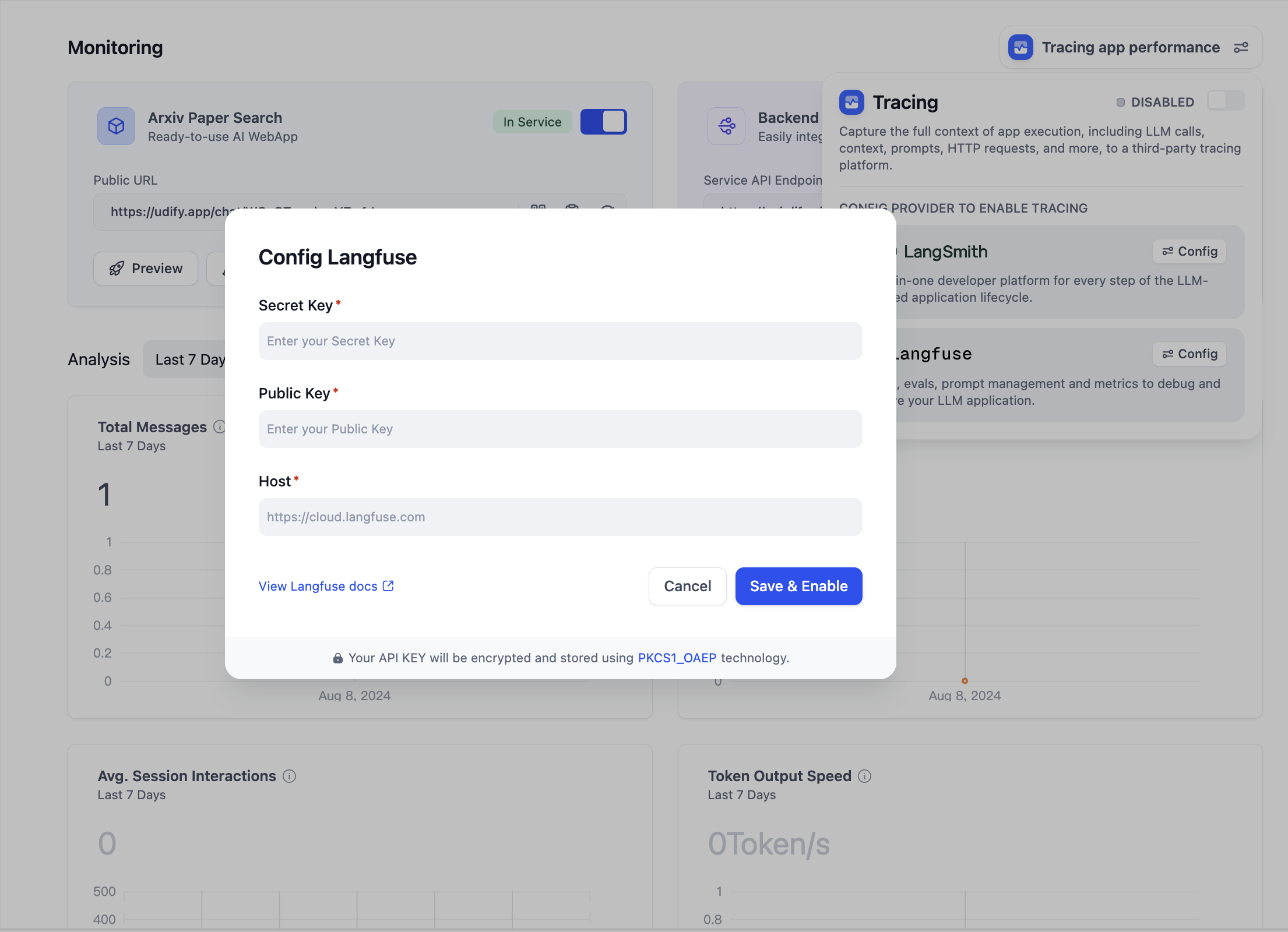
After clicking Config, paste the Secret Key, Public Key, Host created in Langfuse into the configuration and save. Host must be the base URL for your project’s region or self-hosted instance, without /api/public.
Dify sends traces over OpenTelemetry, to /api/public/otel/v1/traces, so a self-hosted Langfuse must be v3.63.0 or later. For a new deployment, use v4.
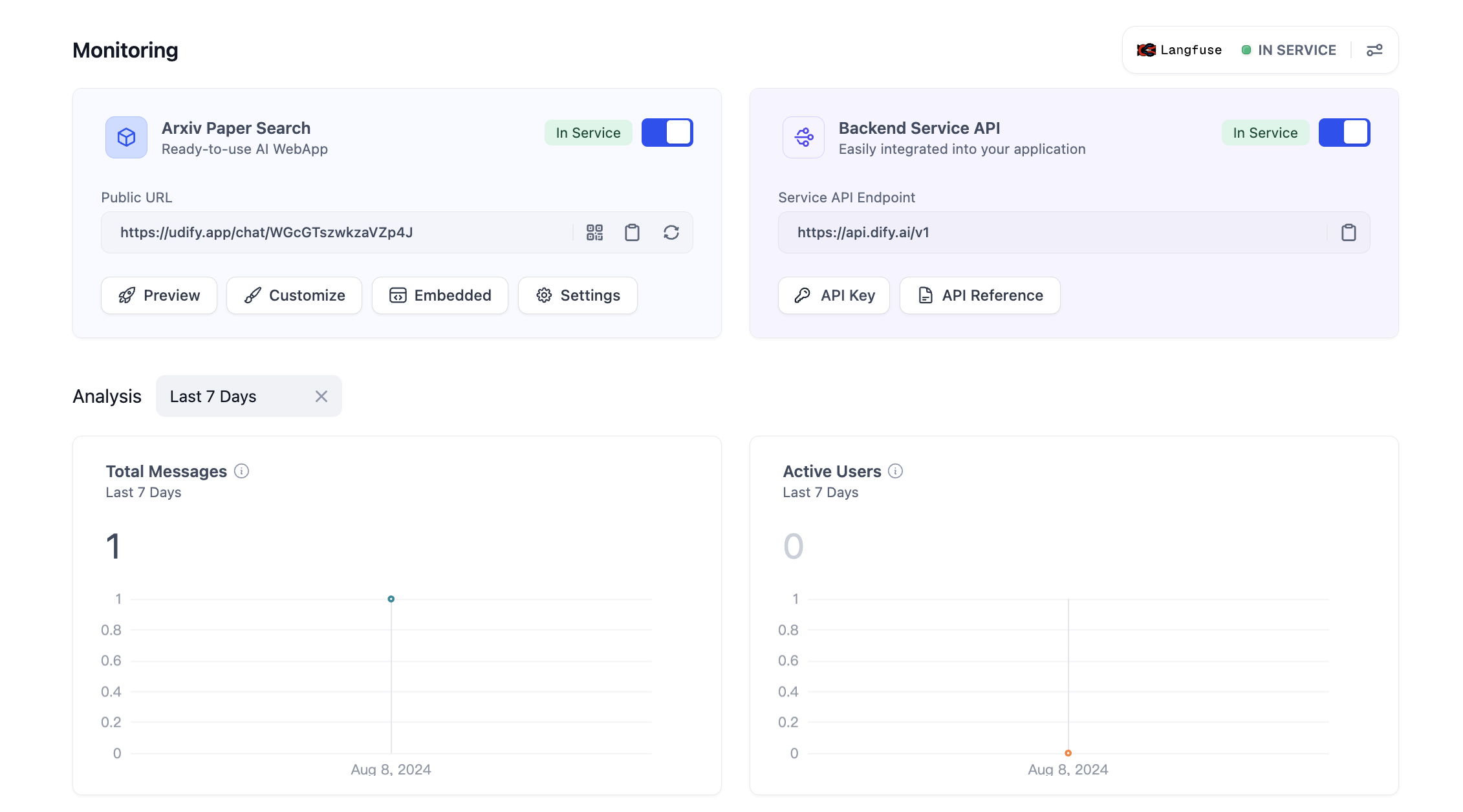
Once successfully saved, you can view the status on the current page.
View Monitoring Data in Langfuse
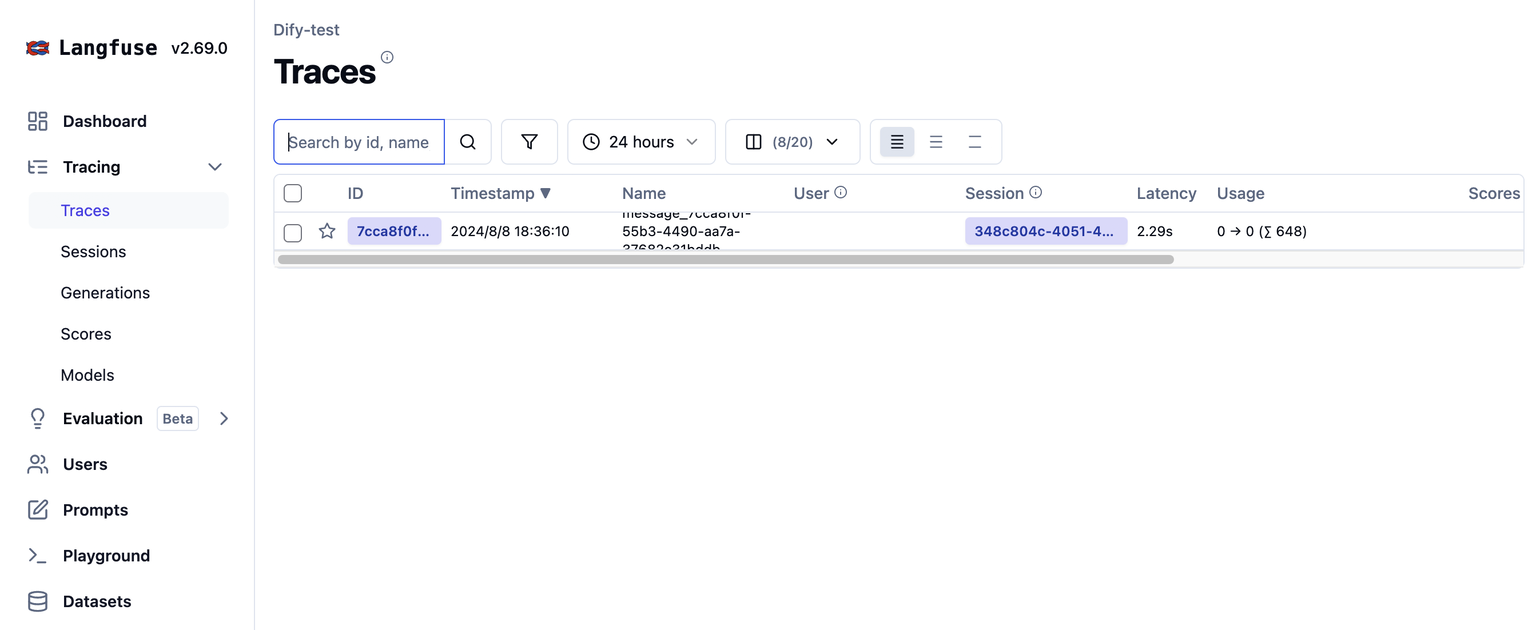
After configuration, debugging or production data of the application in Dify can be viewed in Langfuse.
After saving and enabling tracing, run the app again and check for a new trace in the monitoring service. Delivery is asynchronous; saving the configuration alone does not confirm that a trace has arrived.With both deployment switches off, the new Agent app type and workflows using the new Agent node still send ordinary traces, including available inputs and outputs, but omit the Agent’s internal model and tool calls.To collect those calls, ask your deployment administrator to turn on both deployment switches in the Helm values: OPS_AGENT_TRACE_ENABLED and DIFY_AGENT_APPLICATION_TRACING_ENABLED. See LLMOps Trace Delivery for details.Once both deployment switches are on, Capture content is off by default for these apps: inputs, outputs, and most metadata are removed, and error text is redacted across the whole workflow. Enable it to send that content. Legacy Agent apps and workflows using only classic Agent nodes retain ordinary tracing.
List of monitoring data
The tables below describe ordinary traces. When both deployment switches are on, traces from the new Agent app type and from workflows containing a new Agent node use a new UUIDv7 trace ID, with source and tracing-run IDs retained as dify.source.id and dify.tracing.run_id attributes. For the new Agent app type, spans named Agent attempt 1, Agent attempt 2, and so on, with the internal model and tool calls, replace the ordinary llm span when Capture Agent internals is on. These traces leave out the separate moderation, suggested-question, and naming records.Dify exports a hierarchy of operations: a message contains an llm call, and a Chatflow message contains its workflow and node operations.Workflow apps take the trace ID from the workflow run ID, and all other app types from the message ID. When you call a Chatflow or Workflow app through the API with an X-Trace-Id header, that value takes its place. In Langfuse, the ID appears as 32 hexadecimal characters:
A UUID or 32 hexadecimal characters, including message and workflow run IDs: the same digits, without dashes.
Any other X-Trace-Id value: a hash of it. The original value is kept in the trace’s metadata as external_trace_id.
Observation IDs are derived. Native token usage is reported on model calls only.For Chatflow, the trace root is the message, with the user’s query as input (or workflow inputs when the query is empty). Its workflow child retains the workflow inputs and outputs.The detail lists below describe Dify’s source records and metadata. Only the relevant, available values are exported; the raw records are not sent in full.
Trace the information of Workflow and Chatflow
Tracing Workflow and Chatflow
Workflow
Langfuse Trace
workflow_run_id (Workflow) / message_id (Chatflow), unless X-Trace-Id is supplied
id (trace)
user_id
userId
workflow (Workflow) / message (Chatflow)
name
start_time
timestamp / startTime
end_time
endTime (observations)
Workflow inputs / Chatflow query (workflow inputs if empty)
input
outputs
output
Model token consumption (LLM calls)
usage
metadata
metadata
error
level (observations)
error
statusMessage (observations)
Session ID
sessionId
Parent span (when present)
parentObservationId (nested observations)
Workflow Trace Info
workflow_id - Unique ID of Workflow
conversation_id - Conversation ID
workflow_run_id - Workflow ID of this runtime
tenant_id - Tenant ID
elapsed_time - Elapsed time at this runtime
status - Runtime status
version - Workflow version
total_tokens - Total token used at this runtime
file_list - List of files processed
triggered_from - Source that triggered this runtime
workflow_run_inputs - Input of this workflow
workflow_run_outputs - Output of this workflow
error - Error Message
query - Queries used at runtime
workflow_app_log_id - Workflow Application Log ID
message_id - Relevant Message ID
start_time - Start time of this runtime
end_time - End time of this runtime
workflow node executions - Workflow node runtime information
Metadata
workflow_id - Unique ID of Workflow
conversation_id - Conversation ID
workflow_run_id - Workflow ID of this runtime
tenant_id - Tenant ID
elapsed_time - Elapsed time at this runtime
status - Operational state
version - Workflow version
total_tokens - Total token used at this runtime
file_list - List of files processed
triggered_from - Source that triggered this runtime
Message Trace Info
For trace llm conversation
Message
Langfuse Generation/Trace
message_id
id (trace)
end_user_session_id (or user_id)
userId
message
name
start_time
timestamp / startTime
end_time
endTime (observations)
inputs
input
outputs
output
Model token consumption (LLM calls)
usage
metadata
metadata
error
level (observations)
error
statusMessage (observations)
Session ID
sessionId
Message Trace Info
message_id - Message ID
message_data - Message data
end_user_session_id - Session ID for user
conversation_model - Conversation model
message_tokens - Message tokens
answer_tokens - Answer Tokens
total_tokens - Total Tokens from Message and Answer
error - Error Message
inputs - Input data
outputs - Output data
file_list - List of files processed
start_time - Start time
end_time - End time
conversation_mode - Conversation mode
Metadata
conversation_id - Conversation ID
ls_provider - Model provider
ls_model_name - Model ID
status - Message status
from_end_user_id - Sending user’s ID
from_account_id - Sending account’s ID
agent_based - Whether agent based
workflow_run_id - Workflow ID of this runtime
from_source - Message source
message_id - Message ID
Moderation Trace Information
Used to track conversation moderation
Moderation
Langfuse Tool Observation
user_id
metadata.user_id
moderation
name
start_time
startTime
end_time
endTime (observations)
inputs
input
action, flagged
output
metadata
metadata
message_id (unless X-Trace-Id is supplied in a Chatflow)
traceId
Message Trace Info
message_id - Message ID
user_id - user ID
workflow_app_log_id workflow_app_log_id
inputs - Input data for review
message_data - Message Data
flagged - Whether it is flagged for attention
action - Specific actions to implement
preset_response - Preset response
start_time - Start time of review
end_time - End time of review
Metadata
message_id - Message ID
action - Specific actions to implement
preset_response - Preset response
Suggested Question Trace Information
Used to track suggested questions
Suggested Question
Langfuse Tool Observation
user_id
metadata.user_id
suggested_question
name
start_time
startTime
end_time
endTime (observations)
inputs
input
suggested_question
output
metadata
metadata
message_id
traceId
Message Trace Info
message_id - Message ID
message_data - Message data
inputs - Input data
outputs - Output data
start_time - Start time
end_time - End time
total_tokens - Total tokens
status - Message Status
error - Error Message
from_account_id - Sending account ID
agent_based - Whether agent based
from_source - Message source
model_provider - Model provider
model_id - Model ID
suggested_question - Suggested question
level - Status level
status_message - Message status
Metadata
message_id - Message ID
ls_provider - Model Provider
ls_model_name - Model ID
status - Message status
from_end_user_id - Sending user’s ID
from_account_id - Sending Account ID
workflow_run_id - Workflow ID of this runtime
from_source - Message source
Dataset Retrieval Trace Information
Used to track knowledge base retrieval
Dataset Retrieval
Langfuse Retriever Observation
user_id
metadata.user_id
dataset_retrieval
name
start_time
startTime
end_time
endTime (observations)
inputs
input
documents
output
metadata
metadata
message_id
traceId
Dataset Retrieval Trace Info
message_id - Message ID
inputs - Input Message
documents - Document data
start_time - Start time
end_time - End time
message_data - Message data
Metadata
message_id - Message ID
ls_provider - Model Provider
ls_model_name - Model ID
status - Model status
from_end_user_id - Sending user’s ID
from_account_id - Sending account’s ID
agent_based - Whether agent based
workflow_run_id - Workflow ID of this runtime
from_source - Message Source
Tool Trace Information
Used to track tool invocation
Tool
Langfuse Tool Observation
user_id
metadata.user_id
tool_name
name
start_time
startTime
end_time
endTime (observations)
tool_inputs
input
tool_outputs
output
metadata
metadata
message_id
traceId
Tool Trace Info
message_id - Message ID
tool_name - Tool Name
start_time - Start time
end_time - End time
tool_inputs - Tool inputs
tool_outputs - Tool outputs
message_data - Message data
error - Error Message, if exist
inputs - Input of Message
outputs - Output of Message
tool_config - Tool config
time_cost - Time cost
tool_parameters - Tool Parameters
file_url - URL of relevant files
Metadata
message_id - Message ID
tool_name - Tool Name
tool_inputs - Tool inputs
tool_outputs - Tool outputs
tool_config - Tool config
time_cost - Time. cost
error - Error Message
tool_parameters - Tool parameters
message_file_id - Message file ID
created_by_role - Created by role
created_user_id - Created user ID
Generate Name Trace
Used to track conversation title generationAutomatic naming without an associated message creates a standalone trace named generate_name with one tool observation. Naming linked to a message creates a tool observation in that message’s trace. Editing a title directly does not create a naming trace.
Get Prompt: Fetch specific prompts managed in Langfuse.
Search Prompts: Search for prompts in Langfuse using various filters.
Update Prompt: Create new versions of prompts in Langfuse and set tags/labels.
This integration streamlines the process of managing and versioning your prompts, contributing to more efficient development and iteration cycles. You can find the plugin and installation instructions here.
{"docsConfig":{"theme":"aspen","$schema":"https://mintlify.com/docs.json","name":"Dify Enterprise Docs","colors":{"primary":"#0060FF","light":"#688FE8","dark":"#0034FF"},"logo":{"light":"https://assets-docs.dify.ai/2025/05/d05cfc6ebe48f725d171dc71c64a5d16.svg","dark":"https://assets-docs.dify.ai/2025/05/c51f1cda47c1d9a4a162d7736f6e4c53.svg"},"favicon":"https://mintcdn.com/dify-enterprise-docs/zvhvyUvEpyoIONBf/logo/dify-logo.png?fit=max\u0026auto=format\u0026n=zvhvyUvEpyoIONBf\u0026q=85\u0026s=e0afd8349b7a272ad12280680a53043c","navbar":{"links":[{"href":"mailto:support@dify.ai","label":"Support"}]},"footer":{"socials":{"x":"https://x.com/dify_ai","github":"https://github.com/langgenius/dify","linkedin":"https://www.linkedin.com/company/langgenius"}},"styling":{"latex":false},"navigation":{"languages":[{"language":"en","default":true,"href":"en/3.14.x/deploy/checklist"},{"language":"zh","href":"zh/3.14.x/deploy/checklist"},{"language":"ja","href":"ja/3.14.x/deploy/checklist"}]}},"deployment":{"deploymentMetadataValue":{"subdomain":"dify-enterprise-docs","hasAudioNarration":false,"actualSubdomain":"dify-enterprise-docs","customDomains":["enterprise-docs.dify.ai"],"gitSource":{"type":"github","owner":"langgenius","repo":"dify-enterprise-docs","deployBranch":"main","contentDirectory":"","isPrivate":true,"mountPath":"","label":""},"entitlements":{},"buildId":"6b093c32dd4a00ade0d099a3","clientVersion":"0.0.4340","searchFilterCounts":[{"language":"en","tag":"Developer Resources","count":2107},{"language":"ja","tag":"開発者リソース","count":2107},{"language":"zh","tag":"开发者资源","count":2107},{"language":"en","tag":"Use","count":1519},{"language":"ja","tag":"使い方","count":1519},{"language":"zh","tag":"使用","count":1519},{"language":"en","tag":"Workspace API","count":1459},{"language":"ja","tag":"Workspace API","count":1459},{"language":"zh","tag":"Workspace API","count":1459},{"language":"en","tag":"Knowledge APIs","count":685},{"language":"ja","tag":"ナレッジ API","count":685},{"language":"zh","tag":"知识库 API","count":685},{"language":"en","tag":"Orchestrate","count":671},{"language":"ja","tag":"オーケストレーション","count":671},{"language":"zh","tag":"编排","count":671},{"language":"en","tag":"App APIs","count":593},{"language":"ja","tag":"アプリ API","count":593},{"language":"zh","tag":"应用 API","count":593},{"language":"en","tag":"Workflow \u0026 Chatflow","count":576},{"language":"ja","tag":"ワークフローとチャットフロー","count":576},{"language":"zh","tag":"工作流与对话流","count":576},{"language":"en","tag":"Deploy","count":565},{"language":"ja","tag":"デプロイ","count":565},{"language":"zh","tag":"部署","count":565},{"language":"en","tag":"Plugins","count":563},{"language":"ja","tag":"プラグイン開発","count":561},{"language":"zh","tag":"插件开发","count":561},{"language":"ja","tag":"管理","count":506},{"language":"zh","tag":"管理","count":506},{"language":"en","tag":"Administer","count":451}],"searchSettings":{"maxResults":12}},"assistantConfig":{"enableAskAiButton":false,"enableStarterQuestions":false,"enableContextualStarterQuestions":false,"enableAskAiSearchBar":true},"basePath":"","hasChatPermissions":false,"hasWebMcpPermissions":false,"toggles":[{"name":"kill-isr","enabled":true,"variant":{"name":"disabled","enabled":false,"feature_enabled":true},"impressionData":false},{"name":"custom-rbac-roles","enabled":true,"variant":{"name":"disabled","enabled":false,"feature_enabled":true},"impressionData":false},{"name":"agent-mintlify-slack","enabled":true,"variant":{"name":"disabled","enabled":false,"feature_enabled":true},"impressionData":false},{"name":"agent-integrations-settings","enabled":true,"variant":{"name":"disabled","enabled":false,"feature_enabled":true},"impressionData":false},{"name":"rbac-expansion","enabled":true,"variant":{"name":"disabled","enabled":false,"feature_enabled":true},"impressionData":false},{"name":"automations-pr-grouping","enabled":true,"variant":{"name":"disabled","enabled":false,"feature_enabled":true},"impressionData":false},{"name":"custom-prefix","enabled":true,"variant":{"name":"disabled","enabled":false,"feature_enabled":true},"impressionData":false},{"name":"analytics-v7","enabled":true,"variant":{"name":"disabled","enabled":false,"feature_enabled":true},"impressionData":false},{"name":"user-flows-analytics","enabled":true,"variant":{"name":"disabled","enabled":false,"feature_enabled":true},"impressionData":false},{"name":"no-publish-flow","enabled":true,"variant":{"name":"disabled","enabled":false,"feature_enabled":true},"impressionData":false},{"name":"snapshot-serving-live","enabled":true,"variant":{"name":"disabled","enabled":false,"feature_enabled":true},"impressionData":false},{"name":"stripTemperatureMiddleware","enabled":true,"variant":{"name":"disabled","enabled":false,"feature_enabled":true},"impressionData":false},{"name":"support-platform-pylon-zendesk","enabled":true,"variant":{"name":"disabled","enabled":false,"feature_enabled":true},"impressionData":false},{"name":"snapshot-serving","enabled":true,"variant":{"name":"disabled","enabled":false,"feature_enabled":true},"impressionData":false},{"name":"instant-rollback","enabled":true,"variant":{"name":"disabled","enabled":false,"feature_enabled":true},"impressionData":false},{"name":"granular-notifications-server","enabled":true,"variant":{"name":"disabled","enabled":false,"feature_enabled":true},"impressionData":false},{"name":"granular-notifications","enabled":true,"variant":{"name":"disabled","enabled":false,"feature_enabled":true},"impressionData":false},{"name":"automations-fable","enabled":true,"variant":{"name":"disabled","enabled":false,"feature_enabled":true},"impressionData":false},{"name":"fixed-ai-action-pricing","enabled":true,"variant":{"name":"disabled","enabled":false,"feature_enabled":true},"impressionData":false},{"name":"site-roles","enabled":true,"variant":{"name":"disabled","enabled":false,"feature_enabled":true},"impressionData":false},{"name":"automation-resolve-merge-conflict","enabled":true,"variant":{"name":"disabled","enabled":false,"feature_enabled":true},"impressionData":false},{"name":"scoped-publishing","enabled":true,"variant":{"name":"disabled","enabled":false,"feature_enabled":true},"impressionData":false},{"name":"mintql","enabled":true,"variant":{"name":"disabled","enabled":false,"feature_enabled":true},"impressionData":false},{"name":"page-level-analytics","enabled":true,"variant":{"name":"disabled","enabled":false,"feature_enabled":true},"impressionData":false},{"name":"editor-version-history-v2","enabled":true,"variant":{"name":"disabled","enabled":false,"feature_enabled":true},"impressionData":false},{"name":"billing-page-v2","enabled":true,"variant":{"name":"disabled","enabled":false,"feature_enabled":true},"impressionData":false},{"name":"full-page-search","enabled":true,"variant":{"name":"disabled","enabled":false,"feature_enabled":true},"impressionData":false},{"name":"workspace-projects","enabled":true,"variant":{"name":"disabled","enabled":false,"feature_enabled":true},"impressionData":false},{"name":"fork-pr-previews","enabled":true,"variant":{"name":"disabled","enabled":false,"feature_enabled":true},"impressionData":false},{"name":"revalidation-jwt","enabled":true,"variant":{"name":"disabled","enabled":false,"feature_enabled":true},"impressionData":false},{"name":"hobby-abuse-scan","enabled":true,"variant":{"name":"disabled","enabled":false,"feature_enabled":true},"impressionData":false},{"name":"dashboard-inbox","enabled":true,"variant":{"name":"disabled","enabled":false,"feature_enabled":true},"impressionData":false},{"name":"turbopuffer-dual-write","enabled":true,"variant":{"name":"disabled","enabled":false,"feature_enabled":true},"impressionData":false},{"name":"approve-review-flow","enabled":true,"variant":{"name":"disabled","enabled":false,"feature_enabled":true},"impressionData":false},{"name":"editor-metadata","enabled":true,"variant":{"name":"disabled","enabled":false,"feature_enabled":true},"impressionData":false},{"name":"turbopuffer-serve","enabled":true,"variant":{"name":"disabled","enabled":false,"feature_enabled":true},"impressionData":false},{"name":"live-agents","enabled":true,"variant":{"name":"disabled","enabled":false,"feature_enabled":true},"impressionData":false},{"name":"starter-pricing","enabled":true,"variant":{"name":"control","enabled":true,"payload":{"type":"string","value":"control"},"feature_enabled":true},"impressionData":false},{"name":"llms-txt-v2","enabled":true,"variant":{"name":"disabled","enabled":false,"feature_enabled":true},"impressionData":false},{"name":"wildcard-email-auth","enabled":true,"variant":{"name":"disabled","enabled":false,"feature_enabled":true},"impressionData":false}],"starterQuestions":[],"googleFontsInlined":false},"customCss":[{"filePath":"style.css","content":"body{text-autospace:normal}html[data-current-path=\"/\"] .nav-tabs{display:none}"}]}
{"page":{"pagePath":"en/3.14.x/use/monitor/integrations/integrate-langfuse","slug":"/en/3.14.x/use/monitor/integrations/integrate-langfuse","pageMetadata":{"title":"Integrate with Langfuse","sidebarTitle":"Langfuse","description":null,"href":"/en/3.14.x/use/monitor/integrations/integrate-langfuse"},"pageType":"default","mdx":{"mdxSource":{"compiledSource":"\"use strict\";const{Fragment:_Fragment,jsx:_jsx,jsxs:_jsxs}=arguments[0];const{useMDXComponents:_provideComponents}=arguments[0];function _createMdxContent(props){const _components={a:`a`,code:`code`,img:`img`,li:`li`,ol:`ol`,p:`p`,strong:`strong`,table:`table`,tbody:`tbody`,td:`td`,th:`th`,thead:`thead`,tr:`tr`,ul:`ul`,..._provideComponents(),...props.components},{Frame,Heading,Info,Note}=_components;if(!Frame)_missingMdxReference(`Frame`,true);if(!Heading)_missingMdxReference(`Heading`,true);if(!Info)_missingMdxReference(`Info`,true);if(!Note)_missingMdxReference(`Note`,true);return _jsxs(_Fragment,{children:[_jsx(Heading,{level:`3`,id:`what-is-langfuse`,children:`What is Langfuse`}),`\n`,_jsx(_components.p,{children:`Langfuse is an open-source LLM engineering platform that helps teams collaborate on debugging, analyzing, and iterating their applications.`}),`\n`,_jsx(Info,{children:_jsxs(_components.p,{children:[`Introduction to Langfuse: `,_jsx(_components.a,{href:`https://langfuse.com/`,children:`https://langfuse.com/`})]})}),`\n`,_jsx(Heading,{level:`3`,id:`how-to-configure-langfuse`,children:`How to Configure Langfuse`}),`\n`,_jsxs(_components.ol,{children:[`\n`,_jsxs(_components.li,{children:[`Register and log in to Langfuse on the `,_jsx(_components.a,{href:`https://langfuse.com/`,children:`official website`})]}),`\n`,_jsxs(_components.li,{children:[`Create a project in Langfuse. After logging in, click `,_jsx(_components.strong,{children:`New`}),` on the homepage to create your own project. The `,_jsx(_components.strong,{children:`project`}),` will be used to associate with `,_jsx(_components.strong,{children:`applications`}),` in Dify for data monitoring.`]}),`\n`]}),`\n`,_jsx(Frame,{children:_jsx(_components.p,{children:_jsx(_components.img,{src:`https://assets-docs.dify.ai/2025/04/34ca6a973c4a1230be659b313b99fd90.png`,alt:`Create a Project in Langfuse`})})}),`\n`,_jsx(_components.p,{children:`Edit a name for the project.`}),`\n`,_jsx(Frame,{children:_jsx(_components.p,{children:_jsx(_components.img,{src:`https://assets-docs.dify.ai/dify-enterprise-mintlify/en/guides/monitoring/integrate-external-ops-tools/26cfbb94e312a100c39e217fdd0b4406.png`,alt:`Create a Project in Langfuse`})})}),`\n`,_jsxs(_components.ol,{start:`3`,children:[`\n`,_jsxs(_components.li,{children:[`Create project API credentials. In the left sidebar of the project, click `,_jsx(_components.strong,{children:`Settings`}),` to open the settings.`]}),`\n`]}),`\n`,_jsx(Frame,{children:_jsx(_components.p,{children:_jsx(_components.img,{src:`https://assets-docs.dify.ai/dify-enterprise-mintlify/en/guides/monitoring/integrate-external-ops-tools/2ed72a6761f2977201c29e67e5bc634c.png`,alt:`Create Project API Credentials`})})}),`\n`,_jsxs(_components.p,{children:[`In Settings, click `,_jsx(_components.strong,{children:`Create API Keys`}),` to create project API credentials.`]}),`\n`,_jsx(Frame,{children:_jsx(_components.p,{children:_jsx(_components.img,{src:`https://assets-docs.dify.ai/dify-enterprise-mintlify/en/guides/monitoring/integrate-external-ops-tools/3c3fbd5392d37fbccf1f9ef76c54f0bc.png`,alt:`Create Project API Credentials`})})}),`\n`,_jsxs(_components.p,{children:[`Copy and save the `,_jsx(_components.strong,{children:`Secret Key`}),`, `,_jsx(_components.strong,{children:`Public Key`}),`, and `,_jsx(_components.strong,{children:`Host`}),`.`]}),`\n`,_jsx(Frame,{children:_jsx(_components.p,{children:_jsx(_components.img,{src:`https://assets-docs.dify.ai/dify-enterprise-mintlify/en/guides/monitoring/integrate-external-ops-tools/a2ff67951ce300082d875eae8458c8c7.png`,alt:`Get API Key Configuration`})})}),`\n`,_jsxs(_components.ol,{start:`4`,children:[`\n`,_jsxs(_components.li,{children:[`Configure Langfuse in Dify. Open the application you need to monitor, open `,_jsx(_components.strong,{children:`Monitoring`}),` in the side menu, and select `,_jsx(_components.strong,{children:`Tracing app performance`}),` on the page.`]}),`\n`]}),`\n`,_jsx(Frame,{children:_jsx(_components.p,{children:_jsx(_components.img,{src:`https://assets-docs.dify.ai/dify-enterprise-mintlify/en/guides/monitoring/integrate-external-ops-tools/ebc84b328ad37c0f6dbca6101e1f90ab.png`,alt:`Configure Langfuse`})})}),`\n`,_jsxs(_components.p,{children:[`After clicking `,_jsx(_components.strong,{children:`Config`}),`, paste the `,_jsx(_components.strong,{children:`Secret Key, Public Key, Host`}),` created in Langfuse into the configuration and save. `,_jsx(_components.strong,{children:`Host`}),` must be the base URL for your project’s region or self-hosted instance, without `,_jsx(_components.code,{children:`/api/public`}),`.`]}),`\n`,_jsx(Info,{children:_jsxs(_components.p,{children:[`Dify sends traces over OpenTelemetry, to `,_jsx(_components.code,{children:`/api/public/otel/v1/traces`}),`, so a self-hosted Langfuse must be v3.63.0 or later. For a new deployment, use v4.`]})}),`\n`,_jsx(Frame,{children:_jsx(_components.p,{children:_jsx(_components.img,{src:`https://assets-docs.dify.ai/dify-enterprise-mintlify/en/guides/monitoring/integrate-external-ops-tools/5bfa409e7a073f133f21146535401512.png`,alt:`Configure Langfuse`})})}),`\n`,_jsx(_components.p,{children:`Once successfully saved, you can view the status on the current page.`}),`\n`,_jsx(Frame,{children:_jsx(_components.p,{children:_jsx(_components.img,{src:`https://assets-docs.dify.ai/dify-enterprise-mintlify/en/guides/monitoring/integrate-external-ops-tools/1aa086a1aead0e29948e7d6d5815d5d1.png`,alt:`View Configuration Status`})})}),`\n`,_jsx(Heading,{level:`3`,id:`view-monitoring-data-in-langfuse`,children:`View Monitoring Data in Langfuse`}),`\n`,_jsx(_components.p,{children:`After configuration, debugging or production data of the application in Dify can be viewed in Langfuse.`}),`\n`,_jsx(Frame,{children:_jsx(_components.p,{children:_jsx(_components.img,{src:`https://assets-docs.dify.ai/2025/04/a2c02ccc559743b85b0f972aa513e47a.png`,alt:`Configuration, Debugging or Production Data of the Application in Dify Can Be`})})}),`\n`,_jsx(Frame,{children:_jsx(_components.p,{children:_jsx(_components.img,{src:`https://assets-docs.dify.ai/2025/04/88f3adfb03f325d2ea800ba5685b9ec9.png`,alt:``})})}),`\n`,_jsxs(Note,{children:[_jsx(_components.p,{children:`After saving and enabling tracing, run the app again and check for a new trace in the monitoring service. Delivery is asynchronous; saving the configuration alone does not confirm that a trace has arrived.`}),_jsxs(_components.p,{children:[`With both deployment switches off, the new Agent app type and workflows using the `,_jsx(_components.a,{href:`/en/3.14.x/use/nodes/agent#new-agent`,children:`new Agent node`}),` still send ordinary traces, including available inputs and outputs, but omit the Agent’s internal model and tool calls.`]}),_jsxs(_components.p,{children:[`To collect those calls, ask your deployment administrator to turn on both deployment switches in the Helm values: `,_jsx(_components.code,{children:`OPS_AGENT_TRACE_ENABLED`}),` and `,_jsx(_components.code,{children:`DIFY_AGENT_APPLICATION_TRACING_ENABLED`}),`. See `,_jsx(_components.a,{href:`/en/3.14.x/deploy/advanced-configuration/environment-variables#llmops-trace-delivery`,children:`LLMOps Trace Delivery`}),` for details.`]}),_jsxs(_components.p,{children:[`Once both deployment switches are on, `,_jsx(_components.strong,{children:`Capture content`}),` is off by default for these apps: inputs, outputs, and most metadata are removed, and error text is redacted across the whole workflow. Enable it to send that content. Legacy Agent apps and workflows using only classic Agent nodes retain ordinary tracing.`]})]}),`\n`,_jsx(Heading,{level:`3`,id:`list-of-monitoring-data`,children:`List of monitoring data`}),`\n`,_jsxs(_components.p,{children:[`The tables below describe ordinary traces. When both deployment switches are on, traces from the new Agent app type and from workflows containing a new Agent node use a new UUIDv7 trace ID, with source and tracing-run IDs retained as `,_jsx(_components.code,{children:`dify.source.id`}),` and `,_jsx(_components.code,{children:`dify.tracing.run_id`}),` attributes. For the new Agent app type, spans named `,_jsx(_components.code,{children:`Agent attempt 1`}),`, `,_jsx(_components.code,{children:`Agent attempt 2`}),`, and so on, with the internal model and tool calls, replace the ordinary `,_jsx(_components.code,{children:`llm`}),` span when `,_jsx(_components.strong,{children:`Capture Agent internals`}),` is on. These traces leave out the separate moderation, suggested-question, and naming records.`]}),`\n`,_jsxs(_components.p,{children:[`Dify exports a hierarchy of operations: a message contains an `,_jsx(_components.code,{children:`llm`}),` call, and a Chatflow message contains its workflow and node operations.`]}),`\n`,_jsxs(_components.p,{children:[`Workflow apps take the trace ID from the workflow run ID, and all other app types from the message ID. When you call a Chatflow or Workflow app through the API with an `,_jsx(_components.code,{children:`X-Trace-Id`}),` header, that value takes its place. In Langfuse, the ID appears as 32 hexadecimal characters:`]}),`\n`,_jsxs(_components.ul,{children:[`\n`,_jsxs(_components.li,{children:[_jsx(_components.strong,{children:`A UUID or 32 hexadecimal characters`}),`, including message and workflow run IDs: the same digits, without dashes.`]}),`\n`,_jsxs(_components.li,{children:[_jsxs(_components.strong,{children:[`Any other `,_jsx(_components.code,{children:`X-Trace-Id`}),` value`]}),`: a hash of it. The original value is kept in the trace’s metadata as `,_jsx(_components.code,{children:`external_trace_id`}),`.`]}),`\n`]}),`\n`,_jsx(_components.p,{children:`Observation IDs are derived. Native token usage is reported on model calls only.`}),`\n`,_jsxs(_components.p,{children:[`For Chatflow, the trace root is the `,_jsx(_components.code,{children:`message`}),`, with the user’s query as input (or workflow inputs when the query is empty). Its `,_jsx(_components.code,{children:`workflow`}),` child retains the workflow inputs and outputs.`]}),`\n`,_jsx(_components.p,{children:`The detail lists below describe Dify’s source records and metadata. Only the relevant, available values are exported; the raw records are not sent in full.`}),`\n`,_jsx(Heading,{level:`4`,id:`trace-the-information-of-workflow-and-chatflow`,children:`Trace the information of Workflow and Chatflow`}),`\n`,_jsx(_components.p,{children:_jsx(_components.strong,{children:`Tracing Workflow and Chatflow`})}),`\n`,_jsxs(_components.table,{\"data-html-table\":true,children:[_jsx(_components.thead,{children:_jsxs(_components.tr,{children:[_jsx(_components.th,{children:`Workflow`}),_jsx(_components.th,{children:`Langfuse Trace`})]})}),_jsxs(_components.tbody,{children:[_jsxs(_components.tr,{children:[_jsx(_components.td,{children:`workflow_run_id (Workflow) / message_id (Chatflow), unless X-Trace-Id is supplied`}),_jsx(_components.td,{children:`id (trace)`})]}),_jsxs(_components.tr,{children:[_jsx(_components.td,{children:`user_id`}),_jsx(_components.td,{children:`userId`})]}),_jsxs(_components.tr,{children:[_jsx(_components.td,{children:`workflow (Workflow) / message (Chatflow)`}),_jsx(_components.td,{children:`name`})]}),_jsxs(_components.tr,{children:[_jsx(_components.td,{children:`start_time`}),_jsx(_components.td,{children:`timestamp / startTime`})]}),_jsxs(_components.tr,{children:[_jsx(_components.td,{children:`end_time`}),_jsx(_components.td,{children:`endTime (observations)`})]}),_jsxs(_components.tr,{children:[_jsx(_components.td,{children:`Workflow inputs / Chatflow query (workflow inputs if empty)`}),_jsx(_components.td,{children:`input`})]}),_jsxs(_components.tr,{children:[_jsx(_components.td,{children:`outputs`}),_jsx(_components.td,{children:`output`})]}),_jsxs(_components.tr,{children:[_jsx(_components.td,{children:`Model token consumption (LLM calls)`}),_jsx(_components.td,{children:`usage`})]}),_jsxs(_components.tr,{children:[_jsx(_components.td,{children:`metadata`}),_jsx(_components.td,{children:`metadata`})]}),_jsxs(_components.tr,{children:[_jsx(_components.td,{children:`error`}),_jsx(_components.td,{children:`level (observations)`})]}),_jsxs(_components.tr,{children:[_jsx(_components.td,{children:`error`}),_jsx(_components.td,{children:`statusMessage (observations)`})]}),_jsxs(_components.tr,{children:[_jsx(_components.td,{children:`Session ID`}),_jsx(_components.td,{children:`sessionId`})]}),_jsxs(_components.tr,{children:[_jsx(_components.td,{children:`Parent span (when present)`}),_jsx(_components.td,{children:`parentObservationId (nested observations)`})]})]})]}),`\n`,_jsx(_components.p,{children:_jsx(_components.strong,{children:`Workflow Trace Info`})}),`\n`,_jsxs(_components.ul,{children:[`\n`,_jsx(_components.li,{children:`workflow_id - Unique ID of Workflow`}),`\n`,_jsx(_components.li,{children:`conversation_id - Conversation ID`}),`\n`,_jsx(_components.li,{children:`workflow_run_id - Workflow ID of this runtime`}),`\n`,_jsx(_components.li,{children:`tenant_id - Tenant ID`}),`\n`,_jsx(_components.li,{children:`elapsed_time - Elapsed time at this runtime`}),`\n`,_jsx(_components.li,{children:`status - Runtime status`}),`\n`,_jsx(_components.li,{children:`version - Workflow version`}),`\n`,_jsx(_components.li,{children:`total_tokens - Total token used at this runtime`}),`\n`,_jsx(_components.li,{children:`file_list - List of files processed`}),`\n`,_jsx(_components.li,{children:`triggered_from - Source that triggered this runtime`}),`\n`,_jsx(_components.li,{children:`workflow_run_inputs - Input of this workflow`}),`\n`,_jsx(_components.li,{children:`workflow_run_outputs - Output of this workflow`}),`\n`,_jsx(_components.li,{children:`error - Error Message`}),`\n`,_jsx(_components.li,{children:`query - Queries used at runtime`}),`\n`,_jsx(_components.li,{children:`workflow_app_log_id - Workflow Application Log ID`}),`\n`,_jsx(_components.li,{children:`message_id - Relevant Message ID`}),`\n`,_jsx(_components.li,{children:`start_time - Start time of this runtime`}),`\n`,_jsx(_components.li,{children:`end_time - End time of this runtime`}),`\n`,_jsx(_components.li,{children:`workflow node executions - Workflow node runtime information`}),`\n`,_jsxs(_components.li,{children:[`Metadata`,`\n`,_jsxs(_components.ul,{children:[`\n`,_jsx(_components.li,{children:`workflow_id - Unique ID of Workflow`}),`\n`,_jsx(_components.li,{children:`conversation_id - Conversation ID`}),`\n`,_jsx(_components.li,{children:`workflow_run_id - Workflow ID of this runtime`}),`\n`,_jsx(_components.li,{children:`tenant_id - Tenant ID`}),`\n`,_jsx(_components.li,{children:`elapsed_time - Elapsed time at this runtime`}),`\n`,_jsx(_components.li,{children:`status - Operational state`}),`\n`,_jsx(_components.li,{children:`version - Workflow version`}),`\n`,_jsx(_components.li,{children:`total_tokens - Total token used at this runtime`}),`\n`,_jsx(_components.li,{children:`file_list - List of files processed`}),`\n`,_jsx(_components.li,{children:`triggered_from - Source that triggered this runtime`}),`\n`]}),`\n`]}),`\n`]}),`\n`,_jsx(Heading,{level:`4`,id:`message-trace-info`,children:`Message Trace Info`}),`\n`,_jsx(_components.p,{children:_jsx(_components.strong,{children:`For trace llm conversation`})}),`\n`,_jsxs(_components.table,{\"data-html-table\":true,children:[_jsx(_components.thead,{children:_jsxs(_components.tr,{children:[_jsx(_components.th,{children:`Message`}),_jsx(_components.th,{children:`Langfuse Generation/Trace`})]})}),_jsxs(_components.tbody,{children:[_jsxs(_components.tr,{children:[_jsx(_components.td,{children:`message_id`}),_jsx(_components.td,{children:`id (trace)`})]}),_jsxs(_components.tr,{children:[_jsx(_components.td,{children:`end_user_session_id (or user_id)`}),_jsx(_components.td,{children:`userId`})]}),_jsxs(_components.tr,{children:[_jsx(_components.td,{children:`message`}),_jsx(_components.td,{children:`name`})]}),_jsxs(_components.tr,{children:[_jsx(_components.td,{children:`start_time`}),_jsx(_components.td,{children:`timestamp / startTime`})]}),_jsxs(_components.tr,{children:[_jsx(_components.td,{children:`end_time`}),_jsx(_components.td,{children:`endTime (observations)`})]}),_jsxs(_components.tr,{children:[_jsx(_components.td,{children:`inputs`}),_jsx(_components.td,{children:`input`})]}),_jsxs(_components.tr,{children:[_jsx(_components.td,{children:`outputs`}),_jsx(_components.td,{children:`output`})]}),_jsxs(_components.tr,{children:[_jsx(_components.td,{children:`Model token consumption (LLM calls)`}),_jsx(_components.td,{children:`usage`})]}),_jsxs(_components.tr,{children:[_jsx(_components.td,{children:`metadata`}),_jsx(_components.td,{children:`metadata`})]}),_jsxs(_components.tr,{children:[_jsx(_components.td,{children:`error`}),_jsx(_components.td,{children:`level (observations)`})]}),_jsxs(_components.tr,{children:[_jsx(_components.td,{children:`error`}),_jsx(_components.td,{children:`statusMessage (observations)`})]}),_jsxs(_components.tr,{children:[_jsx(_components.td,{children:`Session ID`}),_jsx(_components.td,{children:`sessionId`})]})]})]}),`\n`,_jsx(_components.p,{children:_jsx(_components.strong,{children:`Message Trace Info`})}),`\n`,_jsxs(_components.ul,{children:[`\n`,_jsx(_components.li,{children:`message_id - Message ID`}),`\n`,_jsx(_components.li,{children:`message_data - Message data`}),`\n`,_jsx(_components.li,{children:`end_user_session_id - Session ID for user`}),`\n`,_jsx(_components.li,{children:`conversation_model - Conversation model`}),`\n`,_jsx(_components.li,{children:`message_tokens - Message tokens`}),`\n`,_jsx(_components.li,{children:`answer_tokens - Answer Tokens`}),`\n`,_jsx(_components.li,{children:`total_tokens - Total Tokens from Message and Answer`}),`\n`,_jsx(_components.li,{children:`error - Error Message`}),`\n`,_jsx(_components.li,{children:`inputs - Input data`}),`\n`,_jsx(_components.li,{children:`outputs - Output data`}),`\n`,_jsx(_components.li,{children:`file_list - List of files processed`}),`\n`,_jsx(_components.li,{children:`start_time - Start time`}),`\n`,_jsx(_components.li,{children:`end_time - End time`}),`\n`,_jsx(_components.li,{children:`conversation_mode - Conversation mode`}),`\n`,_jsxs(_components.li,{children:[`Metadata`,`\n`,_jsxs(_components.ul,{children:[`\n`,_jsx(_components.li,{children:`conversation_id - Conversation ID`}),`\n`,_jsx(_components.li,{children:`ls_provider - Model provider`}),`\n`,_jsx(_components.li,{children:`ls_model_name - Model ID`}),`\n`,_jsx(_components.li,{children:`status - Message status`}),`\n`,_jsx(_components.li,{children:`from_end_user_id - Sending user’s ID`}),`\n`,_jsx(_components.li,{children:`from_account_id - Sending account’s ID`}),`\n`,_jsx(_components.li,{children:`agent_based - Whether agent based`}),`\n`,_jsx(_components.li,{children:`workflow_run_id - Workflow ID of this runtime`}),`\n`,_jsx(_components.li,{children:`from_source - Message source`}),`\n`,_jsx(_components.li,{children:`message_id - Message ID`}),`\n`]}),`\n`]}),`\n`]}),`\n`,_jsx(Heading,{level:`4`,id:`moderation-trace-information`,children:`Moderation Trace Information`}),`\n`,_jsx(_components.p,{children:_jsx(_components.strong,{children:`Used to track conversation moderation`})}),`\n`,_jsxs(_components.table,{\"data-html-table\":true,children:[_jsx(_components.thead,{children:_jsxs(_components.tr,{children:[_jsx(_components.th,{children:`Moderation`}),_jsx(_components.th,{children:`Langfuse Tool Observation`})]})}),_jsxs(_components.tbody,{children:[_jsxs(_components.tr,{children:[_jsx(_components.td,{children:`user_id`}),_jsx(_components.td,{children:`metadata.user_id`})]}),_jsxs(_components.tr,{children:[_jsx(_components.td,{children:`moderation`}),_jsx(_components.td,{children:`name`})]}),_jsxs(_components.tr,{children:[_jsx(_components.td,{children:`start_time`}),_jsx(_components.td,{children:`startTime`})]}),_jsxs(_components.tr,{children:[_jsx(_components.td,{children:`end_time`}),_jsx(_components.td,{children:`endTime (observations)`})]}),_jsxs(_components.tr,{children:[_jsx(_components.td,{children:`inputs`}),_jsx(_components.td,{children:`input`})]}),_jsxs(_components.tr,{children:[_jsx(_components.td,{children:`action, flagged`}),_jsx(_components.td,{children:`output`})]}),_jsxs(_components.tr,{children:[_jsx(_components.td,{children:`metadata`}),_jsx(_components.td,{children:`metadata`})]}),_jsxs(_components.tr,{children:[_jsx(_components.td,{children:`message_id (unless X-Trace-Id is supplied in a Chatflow)`}),_jsx(_components.td,{children:`traceId`})]})]})]}),`\n`,_jsx(_components.p,{children:_jsx(_components.strong,{children:`Message Trace Info`})}),`\n`,_jsxs(_components.ul,{children:[`\n`,_jsx(_components.li,{children:`message_id - Message ID`}),`\n`,_jsx(_components.li,{children:`user_id - user ID`}),`\n`,_jsx(_components.li,{children:`workflow_app_log_id workflow_app_log_id`}),`\n`,_jsx(_components.li,{children:`inputs - Input data for review`}),`\n`,_jsx(_components.li,{children:`message_data - Message Data`}),`\n`,_jsx(_components.li,{children:`flagged - Whether it is flagged for attention`}),`\n`,_jsx(_components.li,{children:`action - Specific actions to implement`}),`\n`,_jsx(_components.li,{children:`preset_response - Preset response`}),`\n`,_jsx(_components.li,{children:`start_time - Start time of review`}),`\n`,_jsx(_components.li,{children:`end_time - End time of review`}),`\n`,_jsxs(_components.li,{children:[`Metadata`,`\n`,_jsxs(_components.ul,{children:[`\n`,_jsx(_components.li,{children:`message_id - Message ID`}),`\n`,_jsx(_components.li,{children:`action - Specific actions to implement`}),`\n`,_jsx(_components.li,{children:`preset_response - Preset response`}),`\n`]}),`\n`]}),`\n`]}),`\n`,_jsx(Heading,{level:`4`,id:`suggested-question-trace-information`,children:`Suggested Question Trace Information`}),`\n`,_jsx(_components.p,{children:_jsx(_components.strong,{children:`Used to track suggested questions`})}),`\n`,_jsxs(_components.table,{\"data-html-table\":true,children:[_jsx(_components.thead,{children:_jsxs(_components.tr,{children:[_jsx(_components.th,{children:`Suggested Question`}),_jsx(_components.th,{children:`Langfuse Tool Observation`})]})}),_jsxs(_components.tbody,{children:[_jsxs(_components.tr,{children:[_jsx(_components.td,{children:`user_id`}),_jsx(_components.td,{children:`metadata.user_id`})]}),_jsxs(_components.tr,{children:[_jsx(_components.td,{children:`suggested_question`}),_jsx(_components.td,{children:`name`})]}),_jsxs(_components.tr,{children:[_jsx(_components.td,{children:`start_time`}),_jsx(_components.td,{children:`startTime`})]}),_jsxs(_components.tr,{children:[_jsx(_components.td,{children:`end_time`}),_jsx(_components.td,{children:`endTime (observations)`})]}),_jsxs(_components.tr,{children:[_jsx(_components.td,{children:`inputs`}),_jsx(_components.td,{children:`input`})]}),_jsxs(_components.tr,{children:[_jsx(_components.td,{children:`suggested_question`}),_jsx(_components.td,{children:`output`})]}),_jsxs(_components.tr,{children:[_jsx(_components.td,{children:`metadata`}),_jsx(_components.td,{children:`metadata`})]}),_jsxs(_components.tr,{children:[_jsx(_components.td,{children:`message_id`}),_jsx(_components.td,{children:`traceId`})]})]})]}),`\n`,_jsx(_components.p,{children:_jsx(_components.strong,{children:`Message Trace Info`})}),`\n`,_jsxs(_components.ul,{children:[`\n`,_jsx(_components.li,{children:`message_id - Message ID`}),`\n`,_jsx(_components.li,{children:`message_data - Message data`}),`\n`,_jsx(_components.li,{children:`inputs - Input data`}),`\n`,_jsx(_components.li,{children:`outputs - Output data`}),`\n`,_jsx(_components.li,{children:`start_time - Start time`}),`\n`,_jsx(_components.li,{children:`end_time - End time`}),`\n`,_jsx(_components.li,{children:`total_tokens - Total tokens`}),`\n`,_jsx(_components.li,{children:`status - Message Status`}),`\n`,_jsx(_components.li,{children:`error - Error Message`}),`\n`,_jsx(_components.li,{children:`from_account_id - Sending account ID`}),`\n`,_jsx(_components.li,{children:`agent_based - Whether agent based`}),`\n`,_jsx(_components.li,{children:`from_source - Message source`}),`\n`,_jsx(_components.li,{children:`model_provider - Model provider`}),`\n`,_jsx(_components.li,{children:`model_id - Model ID`}),`\n`,_jsx(_components.li,{children:`suggested_question - Suggested question`}),`\n`,_jsx(_components.li,{children:`level - Status level`}),`\n`,_jsx(_components.li,{children:`status_message - Message status`}),`\n`,_jsxs(_components.li,{children:[`Metadata`,`\n`,_jsxs(_components.ul,{children:[`\n`,_jsx(_components.li,{children:`message_id - Message ID`}),`\n`,_jsx(_components.li,{children:`ls_provider - Model Provider`}),`\n`,_jsx(_components.li,{children:`ls_model_name - Model ID`}),`\n`,_jsx(_components.li,{children:`status - Message status`}),`\n`,_jsx(_components.li,{children:`from_end_user_id - Sending user’s ID`}),`\n`,_jsx(_components.li,{children:`from_account_id - Sending Account ID`}),`\n`,_jsx(_components.li,{children:`workflow_run_id - Workflow ID of this runtime`}),`\n`,_jsx(_components.li,{children:`from_source - Message source`}),`\n`]}),`\n`]}),`\n`]}),`\n`,_jsx(Heading,{level:`4`,id:`dataset-retrieval-trace-information`,children:`Dataset Retrieval Trace Information`}),`\n`,_jsx(_components.p,{children:_jsx(_components.strong,{children:`Used to track knowledge base retrieval`})}),`\n`,_jsxs(_components.table,{\"data-html-table\":true,children:[_jsx(_components.thead,{children:_jsxs(_components.tr,{children:[_jsx(_components.th,{children:`Dataset Retrieval`}),_jsx(_components.th,{children:`Langfuse Retriever Observation`})]})}),_jsxs(_components.tbody,{children:[_jsxs(_components.tr,{children:[_jsx(_components.td,{children:`user_id`}),_jsx(_components.td,{children:`metadata.user_id`})]}),_jsxs(_components.tr,{children:[_jsx(_components.td,{children:`dataset_retrieval`}),_jsx(_components.td,{children:`name`})]}),_jsxs(_components.tr,{children:[_jsx(_components.td,{children:`start_time`}),_jsx(_components.td,{children:`startTime`})]}),_jsxs(_components.tr,{children:[_jsx(_components.td,{children:`end_time`}),_jsx(_components.td,{children:`endTime (observations)`})]}),_jsxs(_components.tr,{children:[_jsx(_components.td,{children:`inputs`}),_jsx(_components.td,{children:`input`})]}),_jsxs(_components.tr,{children:[_jsx(_components.td,{children:`documents`}),_jsx(_components.td,{children:`output`})]}),_jsxs(_components.tr,{children:[_jsx(_components.td,{children:`metadata`}),_jsx(_components.td,{children:`metadata`})]}),_jsxs(_components.tr,{children:[_jsx(_components.td,{children:`message_id`}),_jsx(_components.td,{children:`traceId`})]})]})]}),`\n`,_jsx(_components.p,{children:_jsx(_components.strong,{children:`Dataset Retrieval Trace Info`})}),`\n`,_jsxs(_components.ul,{children:[`\n`,_jsx(_components.li,{children:`message_id - Message ID`}),`\n`,_jsx(_components.li,{children:`inputs - Input Message`}),`\n`,_jsx(_components.li,{children:`documents - Document data`}),`\n`,_jsx(_components.li,{children:`start_time - Start time`}),`\n`,_jsx(_components.li,{children:`end_time - End time`}),`\n`,_jsx(_components.li,{children:`message_data - Message data`}),`\n`,_jsxs(_components.li,{children:[`Metadata`,`\n`,_jsxs(_components.ul,{children:[`\n`,_jsx(_components.li,{children:`message_id - Message ID`}),`\n`,_jsx(_components.li,{children:`ls_provider - Model Provider`}),`\n`,_jsx(_components.li,{children:`ls_model_name - Model ID`}),`\n`,_jsx(_components.li,{children:`status - Model status`}),`\n`,_jsx(_components.li,{children:`from_end_user_id - Sending user’s ID`}),`\n`,_jsx(_components.li,{children:`from_account_id - Sending account’s ID`}),`\n`,_jsx(_components.li,{children:`agent_based - Whether agent based`}),`\n`,_jsx(_components.li,{children:`workflow_run_id - Workflow ID of this runtime`}),`\n`,_jsx(_components.li,{children:`from_source - Message Source`}),`\n`]}),`\n`]}),`\n`]}),`\n`,_jsx(Heading,{level:`4`,id:`tool-trace-information`,children:`Tool Trace Information`}),`\n`,_jsx(_components.p,{children:_jsx(_components.strong,{children:`Used to track tool invocation`})}),`\n`,_jsxs(_components.table,{\"data-html-table\":true,children:[_jsx(_components.thead,{children:_jsxs(_components.tr,{children:[_jsx(_components.th,{children:`Tool`}),_jsx(_components.th,{children:`Langfuse Tool Observation`})]})}),_jsxs(_components.tbody,{children:[_jsxs(_components.tr,{children:[_jsx(_components.td,{children:`user_id`}),_jsx(_components.td,{children:`metadata.user_id`})]}),_jsxs(_components.tr,{children:[_jsx(_components.td,{children:`tool_name`}),_jsx(_components.td,{children:`name`})]}),_jsxs(_components.tr,{children:[_jsx(_components.td,{children:`start_time`}),_jsx(_components.td,{children:`startTime`})]}),_jsxs(_components.tr,{children:[_jsx(_components.td,{children:`end_time`}),_jsx(_components.td,{children:`endTime (observations)`})]}),_jsxs(_components.tr,{children:[_jsx(_components.td,{children:`tool_inputs`}),_jsx(_components.td,{children:`input`})]}),_jsxs(_components.tr,{children:[_jsx(_components.td,{children:`tool_outputs`}),_jsx(_components.td,{children:`output`})]}),_jsxs(_components.tr,{children:[_jsx(_components.td,{children:`metadata`}),_jsx(_components.td,{children:`metadata`})]}),_jsxs(_components.tr,{children:[_jsx(_components.td,{children:`message_id`}),_jsx(_components.td,{children:`traceId`})]})]})]}),`\n`,_jsx(_components.p,{children:_jsx(_components.strong,{children:`Tool Trace Info`})}),`\n`,_jsxs(_components.ul,{children:[`\n`,_jsx(_components.li,{children:`message_id - Message ID`}),`\n`,_jsx(_components.li,{children:`tool_name - Tool Name`}),`\n`,_jsx(_components.li,{children:`start_time - Start time`}),`\n`,_jsx(_components.li,{children:`end_time - End time`}),`\n`,_jsx(_components.li,{children:`tool_inputs - Tool inputs`}),`\n`,_jsx(_components.li,{children:`tool_outputs - Tool outputs`}),`\n`,_jsx(_components.li,{children:`message_data - Message data`}),`\n`,_jsx(_components.li,{children:`error - Error Message, if exist`}),`\n`,_jsx(_components.li,{children:`inputs - Input of Message`}),`\n`,_jsx(_components.li,{children:`outputs - Output of Message`}),`\n`,_jsx(_components.li,{children:`tool_config - Tool config`}),`\n`,_jsx(_components.li,{children:`time_cost - Time cost`}),`\n`,_jsx(_components.li,{children:`tool_parameters - Tool Parameters`}),`\n`,_jsx(_components.li,{children:`file_url - URL of relevant files`}),`\n`,_jsxs(_components.li,{children:[`Metadata`,`\n`,_jsxs(_components.ul,{children:[`\n`,_jsx(_components.li,{children:`message_id - Message ID`}),`\n`,_jsx(_components.li,{children:`tool_name - Tool Name`}),`\n`,_jsx(_components.li,{children:`tool_inputs - Tool inputs`}),`\n`,_jsx(_components.li,{children:`tool_outputs - Tool outputs`}),`\n`,_jsx(_components.li,{children:`tool_config - Tool config`}),`\n`,_jsx(_components.li,{children:`time_cost - Time. cost`}),`\n`,_jsx(_components.li,{children:`error - Error Message`}),`\n`,_jsx(_components.li,{children:`tool_parameters - Tool parameters`}),`\n`,_jsx(_components.li,{children:`message_file_id - Message file ID`}),`\n`,_jsx(_components.li,{children:`created_by_role - Created by role`}),`\n`,_jsx(_components.li,{children:`created_user_id - Created user ID`}),`\n`]}),`\n`]}),`\n`]}),`\n`,_jsx(Heading,{level:`4`,id:`generate-name-trace`,children:`Generate Name Trace`}),`\n`,_jsx(_components.p,{children:_jsx(_components.strong,{children:`Used to track conversation title generation`})}),`\n`,_jsxs(_components.p,{children:[`Automatic naming without an associated message creates a standalone trace named `,_jsx(_components.code,{children:`generate_name`}),` with one `,_jsx(_components.code,{children:`tool`}),` observation. Naming linked to a message creates a `,_jsx(_components.code,{children:`tool`}),` observation in that message’s trace. Editing a title directly does not create a naming trace.`]}),`\n`,_jsxs(_components.table,{\"data-html-table\":true,children:[_jsx(_components.thead,{children:_jsxs(_components.tr,{children:[_jsx(_components.th,{children:`Generate Name`}),_jsx(_components.th,{children:`Langfuse Tool Observation`})]})}),_jsxs(_components.tbody,{children:[_jsxs(_components.tr,{children:[_jsx(_components.td,{children:`user_id`}),_jsx(_components.td,{children:`metadata.user_id`})]}),_jsxs(_components.tr,{children:[_jsx(_components.td,{children:`generate_name`}),_jsx(_components.td,{children:`name`})]}),_jsxs(_components.tr,{children:[_jsx(_components.td,{children:`start_time`}),_jsx(_components.td,{children:`startTime`})]}),_jsxs(_components.tr,{children:[_jsx(_components.td,{children:`end_time`}),_jsx(_components.td,{children:`endTime (observations)`})]}),_jsxs(_components.tr,{children:[_jsx(_components.td,{children:`inputs`}),_jsx(_components.td,{children:`input`})]}),_jsxs(_components.tr,{children:[_jsx(_components.td,{children:`outputs`}),_jsx(_components.td,{children:`output`})]}),_jsxs(_components.tr,{children:[_jsx(_components.td,{children:`metadata`}),_jsx(_components.td,{children:`metadata`})]})]})]}),`\n`,_jsx(_components.p,{children:_jsx(_components.strong,{children:`Generate Name Trace Info`})}),`\n`,_jsxs(_components.ul,{children:[`\n`,_jsx(_components.li,{children:`conversation_id - Conversation ID`}),`\n`,_jsx(_components.li,{children:`inputs - Input data`}),`\n`,_jsx(_components.li,{children:`outputs - Generated session name`}),`\n`,_jsx(_components.li,{children:`start_time - Start time`}),`\n`,_jsx(_components.li,{children:`end_time - End time`}),`\n`,_jsx(_components.li,{children:`tenant_id - Tenant ID`}),`\n`,_jsxs(_components.li,{children:[`Metadata`,`\n`,_jsxs(_components.ul,{children:[`\n`,_jsx(_components.li,{children:`conversation_id - Conversation ID`}),`\n`,_jsx(_components.li,{children:`tenant_id - Tenant ID`}),`\n`]}),`\n`]}),`\n`]}),`\n`,_jsx(Heading,{level:`3`,id:`langfuse-prompt-management`,children:`Langfuse Prompt Management`}),`\n`,_jsxs(_components.p,{children:[`The `,_jsx(_components.a,{href:`https://github.com/gao-ai-com/dify-plugin-langfuse`,children:`Langfuse Prompt Management Plugin`}),` (community maintained) lets you use prompts that are `,_jsx(_components.a,{href:`https://langfuse.com/docs/prompt-management/get-started`,children:`managed and versioned in Langfuse`}),` in your Dify applications, enhancing your LLM application development workflow. Key features include:`]}),`\n`,_jsxs(_components.ul,{children:[`\n`,_jsxs(_components.li,{children:[_jsx(_components.strong,{children:`Get Prompt`}),`: Fetch specific prompts managed in Langfuse.`]}),`\n`,_jsxs(_components.li,{children:[_jsx(_components.strong,{children:`Search Prompts`}),`: Search for prompts in Langfuse using various filters.`]}),`\n`,_jsxs(_components.li,{children:[_jsx(_components.strong,{children:`Update Prompt`}),`: Create new versions of prompts in Langfuse and set tags/labels.`]}),`\n`]}),`\n`,_jsxs(_components.p,{children:[`This integration streamlines the process of managing and versioning your prompts, contributing to more efficient development and iteration cycles. You can find the plugin and installation instructions `,_jsx(_components.a,{href:`https://github.com/gao-ai-com/dify-plugin-langfuse`,children:`here`}),`.`]})]})}function MDXContent(props={}){const{wrapper:MDXLayout}={..._provideComponents(),...props.components};return MDXLayout?_jsx(MDXLayout,{...props,children:_jsx(_createMdxContent,{...props})}):_createMdxContent(props)}return{default:MDXContent};function _missingMdxReference(id,component){throw new Error(`Expected `+(component?`component`:`object`)+\" `\"+id+\"` to be defined: you likely forgot to import, pass, or provide it.\")}","frontmatter":{},"scope":{"config":{},"pageMetadata":{"title":"Integrate with Langfuse","sidebarTitle":"Langfuse","description":null,"href":"/en/3.14.x/use/monitor/integrations/integrate-langfuse"}}},"mdxSourceWithNoJs":null},"mdxExtracts":{"tableOfContents":[{"title":"What is Langfuse","slug":"what-is-langfuse","depth":3,"children":[]},{"title":"How to Configure Langfuse","slug":"how-to-configure-langfuse","depth":3,"children":[]},{"title":"View Monitoring Data in Langfuse","slug":"view-monitoring-data-in-langfuse","depth":3,"children":[]},{"title":"List of monitoring data","slug":"list-of-monitoring-data","depth":3,"children":[]},{"title":"Trace the information of Workflow and Chatflow","slug":"trace-the-information-of-workflow-and-chatflow","depth":4,"children":[]},{"title":"Message Trace Info","slug":"message-trace-info","depth":4,"children":[]},{"title":"Moderation Trace Information","slug":"moderation-trace-information","depth":4,"children":[]},{"title":"Suggested Question Trace Information","slug":"suggested-question-trace-information","depth":4,"children":[]},{"title":"Dataset Retrieval Trace Information","slug":"dataset-retrieval-trace-information","depth":4,"children":[]},{"title":"Tool Trace Information","slug":"tool-trace-information","depth":4,"children":[]},{"title":"Generate Name Trace","slug":"generate-name-trace","depth":4,"children":[]},{"title":"Langfuse Prompt Management","slug":"langfuse-prompt-management","depth":3,"children":[]}],"codeExamples":{}},"jsLinks":[],"subdomain":"dify-enterprise-docs","siteName":"Dify Enterprise Docs","title":"Integrate with Langfuse - Dify Enterprise Docs","contextualStarterQuestions":[],"navMaps":{"firstHrefInVersion":{"3.14.x":{"href":"/en/3.14.x/use/monitor/integrations/integrate-langfuse","matchLevel":0},"3.13.x":{"href":"/en/3.13.x/use/monitor/integrations/integrate-langfuse","matchLevel":1},"3.12.x":{"href":"/en/3.12.x/use/monitor/integrations/integrate-langfuse","matchLevel":1},"3.11.x":{"href":"/en/3.11.x/use/monitor/integrations/integrate-langfuse","matchLevel":1},"3.10.x":{"href":"/en/3.10.x/use/monitor/integrations/integrate-langfuse","matchLevel":1},"3.9.x":{"href":"/en/3.9.x/use/monitor/integrations/integrate-langfuse","matchLevel":1},"3.8.x":{"href":"/en/3.8.x/use/monitor/integrations/integrate-langfuse","matchLevel":1},"3.7.x":{"href":"/en/3.7.x/use/monitor/integrations/integrate-langfuse","matchLevel":1},"3.6.x":{"href":"/en/3.6.x/use/monitor/integrations/integrate-langfuse","matchLevel":1},"3.5.x":{"href":"/en/3.5.x/use/monitor/integrations/integrate-langfuse","matchLevel":1},"3.4.x":{"href":"/en/3.4.x/use/monitor/integrations/integrate-langfuse","matchLevel":1},"3.3.x":{"href":"/en/3.3.x/use/monitor/integrations/integrate-langfuse","matchLevel":1},"3.2.x":{"href":"/en/3.2.x/use/monitor/integrations/integrate-langfuse","matchLevel":1},"3.1.x":{"href":"/en/3.1.x/use/monitor/integrations/integrate-langfuse","matchLevel":1},"3.0.x":{"href":"/en/3.0.x/use/monitor/integrations/integrate-langfuse","matchLevel":1},"2.8.x":{"href":"/en/2.8.x/use/monitor/integrations/integrate-langfuse","matchLevel":1},"2.7.x":{"href":"/en/2.7.x/use/monitor/integrations/integrate-langfuse","matchLevel":1},"2.6.x":{"href":"/en/2.6.x/use/monitor/integrations/integrate-langfuse","matchLevel":1},"2.5.x":{"href":"/en/2.5.x/use/monitor/integrations/integrate-langfuse","matchLevel":1}},"firstHrefInLanguage":{"en":{"href":"/en/3.14.x/use/monitor/integrations/integrate-langfuse","matchLevel":0},"zh":{"href":"/zh/3.14.x/use/monitor/integrations/integrate-langfuse","matchLevel":1},"ja":{"href":"/ja/3.14.x/use/monitor/integrations/integrate-langfuse","matchLevel":1}}},"lastModified":"2026-11-27T08:17:49.278Z","originalFileLocation":"en/3.14.x/use/monitor/integrations/integrate-langfuse.mdx","locale":"en"},"headHtml":"\u003cscript data-mint-head>(function(){var d=document.documentElement,p=null;if(!p){try{p=localStorage.getItem(\"isDarkMode\")}catch(e){}if(p==='true')p='dark';else if(p==='false')p='light';if(p!=='light'\u0026\u0026p!=='dark'\u0026\u0026p!=='system')p=\"system\"}var r=p==='system'?(matchMedia(\"(prefers-color-scheme: dark)\").matches?'dark':'light'):p;d.classList.remove(r==='dark'?'light':'dark');d.classList.add(r);d.setAttribute(\"data-theme-preference\",p)})();\u003c/script>\u003cmeta data-mint-head name=\"application-name\" content=\"Dify Enterprise Docs\">\u003cmeta data-mint-head name=\"generator\" content=\"Mintlify\">\u003clink data-mint-head rel=\"icon\" type=\"image/png\" sizes=\"192x192\" href=\"/mintlify-assets/_mintlify/favicons/dify-enterprise-docs/0-RXGeruZhgwpkgZ/_generated/favicon/android-chrome-192x192.png\" media=\"(prefers-color-scheme: light)\">\u003clink data-mint-head rel=\"apple-touch-icon\" type=\"image/png\" sizes=\"180x180\" href=\"/mintlify-assets/_mintlify/favicons/dify-enterprise-docs/0-RXGeruZhgwpkgZ/_generated/favicon/apple-touch-icon.png\">\u003clink data-mint-head rel=\"icon\" type=\"image/png\" sizes=\"16x16\" href=\"/mintlify-assets/_mintlify/favicons/dify-enterprise-docs/0-RXGeruZhgwpkgZ/_generated/favicon/favicon-16x16.png\" media=\"(prefers-color-scheme: light)\">\u003clink data-mint-head rel=\"icon\" type=\"image/png\" sizes=\"32x32\" href=\"/mintlify-assets/_mintlify/favicons/dify-enterprise-docs/0-RXGeruZhgwpkgZ/_generated/favicon/favicon-32x32.png\" media=\"(prefers-color-scheme: light)\">\u003clink data-mint-head rel=\"shortcut icon\" type=\"image/x-icon\" href=\"/mintlify-assets/_mintlify/favicons/dify-enterprise-docs/0-RXGeruZhgwpkgZ/_generated/favicon/favicon.ico\" media=\"(prefers-color-scheme: light)\">\u003clink data-mint-head rel=\"icon\" type=\"image/png\" sizes=\"192x192\" href=\"/mintlify-assets/_mintlify/favicons/dify-enterprise-docs/0-RXGeruZhgwpkgZ/_generated/favicon-dark/android-chrome-192x192.png\" media=\"(prefers-color-scheme: dark)\">\u003clink data-mint-head rel=\"icon\" type=\"image/png\" sizes=\"16x16\" href=\"/mintlify-assets/_mintlify/favicons/dify-enterprise-docs/0-RXGeruZhgwpkgZ/_generated/favicon-dark/favicon-16x16.png\" media=\"(prefers-color-scheme: dark)\">\u003clink data-mint-head rel=\"icon\" type=\"image/png\" sizes=\"32x32\" href=\"/mintlify-assets/_mintlify/favicons/dify-enterprise-docs/0-RXGeruZhgwpkgZ/_generated/favicon-dark/favicon-32x32.png\" media=\"(prefers-color-scheme: dark)\">\u003clink data-mint-head rel=\"shortcut icon\" type=\"image/x-icon\" href=\"/mintlify-assets/_mintlify/favicons/dify-enterprise-docs/0-RXGeruZhgwpkgZ/_generated/favicon-dark/favicon.ico\" media=\"(prefers-color-scheme: dark)\">\u003cmeta data-mint-head property=\"og:title\" content=\"Integrate with Langfuse - Dify Enterprise Docs\">\u003cmeta data-mint-head property=\"og:site_name\" content=\"Dify Enterprise Docs\">\u003cmeta data-mint-head property=\"og:url\" content=\"https://enterprise-docs.dify.ai/en/3.14.x/use/monitor/integrations/integrate-langfuse\">\u003cmeta data-mint-head property=\"og:type\" content=\"website\">\u003cmeta data-mint-head property=\"og:image\" content=\"https://dify-enterprise-docs.mintlify.site/_mintlify/api/og/v2?division=Integrations\u0026amp;title=Integrate+with+Langfuse\u0026amp;theme=e95e546bd9c3a8e3c27c730b\u0026amp;signature=5ab31befd1d6f42b8b0da697ec71e2026302fc1052f76adf72cc5555dac473f6\">\u003cmeta data-mint-head property=\"og:image:width\" content=\"1200\">\u003cmeta data-mint-head property=\"og:image:height\" content=\"630\">\u003cmeta data-mint-head name=\"twitter:card\" content=\"summary_large_image\">\u003cmeta data-mint-head name=\"twitter:title\" content=\"Integrate with Langfuse - Dify Enterprise Docs\">\u003cmeta data-mint-head name=\"twitter:image\" content=\"https://dify-enterprise-docs.mintlify.site/_mintlify/api/og/v2?division=Integrations\u0026amp;title=Integrate+with+Langfuse\u0026amp;theme=e95e546bd9c3a8e3c27c730b\u0026amp;signature=5ab31befd1d6f42b8b0da697ec71e2026302fc1052f76adf72cc5555dac473f6\">\u003cmeta data-mint-head name=\"twitter:image:width\" content=\"1200\">\u003cmeta data-mint-head name=\"twitter:image:height\" content=\"630\">\u003cmeta data-mint-head name=\"msapplication-config\" content=\"/mintlify-assets/_mintlify/favicons/dify-enterprise-docs/0-RXGeruZhgwpkgZ/_generated/favicon/browserconfig.xml\">\u003cmeta data-mint-head name=\"apple-mobile-web-app-title\" content=\"Dify Enterprise Docs\">\u003cmeta data-mint-head name=\"msapplication-TileColor\" content=\"#0060FF\">\u003clink data-mint-head rel=\"canonical\" href=\"https://enterprise-docs.dify.ai/en/3.14.x/use/monitor/integrations/integrate-langfuse\">\u003clink data-mint-head rel=\"alternate\" type=\"application/xml\" href=\"/sitemap.xml\">\u003clink data-mint-head rel=\"alternate\" type=\"text/markdown\" href=\"/en/3.14.x/use/monitor/integrations/integrate-langfuse.md\">\u003clink data-mint-head rel=\"alternate\" hreflang=\"en\" href=\"https://enterprise-docs.dify.ai/en/3.14.x/use/monitor/integrations/integrate-langfuse\">\u003clink data-mint-head rel=\"alternate\" hreflang=\"zh\" href=\"https://enterprise-docs.dify.ai/zh/3.14.x/use/monitor/integrations/integrate-langfuse\">\u003clink data-mint-head rel=\"alternate\" hreflang=\"ja\" href=\"https://enterprise-docs.dify.ai/ja/3.14.x/use/monitor/integrations/integrate-langfuse\">\u003clink data-mint-head rel=\"alternate\" hreflang=\"x-default\" href=\"https://enterprise-docs.dify.ai/en/3.14.x/use/monitor/integrations/integrate-langfuse\">\u003cscript data-mint-head type=\"application/ld+json\">{\"@context\":\"https://schema.org\",\"@graph\":[{\"@type\":\"Organization\",\"@id\":\"https://enterprise-docs.dify.ai/#organization\",\"name\":\"Dify Enterprise Docs\",\"url\":\"https://enterprise-docs.dify.ai\",\"logo\":{\"@type\":\"ImageObject\",\"url\":\"https://assets-docs.dify.ai/2025/05/d05cfc6ebe48f725d171dc71c64a5d16.svg\"}},{\"@type\":\"WebSite\",\"@id\":\"https://enterprise-docs.dify.ai#website\",\"name\":\"Dify Enterprise Docs\",\"url\":\"https://enterprise-docs.dify.ai\",\"publisher\":{\"@id\":\"https://enterprise-docs.dify.ai/#organization\"}},{\"@type\":\"WebPage\",\"@id\":\"https://enterprise-docs.dify.ai/en/3.14.x/use/monitor/integrations/integrate-langfuse#webpage\",\"url\":\"https://enterprise-docs.dify.ai/en/3.14.x/use/monitor/integrations/integrate-langfuse\",\"name\":\"Integrate with Langfuse\",\"dateModified\":\"2026-11-27T08:17:49.278Z\",\"isPartOf\":{\"@id\":\"https://enterprise-docs.dify.ai#website\"},\"breadcrumb\":{\"@id\":\"https://enterprise-docs.dify.ai/en/3.14.x/use/monitor/integrations/integrate-langfuse#breadcrumb\"}},{\"@type\":\"BreadcrumbList\",\"@id\":\"https://enterprise-docs.dify.ai/en/3.14.x/use/monitor/integrations/integrate-langfuse#breadcrumb\",\"itemListElement\":[{\"@type\":\"ListItem\",\"position\":1,\"name\":\"Monitor\",\"item\":\"https://enterprise-docs.dify.ai/en/3.14.x/use/monitor/analysis\"},{\"@type\":\"ListItem\",\"position\":2,\"name\":\"Integrations\",\"item\":\"https://enterprise-docs.dify.ai/en/3.14.x/use/monitor/integrations/integrate-langsmith\"},{\"@type\":\"ListItem\",\"position\":3,\"name\":\"Integrate with Langfuse\",\"item\":\"https://enterprise-docs.dify.ai/en/3.14.x/use/monitor/integrations/integrate-langfuse\"}]},{\"@type\":[\"Article\",\"TechArticle\"],\"@id\":\"https://enterprise-docs.dify.ai/en/3.14.x/use/monitor/integrations/integrate-langfuse#article\",\"headline\":\"Integrate with Langfuse\",\"name\":\"Integrate with Langfuse\",\"url\":\"https://enterprise-docs.dify.ai/en/3.14.x/use/monitor/integrations/integrate-langfuse\",\"mainEntityOfPage\":{\"@id\":\"https://enterprise-docs.dify.ai/en/3.14.x/use/monitor/integrations/integrate-langfuse#webpage\"},\"dateModified\":\"2026-11-27T08:17:49.278Z\",\"publisher\":{\"@id\":\"https://enterprise-docs.dify.ai/#organization\"},\"isPartOf\":{\"@id\":\"https://enterprise-docs.dify.ai#website\"}}]}\u003c/script>\u003cscript data-mint-head type=\"application/ld+json\">{\"@context\":\"https://schema.org\",\"@type\":\"WebSite\",\"name\":\"Dify Enterprise Docs\",\"publisher\":{\"@type\":\"Organization\",\"name\":\"Dify Enterprise Docs\"},\"provider\":{\"@type\":\"Organization\",\"name\":\"Mintlify\",\"url\":\"https://mintlify.com\"}}\u003c/script>","agentPointerHref":"/en/3.14.x/use/monitor/integrations/integrate-langfuse.md","siteName":"Dify Enterprise Docs","nav":{"global":null,"languages":[{"language":"en","default":true,"versions":[{"version":"3.14.x","tabs":[{"tab":"Deploy","pages":[{"title":"Deploy","href":"/en/3.14.x/deploy/checklist"}]},{"tab":"Administer","pages":[{"title":"Administer","href":"/en/3.14.x/administer/workspace-management"}]},{"tab":"Use","pages":[{"group":"Orchestrate","icon":"hammer","pages":[{"group":"Workflow \u0026 Chatflow","expanded":false,"pages":[{"title":"Workflow \u0026 Chatflow","sidebarTitle":"Overview","href":"/en/3.14.x/use/build/workflow-chatflow"},{"title":"Orchestration Logic","href":"/en/3.14.x/use/build/orchestrate-node"},{"group":"Nodes","expanded":false,"pages":[{"group":"Start","root":{"title":"Start Node","href":"/en/3.14.x/use/nodes/start"},"pages":[{"title":"User Input","href":"/en/3.14.x/use/nodes/user-input"},{"group":"Trigger","root":{"title":"Trigger","sidebarTitle":"Overview","href":"/en/3.14.x/use/nodes/trigger/overview"},"pages":[{"title":"Schedule Trigger","href":"/en/3.14.x/use/nodes/trigger/schedule-trigger"},{"title":"Integration Trigger","href":"/en/3.14.x/use/nodes/trigger/plugin-trigger"},{"title":"Webhook Trigger","href":"/en/3.14.x/use/nodes/trigger/webhook-trigger"}]}]},{"title":"LLM","href":"/en/3.14.x/use/nodes/llm"},{"title":"Knowledge Retrieval","href":"/en/3.14.x/use/nodes/knowledge-retrieval"},{"title":"Answer","href":"/en/3.14.x/use/nodes/answer"},{"title":"Output","href":"/en/3.14.x/use/nodes/output"},{"title":"Agent","href":"/en/3.14.x/use/nodes/agent"},{"title":"Question Classifier","href":"/en/3.14.x/use/nodes/question-classifier"},{"title":"If-Else","href":"/en/3.14.x/use/nodes/ifelse"},{"group":"Human Input","root":{"title":"Human Input","href":"/en/3.14.x/use/nodes/human-input"},"expanded":false,"pages":[]},{"title":"Iteration","href":"/en/3.14.x/use/nodes/iteration"},{"title":"Loop","href":"/en/3.14.x/use/nodes/loop"},{"title":"Code","href":"/en/3.14.x/use/nodes/code"},{"title":"Template","href":"/en/3.14.x/use/nodes/template"},{"title":"Variable Aggregator","href":"/en/3.14.x/use/nodes/variable-aggregator"},{"title":"Document Extractor","href":"/en/3.14.x/use/nodes/doc-extractor"},{"title":"Variable Assigner","href":"/en/3.14.x/use/nodes/variable-assigner"},{"title":"Parameter Extractor","href":"/en/3.14.x/use/nodes/parameter-extractor"},{"title":"HTTP Request","href":"/en/3.14.x/use/nodes/http-request"},{"title":"List Operator","href":"/en/3.14.x/use/nodes/list-operator"},{"title":"Tool Node","sidebarTitle":"Tool","href":"/en/3.14.x/use/nodes/tools"}]},{"title":"Hotkeys","href":"/en/3.14.x/use/build/shortcut-key"},{"title":"Version Control","href":"/en/3.14.x/use/build/version-control"},{"title":"Snippets","sidebarTitle":"Snippets","href":"/en/3.14.x/use/build/snippet"},{"title":"Collaborate with Teammates","sidebarTitle":"Collaboration","href":"/en/3.14.x/use/build/workflow-collaboration"},{"group":"Debug","expanded":false,"pages":[{"title":"Handle Errors","href":"/en/3.14.x/use/build/predefined-error-handling-logic"},{"title":"Single Node","href":"/en/3.14.x/use/debug/step-run"},{"title":"Variable Inspector","href":"/en/3.14.x/use/debug/variable-inspect"},{"title":"Run History","href":"/en/3.14.x/use/debug/history-and-logs"},{"title":"Error Types","href":"/en/3.14.x/use/debug/error-type"}]}]},{"group":"Agent","tag":"New","expanded":false,"pages":[{"title":"Agent","sidebarTitle":"Overview","href":"/en/3.14.x/use/build/new-agent/overview"},{"title":"Build an Agent","sidebarTitle":"Build","href":"/en/3.14.x/use/build/new-agent/build"}]},{"title":"Skills","sidebarTitle":"Skills","href":"/en/3.14.x/use/build/skills"},{"group":"Basic Apps","expanded":false,"pages":[{"title":"Agent","tag":"Legacy","href":"/en/3.14.x/use/build/agent"},{"title":"Chatbot","sidebarTitle":"Chatbot","href":"/en/3.14.x/use/build/chatbot"},{"title":"Text Generator","sidebarTitle":"Text Generator","href":"/en/3.14.x/use/build/text-generator"}]},{"title":"App Toolkit","href":"/en/3.14.x/use/build/additional-features"},{"title":"Go to Anything","href":"/en/3.14.x/use/build/goto-anything"}]},{"group":"Publish","icon":"paper-plane","expanded":false,"pages":[{"title":"Overview","href":"/en/3.14.x/use/publish/README"},{"group":"Web App","pages":[{"title":"Workflow Web Apps","href":"/en/3.14.x/use/publish/webapp/workflow-webapp"},{"title":"Chat Web Apps","href":"/en/3.14.x/use/publish/webapp/chatflow-webapp"},{"title":"Settings","href":"/en/3.14.x/use/publish/webapp/web-app-settings"},{"title":"Access Control","href":"/en/3.14.x/use/publish/webapp/web-app-access"},{"title":"Embed Your Web App","sidebarTitle":"Embeds","href":"/en/3.14.x/use/publish/webapp/embedding-in-websites"}]},{"title":"MCP Server","href":"/en/3.14.x/use/publish/publish-mcp"},{"title":"Publish Apps to Marketplace","sidebarTitle":"Marketplace","href":"/en/3.14.x/use/publish/publish-to-marketplace"}]},{"group":"Evaluate","icon":"clipboard-check","expanded":false,"pages":[{"title":"Run an Evaluation","sidebarTitle":"Overview","href":"/en/3.14.x/use/evaluate/run-evaluations"},{"title":"Evaluation Metrics","href":"/en/3.14.x/use/evaluate/metrics"},{"title":"Custom Evaluators","href":"/en/3.14.x/use/evaluate/custom-evaluators"}]},{"group":"Deploy","icon":"rocket","expanded":false,"pages":[{"title":"Overview","sidebarTitle":"Overview","href":"/en/3.14.x/use/deploy/overview"},{"title":"Deploy Apps","href":"/en/3.14.x/use/deploy/deploy-apps"}]},{"group":"Monitor","icon":"chart-line","expanded":false,"pages":[{"title":"Dashboard","href":"/en/3.14.x/use/monitor/analysis"},{"title":"Logs","href":"/en/3.14.x/use/monitor/logs"},{"title":"Annotation System","href":"/en/3.14.x/use/monitor/annotation-reply"},{"group":"Integrations","pages":[{"title":"Integrate with LangSmith","sidebarTitle":"LangSmith","description":null,"href":"/en/3.14.x/use/monitor/integrations/integrate-langsmith"},{"title":"Integrate with Langfuse","sidebarTitle":"Langfuse","href":"/en/3.14.x/use/monitor/integrations/integrate-langfuse"},{"title":"Integrate with Opik","sidebarTitle":"Opik","description":null,"href":"/en/3.14.x/use/monitor/integrations/integrate-opik"},{"title":"Integrate with W\u0026B Weave","sidebarTitle":"W\u0026B Weave","href":"/en/3.14.x/use/monitor/integrations/integrate-weave"},{"title":"Integrate with Arize","sidebarTitle":"Arize","href":"/en/3.14.x/use/monitor/integrations/integrate-arize"},{"title":"Integrate with Phoenix","sidebarTitle":"Phoenix","href":"/en/3.14.x/use/monitor/integrations/integrate-phoenix"},{"title":"Integrate with Alibaba Cloud Monitor","sidebarTitle":"Alibaba Cloud Monitor","href":"/en/3.14.x/use/monitor/integrations/integrate-aliyun"},{"title":"Integrate with OpenTelemetry","sidebarTitle":"OpenTelemetry","href":"/en/3.14.x/use/monitor/integrations/integrate-opentelemetry"}]}]},{"group":"Knowledge","icon":"book","expanded":false,"pages":[{"title":"Knowledge","sidebarTitle":"Overview","href":"/en/3.14.x/use/knowledge/readme"},{"group":"Create","pages":[{"group":"Ready-to-Use Knowledge Base","pages":[{"title":"Create a Ready-to-Use Knowledge Base","sidebarTitle":"Overview","href":"/en/3.14.x/use/knowledge/create-knowledge/introduction"},{"group":"Import Data","pages":[{"title":"Upload Local Files","href":"/en/3.14.x/use/knowledge/create-knowledge/import-text-data/readme"},{"title":"Sync Data from Notion","href":"/en/3.14.x/use/knowledge/create-knowledge/import-text-data/sync-from-notion"},{"title":"Import Data from Website","href":"/en/3.14.x/use/knowledge/create-knowledge/import-text-data/sync-from-website"}]},{"title":"Configure the Chunk Settings","href":"/en/3.14.x/use/knowledge/create-knowledge/chunking-and-cleaning-text"},{"title":"Specify the Index Method and Retrieval Settings","href":"/en/3.14.x/use/knowledge/create-knowledge/setting-indexing-methods"}]},{"group":"Custom Knowledge Base","pages":[{"title":"Build a Custom Knowledge Base","sidebarTitle":"Overview","href":"/en/3.14.x/use/knowledge/knowledge-pipeline/readme"},{"title":"Step 1: Create Knowledge Pipeline","href":"/en/3.14.x/use/knowledge/knowledge-pipeline/create-knowledge-pipeline"},{"title":"Step 2: Orchestrate Knowledge Pipeline","href":"/en/3.14.x/use/knowledge/knowledge-pipeline/knowledge-pipeline-orchestration"},{"title":"Step 3: Publish Knowledge Pipeline","href":"/en/3.14.x/use/knowledge/knowledge-pipeline/publish-knowledge-pipeline"},{"title":"Step 4: Upload Files","href":"/en/3.14.x/use/knowledge/knowledge-pipeline/upload-files"},{"title":"Step 5: Manage and Use Knowledge Base","href":"/en/3.14.x/use/knowledge/knowledge-pipeline/manage-knowledge-base"},{"title":"Authorize Data Source","href":"/en/3.14.x/use/knowledge/knowledge-pipeline/authorize-data-source"}]},{"group":"Connect to External Knowledge","pages":[{"title":"Connect to External Knowledge Base","sidebarTitle":"Overview","href":"/en/3.14.x/use/knowledge/connect-external-knowledge-base"},{"title":"External Knowledge API","href":"/en/3.14.x/use/knowledge/external-knowledge-api"}]}]},{"group":"Manage","pages":[{"title":"Manage Knowledge Content","sidebarTitle":"Documents \u0026 Chunks","href":"/en/3.14.x/use/knowledge/manage-knowledge/maintain-knowledge-documents"},{"title":"Manage Document Metadata","sidebarTitle":"Metadata","href":"/en/3.14.x/use/knowledge/metadata"},{"group":"File Security Scan","root":{"title":"Scan Uploaded Files for Malware","sidebarTitle":"File Security Scan","href":"/en/3.14.x/use/knowledge/file-security-scan"},"pages":[{"title":"Custom Endpoint Scanner API","sidebarTitle":"Custom Endpoint Scanner","href":"/en/3.14.x/use/knowledge/file-security-scan-custom-endpoint"}]},{"title":"Manage Knowledge Settings","sidebarTitle":"Settings","href":"/en/3.14.x/use/knowledge/manage-knowledge/introduction"}]},{"title":"Test Knowledge Retrieval","sidebarTitle":"Test Retrieval","href":"/en/3.14.x/use/knowledge/test-retrieval"},{"title":"Integrate Knowledge within Apps","sidebarTitle":"Integrate in Apps","href":"/en/3.14.x/use/knowledge/integrate-knowledge-within-application"}]},{"group":"Integrations","icon":"plug","expanded":false,"pages":[{"title":"Integrations","sidebarTitle":"Overview","href":"/en/3.14.x/use/workspace/plugins"},{"title":"Model Providers","href":"/en/3.14.x/use/workspace/model-providers"},{"group":"Dify Tools","root":{"title":"Dify Tools","sidebarTitle":"Tools","href":"/en/3.14.x/use/workspace/tools"},"pages":[{"title":"Forward User Identity to MCP Servers","href":"/en/3.14.x/use/workspace/mcp-token-forwarding"}]},{"group":"Custom Endpoint","pages":[{"title":"Custom Endpoints","sidebarTitle":"Overview","href":"/en/3.14.x/use/workspace/api-extension/api-extension"},{"title":"External Data Tool","href":"/en/3.14.x/use/workspace/api-extension/external-data-tool-api-extension"},{"title":"Sensitive Content Moderation","href":"/en/3.14.x/use/workspace/api-extension/moderation-api-extension"},{"title":"Deploy Custom Endpoints Using Cloudflare Workers","href":"/en/3.14.x/use/workspace/api-extension/cloudflare-worker"}]}]},{"group":"Workspace","icon":"briefcase","expanded":false,"pages":[{"title":"Overview","href":"/en/3.14.x/use/workspace/readme"},{"title":"Export and Import Apps","sidebarTitle":"Export and Import","href":"/en/3.14.x/use/workspace/export-import-apps"},{"title":"Manage Members","href":"/en/3.14.x/use/workspace/team-members-management"},{"group":"Permissions","root":{"title":"Roles and Permissions","href":"/en/3.14.x/use/workspace/roles-and-permissions"},"expanded":false,"pages":[{"title":"Permission Reference","href":"/en/3.14.x/use/workspace/permission-reference"}]},{"title":"Personal Settings","href":"/en/3.14.x/use/workspace/personal-account-management"}]}]},{"tab":"Developer Resources","menu":[{"item":"Workspace API","pages":[{"title":"Workspace API","href":"/en/3.14.x/develop/api/guides/get-started"}]},{"item":"CLI","pages":[{"title":"CLI","href":"/en/3.14.x/develop/cli/overview"}]},{"item":"Plugins","pages":[{"title":"Plugins","href":"/en/3.14.x/develop/plugins/getting-started/getting-started-dify-plugin"}]}],"pages":[{"title":"Developer Resources","href":"/en/3.14.x/develop/api/guides/get-started"}]}]},{"version":"3.13.x","tag":"LTS","pages":[{"title":"3.13.x","href":"/en/3.13.x/use/monitor/integrations/integrate-langfuse"}]},{"version":"3.12.x","pages":[{"title":"3.12.x","href":"/en/3.12.x/use/monitor/integrations/integrate-langfuse"}]},{"version":"3.11.x","pages":[{"title":"3.11.x","href":"/en/3.11.x/use/monitor/integrations/integrate-langfuse"}]},{"version":"3.10.x","pages":[{"title":"3.10.x","href":"/en/3.10.x/use/monitor/integrations/integrate-langfuse"}]},{"version":"3.9.x","tag":"LTS","pages":[{"title":"3.9.x","href":"/en/3.9.x/use/monitor/integrations/integrate-langfuse"}]},{"version":"3.8.x","pages":[{"title":"3.8.x","href":"/en/3.8.x/use/monitor/integrations/integrate-langfuse"}]},{"version":"3.7.x","pages":[{"title":"3.7.x","href":"/en/3.7.x/use/monitor/integrations/integrate-langfuse"}]},{"version":"3.6.x","pages":[{"title":"3.6.x","href":"/en/3.6.x/use/monitor/integrations/integrate-langfuse"}]},{"version":"3.5.x","pages":[{"title":"3.5.x","href":"/en/3.5.x/use/monitor/integrations/integrate-langfuse"}]},{"version":"3.4.x","pages":[{"title":"3.4.x","href":"/en/3.4.x/use/monitor/integrations/integrate-langfuse"}]},{"version":"3.3.x","pages":[{"title":"3.3.x","href":"/en/3.3.x/use/monitor/integrations/integrate-langfuse"}]},{"version":"3.2.x","pages":[{"title":"3.2.x","href":"/en/3.2.x/use/monitor/integrations/integrate-langfuse"}]},{"version":"3.1.x","pages":[{"title":"3.1.x","href":"/en/3.1.x/use/monitor/integrations/integrate-langfuse"}]},{"version":"3.0.x","pages":[{"title":"3.0.x","href":"/en/3.0.x/use/monitor/integrations/integrate-langfuse"}]},{"version":"2.8.x","pages":[{"title":"2.8.x","href":"/en/2.8.x/use/monitor/integrations/integrate-langfuse"}]},{"version":"2.7.x","pages":[{"title":"2.7.x","href":"/en/2.7.x/use/monitor/integrations/integrate-langfuse"}]},{"version":"2.6.x","pages":[{"title":"2.6.x","href":"/en/2.6.x/use/monitor/integrations/integrate-langfuse"}]},{"version":"2.5.x","pages":[{"title":"2.5.x","href":"/en/2.5.x/use/monitor/integrations/integrate-langfuse"}]}]},{"language":"zh","pages":[{"title":"zh","href":"/zh/3.14.x/use/monitor/integrations/integrate-langfuse"}]},{"language":"ja","pages":[{"title":"ja","href":"/ja/3.14.x/use/monitor/integrations/integrate-langfuse"}]}]},"basePath":"","title":"Integrate with Langfuse - Dify Enterprise Docs","deploymentId":"dpl_EtLmMeZHkKGqAjV1DiX4ZXCriDj3","buildId":"dpl_EtLmMeZHkKGqAjV1DiX4ZXCriDj3","dynamics":["07c022d89b","a74be98ba7"],"chunks":["Frame-CCOo5IeD.js","DynamicMarkdown-Czhs88Hc.js","zoom-image-lightbox-BA_UUN68.js","lightbox-handle-r17bVUz3.js"]}