
Collects user inputs to start Workflow and Chatflow applications
The User Input node allows you to define what to collect from end users as inputs for your applications.Applications that start with this node run on demand and can be initiated by direct user interaction or API calls.You can also publish these applications as standalone web apps or MCP servers, expose them through backend service APIs, or use them as tools in other Dify applications.
Each application canvas can contain only one User Input node.
Preset input variables are system-defined and available by default.
userinput.files: Files uploaded by end users when they run the application.
For Workflow applications, this preset variable has been considered legacy and kept only for backward compatibility.We recommend using a custom file input field instead to collect user files.
userinput.query (for chatflows only): The text message automatically captured from the user’s latest chat turn.
You can configure custom input fields in a User Input node to collect different kinds of user input. Each field becomes a variable that can be referenced by downstream nodes.
Label Name is displayed to your end users.
If a field’s value is something you already know (like a product identifier or tenant ID) and doesn’t have to come from end users, mark it as Hidden & Pre-Filled and supply it yourself. See Hide and Pre-Fill Input Fields for details.
Displays a dropdown menu with predefined options. Users can choose only from listed options, ensuring data consistency and preventing invalid inputs.
Restricts input to numerical values only—ideal for quantities, ratings, IDs, or any data requiring mathematical processing.
Provides a simple yes/no option. When a user checks the box, the output is true; otherwise, it’s false. Use it for confirmations or any case that requires a binary choice.
Accepts data in JSON object format, ideal for passing complex, nested data structures into your application.You can optionally define a JSON schema to validate the input and guide end users on the expected structure and validation requirements. This also allows you to reference individual properties of the object in other nodes.
Allows users to upload one file of any supported type, either from their device or via a file URL. The uploaded file is available as a variable containing file metadata (name, size, type, etc.).
Supports multiple file uploads at once. It’s useful for handling batches of documents, images, or other files together.
Use a List Operator node to filter, sort, or extract specific files from the uploaded file list for further processing.
File ProcessingSince the User Input node only collects files—it does not read or parse their content—uploaded files must be processed appropriately by subsequent nodes. For example:
Document files can be routed to a Doc Extractor node for text extraction so that LLMs can understand their content.
Images can be sent to LLM nodes with vision capabilities or specialized image processing tool nodes.
Structured data files such as CSV or JSON can be processed with Code nodes to parse and transform the data.
When users upload multiple files with mixed types (e.g., images and documents), you can use a List Operator node to separate them by file type before routing them to different processing branches.
Sometimes the workflow needs an input you already know, and asking end users to type it would be friction. Mark such a field as Hidden & Pre-Filled: you supply the value, end users never see the field, and the workflow still receives it.Imagine your company runs landing pages for many different products, each featuring an AI chatbot. The workflow behind every chatbot is essentially the same; only the product identifier differs.Rather than maintain a separate workflow per product, you keep just one (with a hidden productName field) and pre-fill a different value on each landing page. End users perceive each page as having its own product-specific chatbot, but behind the scenes, every page passes a different productName into the same workflow.
Hidden fields are not secret. Values travel in the URL query string and are visible in the browser address bar, browser history, and network traffic. For credentials and API keys, use Environment Variables instead.
Single File and File List fields do not support this feature.
1
Enable the Feature
In the Edit Input Field window, uncheck Required if it’s checked. These two options are mutually exclusive.
Check Hidden & Pre-Filled. Optionally set a default value as a fallback when no value is pre-filled at runtime.
Hidden fields still appear in the Preview panel so you can test the flow without publishing.
2
Pre-Fill the Field
Publish your app.
Choose the method that fits how your end users reach the app.
Shareable Link
Embed on Your Site
Use this when end users open the web app directly from its link.
In the app’s publishing panel, within the Web App section, click the gear icon next to Launch.
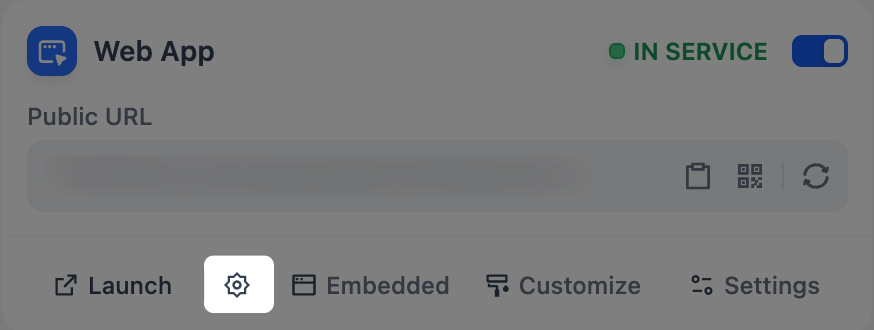
Fill in the hidden fields and click Launch. The web app opens with your values applied as URL query parameters; copy the URL from the address bar to share.
To generate many links with different values, use the same pattern to write more yourself, or have a system fill in the values automatically:
URL-encode any values that contain spaces or special characters (for example, Acme Corp becomes Acme%20Corp).
Example: A CRM Auto-Fills the Customer ID
A support team using a CRM can add ?customerId={{customer.id}} to the end of the web app URL in their ticket-response templates.The CRM substitutes the real customer ID when the rep sends the link, so the chatbot knows which customer it’s talking to without having to ask.
Use this when the app is embedded as an iframe or script on your site.
Same Value for Every Visitor
Different Value Per Visitor
Use this when every visitor should receive the same values (a site-wide region, the embedded page’s product ID, etc.).
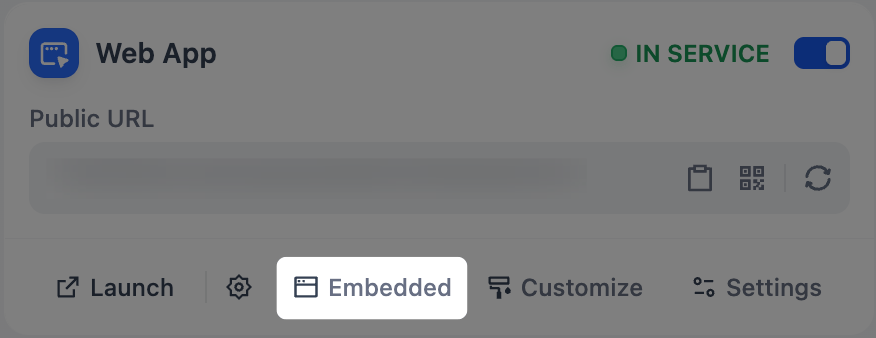
In the app’s publishing panel, within the Web App section, click Embedded > Pre-Fill Hidden Fields.
Fill in the hidden fields. Entered values are baked into the iframe URL and the inputs object of the script snippet.
Copy the updated snippet into your site.
Use this when each visitor should receive their own values (the logged-in user’s ID, the page they’re on, etc.).In the embed snippet on your site, set each hidden field as a key in the inputs object of window.difyChatbotConfig. Each value is computed at render time from your site’s context, so every visitor gets their own.
<script> window.difyChatbotConfig = { token: 'YOUR_TOKEN', inputs: { productName: getCurrentProduct(), // from the current page tenantId: getCurrentTenant(), // from your auth system }, };</script>
{"docsConfig":{"theme":"aspen","$schema":"https://mintlify.com/docs.json","name":"Dify Enterprise Docs","colors":{"primary":"#0060FF","light":"#688FE8","dark":"#0034FF"},"logo":{"light":"https://assets-docs.dify.ai/2025/05/d05cfc6ebe48f725d171dc71c64a5d16.svg","dark":"https://assets-docs.dify.ai/2025/05/c51f1cda47c1d9a4a162d7736f6e4c53.svg"},"favicon":"https://mintcdn.com/dify-enterprise-docs/zvhvyUvEpyoIONBf/logo/dify-logo.png?fit=max\u0026auto=format\u0026n=zvhvyUvEpyoIONBf\u0026q=85\u0026s=e0afd8349b7a272ad12280680a53043c","navbar":{"links":[{"href":"mailto:support@dify.ai","label":"Support"}]},"footer":{"socials":{"x":"https://x.com/dify_ai","github":"https://github.com/langgenius/dify","linkedin":"https://www.linkedin.com/company/langgenius"}},"styling":{"latex":false},"navigation":{"languages":[{"language":"en","default":true,"href":"en/3.13.x/deploy/checklist"},{"language":"zh","href":"zh/3.13.x/deploy/checklist"},{"language":"ja","href":"ja/3.13.x/deploy/checklist"}]}},"deployment":{"deploymentMetadataValue":{"subdomain":"dify-enterprise-docs","hasAudioNarration":false,"actualSubdomain":"dify-enterprise-docs","customDomains":["enterprise-docs.dify.ai"],"gitSource":{"type":"github","owner":"langgenius","repo":"dify-enterprise-docs","deployBranch":"main","contentDirectory":"","isPrivate":true,"mountPath":"","label":""},"chroma":{"collectionId":"b23b91b8-bf61-4fb0-bbf3-d55d66c55095","liveDeploymentHistoryId":"6ae4489fc0a5d590d24bfa62","schemaVersion":"v3","latestBuiltDeploymentHistoryId":"6ae4489fc0a5d590d24bfa62"},"entitlements":{},"buildId":"6ae4489fc0a5d590d24bfa62","clientVersion":"0.0.4043","searchFilterCounts":[{"language":"en","tag":"Developer Resources","count":1947},{"language":"ja","tag":"開発者リソース","count":1947},{"language":"zh","tag":"开发者资源","count":1947},{"language":"en","tag":"Use","count":1401},{"language":"ja","tag":"使い方","count":1401},{"language":"zh","tag":"使用","count":1401},{"language":"en","tag":"Workspace API","count":1353},{"language":"ja","tag":"Workspace API","count":1353},{"language":"zh","tag":"Workspace API","count":1353},{"language":"en","tag":"Knowledge APIs","count":639},{"language":"ja","tag":"ナレッジ API","count":639},{"language":"zh","tag":"知识库 API","count":639},{"language":"en","tag":"Orchestrate","count":620},{"language":"ja","tag":"オーケストレーション","count":620},{"language":"zh","tag":"编排","count":620},{"language":"en","tag":"App APIs","count":545},{"language":"ja","tag":"アプリ API","count":545},{"language":"zh","tag":"应用 API","count":545},{"language":"en","tag":"Workflow \u0026 Chatflow","count":533},{"language":"ja","tag":"ワークフローとチャットフロー","count":533},{"language":"zh","tag":"工作流与对话流","count":533},{"language":"en","tag":"Deploy","count":530},{"language":"ja","tag":"デプロイ","count":530},{"language":"zh","tag":"部署","count":530},{"language":"en","tag":"Plugins","count":524},{"language":"ja","tag":"プラグイン開発","count":522},{"language":"zh","tag":"插件开发","count":522},{"language":"ja","tag":"管理","count":470},{"language":"zh","tag":"管理","count":470},{"language":"en","tag":"Administer","count":420}],"searchSettings":{"maxResults":12}},"assistantConfig":{"enableAskAiButton":false,"enableStarterQuestions":false,"enableContextualStarterQuestions":false,"enableAskAiSearchBar":true},"basePath":"","hasChatPermissions":false,"hasWebMcpPermissions":false,"toggles":[{"name":"kill-isr","enabled":true,"variant":{"name":"disabled","enabled":false,"feature_enabled":true},"impressionData":false},{"name":"agent-mintlify-slack","enabled":true,"variant":{"name":"disabled","enabled":false,"feature_enabled":true},"impressionData":false},{"name":"agent-integrations-settings","enabled":true,"variant":{"name":"disabled","enabled":false,"feature_enabled":true},"impressionData":false},{"name":"automations-pr-grouping","enabled":true,"variant":{"name":"disabled","enabled":false,"feature_enabled":true},"impressionData":false},{"name":"custom-prefix","enabled":true,"variant":{"name":"disabled","enabled":false,"feature_enabled":true},"impressionData":false},{"name":"analytics-v7","enabled":true,"variant":{"name":"disabled","enabled":false,"feature_enabled":true},"impressionData":false},{"name":"user-flows-analytics","enabled":true,"variant":{"name":"disabled","enabled":false,"feature_enabled":true},"impressionData":false},{"name":"no-publish-flow","enabled":true,"variant":{"name":"disabled","enabled":false,"feature_enabled":true},"impressionData":false},{"name":"workos-onboarding","enabled":true,"variant":{"name":"disabled","enabled":false,"feature_enabled":true},"impressionData":false},{"name":"llms-txt-v2","enabled":true,"variant":{"name":"disabled","enabled":false,"feature_enabled":true},"impressionData":false},{"name":"snapshot-serving-live","enabled":true,"variant":{"name":"disabled","enabled":false,"feature_enabled":true},"impressionData":false},{"name":"stripTemperatureMiddleware","enabled":true,"variant":{"name":"disabled","enabled":false,"feature_enabled":true},"impressionData":false},{"name":"support-platform-pylon-zendesk","enabled":true,"variant":{"name":"disabled","enabled":false,"feature_enabled":true},"impressionData":false},{"name":"snapshot-serving","enabled":true,"variant":{"name":"disabled","enabled":false,"feature_enabled":true},"impressionData":false},{"name":"instant-rollback","enabled":true,"variant":{"name":"disabled","enabled":false,"feature_enabled":true},"impressionData":false},{"name":"granular-notifications-server","enabled":true,"variant":{"name":"disabled","enabled":false,"feature_enabled":true},"impressionData":false},{"name":"granular-notifications","enabled":true,"variant":{"name":"disabled","enabled":false,"feature_enabled":true},"impressionData":false},{"name":"automations-fable","enabled":true,"variant":{"name":"disabled","enabled":false,"feature_enabled":true},"impressionData":false},{"name":"fixed-ai-action-pricing","enabled":true,"variant":{"name":"disabled","enabled":false,"feature_enabled":true},"impressionData":false},{"name":"automation-resolve-merge-conflict","enabled":true,"variant":{"name":"disabled","enabled":false,"feature_enabled":true},"impressionData":false},{"name":"scoped-publishing","enabled":true,"variant":{"name":"disabled","enabled":false,"feature_enabled":true},"impressionData":false},{"name":"mintql","enabled":true,"variant":{"name":"disabled","enabled":false,"feature_enabled":true},"impressionData":false},{"name":"page-level-analytics","enabled":true,"variant":{"name":"disabled","enabled":false,"feature_enabled":true},"impressionData":false},{"name":"editor-version-history-v2","enabled":true,"variant":{"name":"disabled","enabled":false,"feature_enabled":true},"impressionData":false},{"name":"billing-page-v2","enabled":true,"variant":{"name":"disabled","enabled":false,"feature_enabled":true},"impressionData":false},{"name":"full-page-search","enabled":true,"variant":{"name":"disabled","enabled":false,"feature_enabled":true},"impressionData":false},{"name":"workspace-projects","enabled":true,"variant":{"name":"disabled","enabled":false,"feature_enabled":true},"impressionData":false},{"name":"assistant-v5","enabled":true,"variant":{"name":"disabled","enabled":false,"feature_enabled":true},"impressionData":false},{"name":"byok-sep-25","enabled":true,"variant":{"name":"disabled","enabled":false,"feature_enabled":true},"impressionData":false},{"name":"fork-pr-previews","enabled":true,"variant":{"name":"disabled","enabled":false,"feature_enabled":true},"impressionData":false},{"name":"revalidation-jwt","enabled":true,"variant":{"name":"disabled","enabled":false,"feature_enabled":true},"impressionData":false},{"name":"vite-origin","enabled":true,"variant":{"name":"disabled","enabled":false,"feature_enabled":true},"impressionData":false},{"name":"billing-updated-9-15","enabled":true,"variant":{"name":"disabled","enabled":false,"feature_enabled":true},"impressionData":false},{"name":"workos-sso-scim","enabled":true,"variant":{"name":"disabled","enabled":false,"feature_enabled":true},"impressionData":false},{"name":"hobby-abuse-scan","enabled":true,"variant":{"name":"disabled","enabled":false,"feature_enabled":true},"impressionData":false},{"name":"dashboard-inbox","enabled":true,"variant":{"name":"disabled","enabled":false,"feature_enabled":true},"impressionData":false},{"name":"workos-signup","enabled":true,"variant":{"name":"disabled","enabled":false,"feature_enabled":true},"impressionData":false},{"name":"turbopuffer-dual-write","enabled":true,"variant":{"name":"disabled","enabled":false,"feature_enabled":true},"impressionData":false},{"name":"workos-enabled","enabled":true,"variant":{"name":"disabled","enabled":false,"feature_enabled":true},"impressionData":false},{"name":"approve-review-flow","enabled":true,"variant":{"name":"disabled","enabled":false,"feature_enabled":true},"impressionData":false},{"name":"sso-setup-deadline-banner","enabled":true,"variant":{"name":"disabled","enabled":false,"feature_enabled":true},"impressionData":false}],"googleFontsInlined":false},"customCss":[{"filePath":"style.css","content":"body{text-autospace:normal}html[data-current-path=\"/\"] .nav-tabs{display:none}"}],"page":{"pagePath":"en/3.12.x/use/nodes/user-input","slug":"/en/3.12.x/use/nodes/user-input","pageMetadata":{"title":"User Input","description":"Collects user inputs to start Workflow and Chatflow applications","href":"/en/3.12.x/use/nodes/user-input"},"description":{"compiledSource":"\"use strict\";\nconst {jsx: _jsx} = arguments[0];\nconst {useMDXComponents: _provideComponents} = arguments[0];\nfunction _createMdxContent(props) {\n const _components = {\n p: \"p\",\n ..._provideComponents(),\n ...props.components\n };\n return _jsx(_components.p, {\n children: \"Collects user inputs to start Workflow and Chatflow applications\"\n });\n}\nfunction MDXContent(props = {}) {\n const {wrapper: MDXLayout} = {\n ..._provideComponents(),\n ...props.components\n };\n return MDXLayout ? _jsx(MDXLayout, {\n ...props,\n children: _jsx(_createMdxContent, {\n ...props\n })\n }) : _createMdxContent(props);\n}\nreturn {\n default: MDXContent\n};\n","frontmatter":{},"scope":{}},"pageType":"default","mdx":{"mdxSource":{"compiledSource":"\"use strict\";const{Fragment:_Fragment,jsx:_jsx,jsxs:_jsxs}=arguments[0];const{useMDXComponents:_provideComponents}=arguments[0];function _createMdxContent(props){const _components={a:`a`,code:`code`,em:`em`,li:`li`,ol:`ol`,p:`p`,pre:`pre`,span:`span`,strong:`strong`,ul:`ul`,..._provideComponents(),...props.components},{Accordion,CodeBlock,Frame,Heading,Info,Note,OptimizedImage,Step,Steps,Tab,Tabs,Tip,Warning}=_components;if(!Accordion)_missingMdxReference(`Accordion`,true);if(!CodeBlock)_missingMdxReference(`CodeBlock`,true);if(!Frame)_missingMdxReference(`Frame`,true);if(!Heading)_missingMdxReference(`Heading`,true);if(!Info)_missingMdxReference(`Info`,true);if(!Note)_missingMdxReference(`Note`,true);if(!OptimizedImage)_missingMdxReference(`OptimizedImage`,true);if(!Step)_missingMdxReference(`Step`,true);if(!Steps)_missingMdxReference(`Steps`,true);if(!Tab)_missingMdxReference(`Tab`,true);if(!Tabs)_missingMdxReference(`Tabs`,true);if(!Tip)_missingMdxReference(`Tip`,true);if(!Warning)_missingMdxReference(`Warning`,true);return _jsxs(_Fragment,{children:[_jsx(_components.p,{children:`The User Input node allows you to define what to collect from end users as inputs for your applications.`}),`\n`,_jsxs(_components.p,{children:[`Applications that start with this node run `,_jsx(_components.em,{children:`on demand`}),` and can be initiated by direct user interaction or API calls.`]}),`\n`,_jsx(_components.p,{children:`You can also publish these applications as standalone web apps or MCP servers, expose them through backend service APIs, or use them as tools in other Dify applications.`}),`\n`,_jsx(Info,{children:_jsx(_components.p,{children:`Each application canvas can contain only one User Input node.`})}),`\n`,_jsx(Heading,{level:`2`,id:`input-variable`,children:`Input Variable`}),`\n`,_jsx(Heading,{level:`3`,id:`preset`,children:`Preset`}),`\n`,_jsx(_components.p,{children:`Preset input variables are system-defined and available by default.`}),`\n`,_jsxs(_components.ul,{children:[`\n`,_jsxs(_components.li,{children:[`\n`,_jsxs(_components.p,{children:[_jsx(_components.code,{children:`userinput.files`}),`: Files uploaded by end users when they run the application.`]}),`\n`,_jsxs(Note,{children:[_jsxs(_components.p,{children:[`For Workflow applications, this preset variable has been considered `,_jsx(_components.em,{children:`legacy`}),` and kept only for backward compatibility.`]}),_jsxs(_components.p,{children:[`We recommend using a `,_jsx(_components.a,{href:`#file-input`,children:`custom file input field`}),` instead to collect user files.`]})]}),`\n`]}),`\n`,_jsxs(_components.li,{children:[`\n`,_jsxs(_components.p,{children:[_jsx(_components.code,{children:`userinput.query`}),` (for chatflows only): The text message automatically captured from the user’s latest chat turn.`]}),`\n`]}),`\n`]}),`\n`,_jsx(Heading,{level:`3`,id:`custom`,children:`Custom`}),`\n`,_jsx(_components.p,{children:`You can configure custom input fields in a User Input node to collect different kinds of user input. Each field becomes a variable that can be referenced by downstream nodes.`}),`\n`,_jsx(Info,{children:_jsxs(_components.p,{children:[_jsx(_components.strong,{children:`Label Name`}),` is displayed to your end users.`]})}),`\n`,_jsx(Tip,{children:_jsxs(_components.p,{children:[`If a field’s value is something you already know (like a product identifier or tenant ID) and doesn’t have to come from end users, mark it as `,_jsx(_components.strong,{children:`Hidden \u0026 Pre-Filled`}),` and supply it yourself. See `,_jsx(_components.a,{href:`#hide-and-pre-fill-input-fields`,children:`Hide and Pre-Fill Input Fields`}),` for details.`]})}),`\n`,_jsx(Heading,{level:`4`,id:`text-input`,children:`Text Input`}),`\n`,_jsxs(Tabs,{children:[_jsx(Tab,{title:`Short Text`,id:`short-text`,children:_jsx(_components.p,{children:`Accepts up to 256 characters. Use it for names, email addresses, titles, or any brief text input that fits on a single line.`})}),_jsx(Tab,{title:`Paragraph`,id:`paragraph`,children:_jsx(_components.p,{children:`Allows long-form text without length restrictions. It gives users a multi-line text area for detailed responses or descriptions.`})})]}),`\n`,_jsx(Heading,{level:`4`,id:`structured-input`,children:`Structured Input`}),`\n`,_jsxs(Tabs,{children:[_jsx(Tab,{title:`Select`,id:`select`,children:_jsx(_components.p,{children:`Displays a dropdown menu with predefined options. Users can choose only from listed options, ensuring data consistency and preventing invalid inputs.`})}),_jsx(Tab,{title:`Number`,id:`number`,children:_jsx(_components.p,{children:`Restricts input to numerical values only—ideal for quantities, ratings, IDs, or any data requiring mathematical processing.`})}),_jsx(Tab,{title:`Checkbox`,id:`checkbox`,children:_jsxs(_components.p,{children:[`Provides a simple yes/no option. When a user checks the box, the output is `,_jsx(_components.code,{children:`true`}),`; otherwise, it’s `,_jsx(_components.code,{children:`false`}),`. Use it for confirmations or any case that requires a binary choice.`]})}),_jsxs(Tab,{title:`JSON Code`,id:`json-code`,children:[_jsx(_components.p,{children:`Accepts data in JSON object format, ideal for passing complex, nested data structures into your application.`}),_jsx(_components.p,{children:`You can optionally define a JSON schema to validate the input and guide end users on the expected structure and validation requirements. This also allows you to reference individual properties of the object in other nodes.`})]})]}),`\n`,_jsx(Heading,{level:`4`,id:`file-input`,children:`File Input`}),`\n`,_jsxs(Tabs,{children:[_jsx(Tab,{title:`Single File`,id:`single-file`,children:_jsx(_components.p,{children:`Allows users to upload one file of any supported type, either from their device or via a file URL. The uploaded file is available as a variable containing file metadata (name, size, type, etc.).`})}),_jsxs(Tab,{title:`File List`,id:`file-list`,children:[_jsx(_components.p,{children:`Supports multiple file uploads at once. It’s useful for handling batches of documents, images, or other files together.`}),_jsx(Tip,{children:_jsx(_components.p,{children:`Use a List Operator node to filter, sort, or extract specific files from the uploaded file list for further processing.`})})]})]}),`\n`,_jsx(_components.p,{children:_jsx(_components.strong,{children:`File Processing`})}),`\n`,_jsx(_components.p,{children:`Since the User Input node only collects files—it does not read or parse their content—uploaded files must be processed appropriately by subsequent nodes. For example:`}),`\n`,_jsxs(_components.ul,{children:[`\n`,_jsxs(_components.li,{children:[`\n`,_jsx(_components.p,{children:`Document files can be routed to a Doc Extractor node for text extraction so that LLMs can understand their content.`}),`\n`]}),`\n`,_jsxs(_components.li,{children:[`\n`,_jsx(_components.p,{children:`Images can be sent to LLM nodes with vision capabilities or specialized image processing tool nodes.`}),`\n`]}),`\n`,_jsxs(_components.li,{children:[`\n`,_jsx(_components.p,{children:`Structured data files such as CSV or JSON can be processed with Code nodes to parse and transform the data.`}),`\n`]}),`\n`]}),`\n`,_jsx(Tip,{children:_jsx(_components.p,{children:`When users upload multiple files with mixed types (e.g., images and documents), you can use a List Operator node to separate them by file type before routing them to different processing branches.`})}),`\n`,_jsx(Heading,{level:`2`,id:`hide-and-pre-fill-input-fields`,children:`Hide and Pre-Fill Input Fields`}),`\n`,_jsxs(_components.p,{children:[`Sometimes the workflow needs an input you already know, and asking end users to type it would be friction. Mark such a field as `,_jsx(_components.strong,{children:`Hidden \u0026 Pre-Filled`}),`: you supply the value, end users never see the field, and the workflow still receives it.`]}),`\n`,_jsx(_components.p,{children:`Imagine your company runs landing pages for many different products, each featuring an AI chatbot. The workflow behind every chatbot is essentially the same; only the product identifier differs.`}),`\n`,_jsxs(_components.p,{children:[`Rather than maintain a separate workflow per product, you keep just one (with a hidden `,_jsx(_components.code,{children:`productName`}),` field) and pre-fill a different value on each landing page. End users perceive each page as having its own product-specific chatbot, but behind the scenes, every page passes a different `,_jsx(_components.code,{children:`productName`}),` into the same workflow.`]}),`\n`,_jsx(Warning,{children:_jsxs(_components.p,{children:[`Hidden fields are `,_jsx(_components.strong,{children:`not secret`}),`. Values travel in the URL query string and are visible in the browser address bar, browser history, and network traffic. For credentials and API keys, use `,_jsx(_components.a,{href:`/en/3.12.x/learn/key-concepts#variables`,children:`Environment Variables`}),` instead.`]})}),`\n`,_jsx(Info,{children:_jsx(_components.p,{children:`Single File and File List fields do not support this feature.`})}),`\n`,_jsxs(Steps,{children:[_jsxs(Step,{title:`Enable the Feature`,children:[_jsxs(_components.ol,{children:[`\n`,_jsxs(_components.li,{children:[`In the `,_jsx(_components.strong,{children:`Edit Input Field`}),` window, uncheck `,_jsx(_components.strong,{children:`Required`}),` if it’s checked. These two options are mutually exclusive.`]}),`\n`,_jsxs(_components.li,{children:[`Check `,_jsx(_components.strong,{children:`Hidden \u0026 Pre-Filled`}),`. Optionally set a default value as a fallback when no value is pre-filled at runtime.`]}),`\n`]}),_jsxs(_components.p,{children:[`Hidden fields still appear in the `,_jsx(_components.strong,{children:`Preview`}),` panel so you can test the flow without publishing.`]})]}),_jsx(Step,{title:`Pre-Fill the Field`,children:_jsxs(_components.ol,{children:[`\n`,_jsxs(_components.li,{children:[`\n`,_jsx(_components.p,{children:`Publish your app.`}),`\n`]}),`\n`,_jsxs(_components.li,{children:[`\n`,_jsx(_components.p,{children:`Choose the method that fits how your end users reach the app.`}),`\n`,_jsxs(Tabs,{children:[_jsxs(Tab,{title:`Shareable Link`,id:`shareable-link`,children:[_jsx(_components.p,{children:`Use this when end users open the web app directly from its link.`}),_jsxs(_components.ol,{children:[`\n`,_jsxs(_components.li,{children:[`In the app’s publishing panel, within the `,_jsx(_components.strong,{children:`Web App`}),` section, click the gear icon next to `,_jsx(_components.strong,{children:`Launch`}),`.`,`\n`,_jsx(Frame,{children:_jsx(OptimizedImage,{src:`https://mintcdn.com/dify-enterprise-docs/zvhvyUvEpyoIONBf/images/use-dify/workflow/hidden-field-config-icon.png?fit=max\u0026auto=format\u0026n=zvhvyUvEpyoIONBf\u0026q=85\u0026s=bbd1c86002256e6ee7a3ee55e839bb15`,alt:`Hidden Fields Pre-Fill Icon`,\"data-og-width\":`874`,width:`874`,\"data-og-height\":`330`,height:`330`,\"data-path\":`images/use-dify/workflow/hidden-field-config-icon.png`,\"data-optimize\":`true`,\"data-opv\":`3`,srcset:`https://mintcdn.com/dify-enterprise-docs/zvhvyUvEpyoIONBf/images/use-dify/workflow/hidden-field-config-icon.png?w=280\u0026fit=max\u0026auto=format\u0026n=zvhvyUvEpyoIONBf\u0026q=85\u0026s=8de7cf4224d50ae714965ade7b95da43 280w, https://mintcdn.com/dify-enterprise-docs/zvhvyUvEpyoIONBf/images/use-dify/workflow/hidden-field-config-icon.png?w=560\u0026fit=max\u0026auto=format\u0026n=zvhvyUvEpyoIONBf\u0026q=85\u0026s=9f3046f2da6a827f61ccfbbcedb43417 560w, https://mintcdn.com/dify-enterprise-docs/zvhvyUvEpyoIONBf/images/use-dify/workflow/hidden-field-config-icon.png?w=840\u0026fit=max\u0026auto=format\u0026n=zvhvyUvEpyoIONBf\u0026q=85\u0026s=189dcb2cc09345e3de49dd5c45b22f54 840w, https://mintcdn.com/dify-enterprise-docs/zvhvyUvEpyoIONBf/images/use-dify/workflow/hidden-field-config-icon.png?w=1100\u0026fit=max\u0026auto=format\u0026n=zvhvyUvEpyoIONBf\u0026q=85\u0026s=c6f3f1b0bb11dffc1495d1191dcfde6a 1100w, https://mintcdn.com/dify-enterprise-docs/zvhvyUvEpyoIONBf/images/use-dify/workflow/hidden-field-config-icon.png?w=1650\u0026fit=max\u0026auto=format\u0026n=zvhvyUvEpyoIONBf\u0026q=85\u0026s=0bc1c4489c931d36d6bae85172891ebf 1650w, https://mintcdn.com/dify-enterprise-docs/zvhvyUvEpyoIONBf/images/use-dify/workflow/hidden-field-config-icon.png?w=2500\u0026fit=max\u0026auto=format\u0026n=zvhvyUvEpyoIONBf\u0026q=85\u0026s=d377df33d022625684a51a7f0c97a1cd 2500w`})}),`\n`]}),`\n`,_jsxs(_components.li,{children:[`Fill in the hidden fields and click `,_jsx(_components.strong,{children:`Launch`}),`. The web app opens with your values applied as URL query parameters; copy the URL from the address bar to share.`]}),`\n`]}),_jsxs(_components.p,{children:[_jsx(_components.strong,{children:`To generate many links with different values`}),`, use the same pattern to write more yourself, or have a system fill in the values automatically:`]}),_jsx(CodeBlock,{filename:``,wrap:`true`,numberOfLines:`4`,language:`text`,children:_jsx(_components.pre,{className:`shiki shiki-themes github-light-default dark-plus`,style:{backgroundColor:`#ffffff`,\"--shiki-dark-bg\":`#0B0C0E`,color:`#1f2328`,\"--shiki-dark\":`#D4D4D4`},language:`text`,children:_jsxs(_components.code,{language:`text`,numberOfLines:`4`,children:[_jsx(_components.span,{className:`line`,children:_jsx(_components.span,{children:`{WEBAPP_URL}?{VARIABLE_NAME}={VALUE}\u0026{VARIABLE_NAME}={VALUE}`})}),`\n`,_jsx(_components.span,{className:`line`,children:_jsx(_components.span,{})}),`\n`,_jsx(_components.span,{className:`line`,children:_jsx(_components.span,{children:`# Example: {WEBAPP_URL}/chat/abc123?productName=Acme\u0026region=us-east`})}),`\n`,_jsx(_components.span,{className:`line`,children:_jsx(_components.span,{})})]})})}),_jsx(Note,{children:_jsxs(_components.p,{children:[`URL-encode any values that contain spaces or special characters (for example, `,_jsx(_components.code,{children:`Acme Corp`}),` becomes `,_jsx(_components.code,{children:`Acme%20Corp`}),`).`]})}),_jsxs(Accordion,{title:`Example: A CRM Auto-Fills the Customer ID`,id:`example-a-crm-auto-fills-the-customer-id`,children:[_jsxs(_components.p,{children:[`A support team using a CRM can add `,_jsx(_components.code,{children:`?customerId={{customer.id}}`}),` to the end of the web app URL in their ticket-response templates.`]}),_jsx(_components.p,{children:`The CRM substitutes the real customer ID when the rep sends the link, so the chatbot knows which customer it’s talking to without having to ask.`})]})]}),_jsxs(Tab,{title:`Embed on Your Site`,id:`embed-on-your-site`,\"data-child-tab-ids\":`[\"same-value-for-every-visitor\",\"different-value-per-visitor\"]`,children:[_jsx(_components.p,{children:`Use this when the app is embedded as an iframe or script on your site.`}),_jsxs(Tabs,{children:[_jsxs(Tab,{title:`Same Value for Every Visitor`,id:`same-value-for-every-visitor`,children:[_jsx(_components.p,{children:`Use this when every visitor should receive the same values (a site-wide region, the embedded page’s product ID, etc.).`}),_jsxs(_components.ol,{children:[`\n`,_jsxs(_components.li,{children:[`In the app’s publishing panel, within the `,_jsx(_components.strong,{children:`Web App`}),` section, click `,_jsx(_components.strong,{children:`Embedded`}),` > `,_jsx(_components.strong,{children:`Pre-Fill Hidden Fields`}),`.`,`\n`,_jsx(Frame,{children:_jsx(OptimizedImage,{src:`https://mintcdn.com/dify-enterprise-docs/zvhvyUvEpyoIONBf/images/use-dify/workflow/embedding-icon.png?fit=max\u0026auto=format\u0026n=zvhvyUvEpyoIONBf\u0026q=85\u0026s=42238bb7c8454eab8a42762aa76f44ee`,alt:`Embedded Icon`,\"data-og-width\":`876`,width:`876`,\"data-og-height\":`338`,height:`338`,\"data-path\":`images/use-dify/workflow/embedding-icon.png`,\"data-optimize\":`true`,\"data-opv\":`3`,srcset:`https://mintcdn.com/dify-enterprise-docs/zvhvyUvEpyoIONBf/images/use-dify/workflow/embedding-icon.png?w=280\u0026fit=max\u0026auto=format\u0026n=zvhvyUvEpyoIONBf\u0026q=85\u0026s=d9e64495a91a2d2f5ba561903f2ce5d6 280w, https://mintcdn.com/dify-enterprise-docs/zvhvyUvEpyoIONBf/images/use-dify/workflow/embedding-icon.png?w=560\u0026fit=max\u0026auto=format\u0026n=zvhvyUvEpyoIONBf\u0026q=85\u0026s=98210874ec5518523014d3a894c96195 560w, https://mintcdn.com/dify-enterprise-docs/zvhvyUvEpyoIONBf/images/use-dify/workflow/embedding-icon.png?w=840\u0026fit=max\u0026auto=format\u0026n=zvhvyUvEpyoIONBf\u0026q=85\u0026s=e187f73b81fdc85c5cabc765b54ead5c 840w, https://mintcdn.com/dify-enterprise-docs/zvhvyUvEpyoIONBf/images/use-dify/workflow/embedding-icon.png?w=1100\u0026fit=max\u0026auto=format\u0026n=zvhvyUvEpyoIONBf\u0026q=85\u0026s=192b834fd17c08e017a08156f1d5c232 1100w, https://mintcdn.com/dify-enterprise-docs/zvhvyUvEpyoIONBf/images/use-dify/workflow/embedding-icon.png?w=1650\u0026fit=max\u0026auto=format\u0026n=zvhvyUvEpyoIONBf\u0026q=85\u0026s=1d188470a6fbc1f47d5fa50cdbc6f237 1650w, https://mintcdn.com/dify-enterprise-docs/zvhvyUvEpyoIONBf/images/use-dify/workflow/embedding-icon.png?w=2500\u0026fit=max\u0026auto=format\u0026n=zvhvyUvEpyoIONBf\u0026q=85\u0026s=bb8a0765fa198a76d387e2ddca7e4880 2500w`})}),`\n`]}),`\n`,_jsxs(_components.li,{children:[`Fill in the hidden fields. Entered values are baked into the iframe URL and the `,_jsx(_components.code,{children:`inputs`}),` object of the script snippet.`]}),`\n`,_jsx(_components.li,{children:`Copy the updated snippet into your site.`}),`\n`]})]}),_jsxs(Tab,{title:`Different Value Per Visitor`,id:`different-value-per-visitor`,children:[_jsx(_components.p,{children:`Use this when each visitor should receive their own values (the logged-in user’s ID, the page they’re on, etc.).`}),_jsxs(_components.p,{children:[`In the embed snippet on your site, set each hidden field as a key in the `,_jsx(_components.code,{children:`inputs`}),` object of `,_jsx(_components.code,{children:`window.difyChatbotConfig`}),`. Each value is computed at render time from your site’s context, so every visitor gets their own.`]}),_jsx(CodeBlock,{filename:``,numberOfLines:`9`,language:`html`,children:_jsx(_components.pre,{className:`shiki shiki-themes github-light-default dark-plus`,style:{backgroundColor:`#ffffff`,\"--shiki-dark-bg\":`#0B0C0E`,color:`#1f2328`,\"--shiki-dark\":`#D4D4D4`},language:`html`,children:_jsxs(_components.code,{language:`html`,numberOfLines:`9`,children:[_jsxs(_components.span,{className:`line`,children:[_jsx(_components.span,{style:{color:`#1F2328`,\"--shiki-dark\":`#808080`},children:`\u003c`}),_jsx(_components.span,{style:{color:`#116329`,\"--shiki-dark\":`#569CD6`},children:`script`}),_jsx(_components.span,{style:{color:`#1F2328`,\"--shiki-dark\":`#808080`},children:`>`})]}),`\n`,_jsxs(_components.span,{className:`line`,children:[_jsx(_components.span,{style:{color:`#1F2328`,\"--shiki-dark\":`#9CDCFE`},children:` window`}),_jsx(_components.span,{style:{color:`#1F2328`,\"--shiki-dark\":`#D4D4D4`},children:`.`}),_jsx(_components.span,{style:{color:`#1F2328`,\"--shiki-dark\":`#9CDCFE`},children:`difyChatbotConfig`}),_jsx(_components.span,{style:{color:`#CF222E`,\"--shiki-dark\":`#D4D4D4`},children:` =`}),_jsx(_components.span,{style:{color:`#1F2328`,\"--shiki-dark\":`#D4D4D4`},children:` {`})]}),`\n`,_jsxs(_components.span,{className:`line`,children:[_jsx(_components.span,{style:{color:`#1F2328`,\"--shiki-dark\":`#9CDCFE`},children:` token:`}),_jsx(_components.span,{style:{color:`#0A3069`,\"--shiki-dark\":`#CE9178`},children:` 'YOUR_TOKEN'`}),_jsx(_components.span,{style:{color:`#1F2328`,\"--shiki-dark\":`#D4D4D4`},children:`,`})]}),`\n`,_jsxs(_components.span,{className:`line`,children:[_jsx(_components.span,{style:{color:`#1F2328`,\"--shiki-dark\":`#9CDCFE`},children:` inputs:`}),_jsx(_components.span,{style:{color:`#1F2328`,\"--shiki-dark\":`#D4D4D4`},children:` {`})]}),`\n`,_jsxs(_components.span,{className:`line`,children:[_jsx(_components.span,{style:{color:`#1F2328`,\"--shiki-dark\":`#9CDCFE`},children:` productName:`}),_jsx(_components.span,{style:{color:`#8250DF`,\"--shiki-dark\":`#DCDCAA`},children:` getCurrentProduct`}),_jsx(_components.span,{style:{color:`#1F2328`,\"--shiki-dark\":`#D4D4D4`},children:`(), `}),_jsx(_components.span,{style:{color:`#6E7781`,\"--shiki-dark\":`#6A9955`},children:`// from the current page`})]}),`\n`,_jsxs(_components.span,{className:`line`,children:[_jsx(_components.span,{style:{color:`#1F2328`,\"--shiki-dark\":`#9CDCFE`},children:` tenantId:`}),_jsx(_components.span,{style:{color:`#8250DF`,\"--shiki-dark\":`#DCDCAA`},children:` getCurrentTenant`}),_jsx(_components.span,{style:{color:`#1F2328`,\"--shiki-dark\":`#D4D4D4`},children:`(), `}),_jsx(_components.span,{style:{color:`#6E7781`,\"--shiki-dark\":`#6A9955`},children:`// from your auth system`})]}),`\n`,_jsx(_components.span,{className:`line`,children:_jsx(_components.span,{style:{color:`#1F2328`,\"--shiki-dark\":`#D4D4D4`},children:` },`})}),`\n`,_jsx(_components.span,{className:`line`,children:_jsx(_components.span,{style:{color:`#1F2328`,\"--shiki-dark\":`#D4D4D4`},children:` };`})}),`\n`,_jsxs(_components.span,{className:`line`,children:[_jsx(_components.span,{style:{color:`#1F2328`,\"--shiki-dark\":`#808080`},children:`\u003c/`}),_jsx(_components.span,{style:{color:`#116329`,\"--shiki-dark\":`#569CD6`},children:`script`}),_jsx(_components.span,{style:{color:`#1F2328`,\"--shiki-dark\":`#808080`},children:`>`})]}),`\n`]})})})]})]})]})]}),`\n`]}),`\n`]})})]})]})}function MDXContent(props={}){const{wrapper:MDXLayout}={..._provideComponents(),...props.components};return MDXLayout?_jsx(MDXLayout,{...props,children:_jsx(_createMdxContent,{...props})}):_createMdxContent(props)}return{default:MDXContent};function _missingMdxReference(id,component){throw new Error(`Expected `+(component?`component`:`object`)+\" `\"+id+\"` to be defined: you likely forgot to import, pass, or provide it.\")}","frontmatter":{},"scope":{"config":{},"pageMetadata":{"title":"User Input","description":"Collects user inputs to start Workflow and Chatflow applications","href":"/en/3.12.x/use/nodes/user-input"}}},"mdxSourceWithNoJs":null},"mdxExtracts":{"tableOfContents":[{"title":"Input Variable","slug":"input-variable","depth":2,"children":[{"title":"Preset","slug":"preset","depth":3,"children":[]},{"title":"Custom","slug":"custom","depth":3,"children":[]},{"title":"Text Input","slug":"text-input","depth":4,"children":[]},{"title":"Structured Input","slug":"structured-input","depth":4,"children":[]},{"title":"File Input","slug":"file-input","depth":4,"children":[]}]},{"title":"Hide and Pre-Fill Input Fields","slug":"hide-and-pre-fill-input-fields","depth":2,"children":[]}],"codeExamples":{}},"jsLinks":[],"subdomain":"dify-enterprise-docs","siteName":"Dify Enterprise Docs","title":"User Input - Dify Enterprise Docs","navMaps":{"firstHrefInVersion":{"3.13.x":{"href":"/en/3.13.x/use/nodes/user-input","matchLevel":1},"3.12.x":{"href":"/en/3.12.x/use/nodes/user-input","matchLevel":0},"3.11.x":{"href":"/en/3.11.x/use/nodes/user-input","matchLevel":1},"3.10.x":{"href":"/en/3.10.x/use/nodes/user-input","matchLevel":1},"3.9.x":{"href":"/en/3.9.x/use/nodes/user-input","matchLevel":1},"3.8.x":{"href":"/en/3.8.x/use/nodes/user-input","matchLevel":1},"3.7.x":{"href":"/en/3.7.x/use/nodes/user-input","matchLevel":1},"3.6.x":{"href":"/en/3.6.x/use/nodes/user-input","matchLevel":1},"3.5.x":{"href":"/en/3.5.x/use/nodes/user-input","matchLevel":1},"3.4.x":{"href":"/en/3.4.x/use/nodes/user-input","matchLevel":1},"3.3.x":{"href":"/en/3.3.x/use/nodes/user-input","matchLevel":1},"3.2.x":{"href":"/en/3.2.x/use/nodes/user-input","matchLevel":1},"3.1.x":{"href":"/en/3.1.x/use/nodes/user-input","matchLevel":1},"3.0.x":{"href":"/en/3.0.x/use/nodes/user-input","matchLevel":1},"2.8.x":{"href":"/en/2.8.x/use/nodes/user-input","matchLevel":1},"2.7.x":{"href":"/en/2.7.x/use/nodes/user-input","matchLevel":1},"2.6.x":{"href":"/en/2.6.x/use/nodes/user-input","matchLevel":1},"2.5.x":{"href":"/en/2.5.x/use/nodes/user-input","matchLevel":1}},"firstHrefInLanguage":{"en":{"href":"/en/3.12.x/use/nodes/user-input","matchLevel":0},"zh":{"href":"/zh/3.12.x/use/nodes/user-input","matchLevel":1},"ja":{"href":"/ja/3.12.x/use/nodes/user-input","matchLevel":1}}},"lastModified":"2026-09-23T15:33:32.633Z","originalFileLocation":"en/3.12.x/use/nodes/user-input.mdx","locale":"en"},"headHtml":"\u003cscript data-mint-head>(function(){var d=document.documentElement,p=null;if(!p){try{p=localStorage.getItem(\"isDarkMode\")}catch(e){}if(p==='true')p='dark';else if(p==='false')p='light';if(p!=='light'\u0026\u0026p!=='dark'\u0026\u0026p!=='system')p=\"system\"}var r=p==='system'?(matchMedia(\"(prefers-color-scheme: dark)\").matches?'dark':'light'):p;d.classList.remove(r==='dark'?'light':'dark');d.classList.add(r);d.setAttribute(\"data-theme-preference\",p)})();\u003c/script>\u003cmeta data-mint-head name=\"description\" content=\"Collects user inputs to start Workflow and Chatflow applications\">\u003cmeta data-mint-head name=\"application-name\" content=\"Dify Enterprise Docs\">\u003cmeta data-mint-head name=\"generator\" content=\"Mintlify\">\u003clink data-mint-head rel=\"icon\" type=\"image/png\" sizes=\"192x192\" href=\"/mintlify-assets/_mintlify/favicons/dify-enterprise-docs/0-RXGeruZhgwpkgZ/_generated/favicon/android-chrome-192x192.png\" media=\"(prefers-color-scheme: light)\">\u003clink data-mint-head rel=\"apple-touch-icon\" type=\"image/png\" sizes=\"180x180\" href=\"/mintlify-assets/_mintlify/favicons/dify-enterprise-docs/0-RXGeruZhgwpkgZ/_generated/favicon/apple-touch-icon.png\">\u003clink data-mint-head rel=\"icon\" type=\"image/png\" sizes=\"16x16\" href=\"/mintlify-assets/_mintlify/favicons/dify-enterprise-docs/0-RXGeruZhgwpkgZ/_generated/favicon/favicon-16x16.png\" media=\"(prefers-color-scheme: light)\">\u003clink data-mint-head rel=\"icon\" type=\"image/png\" sizes=\"32x32\" href=\"/mintlify-assets/_mintlify/favicons/dify-enterprise-docs/0-RXGeruZhgwpkgZ/_generated/favicon/favicon-32x32.png\" media=\"(prefers-color-scheme: light)\">\u003clink data-mint-head rel=\"shortcut icon\" type=\"image/x-icon\" href=\"/mintlify-assets/_mintlify/favicons/dify-enterprise-docs/0-RXGeruZhgwpkgZ/_generated/favicon/favicon.ico\" media=\"(prefers-color-scheme: light)\">\u003clink data-mint-head rel=\"icon\" type=\"image/png\" sizes=\"192x192\" href=\"/mintlify-assets/_mintlify/favicons/dify-enterprise-docs/0-RXGeruZhgwpkgZ/_generated/favicon-dark/android-chrome-192x192.png\" media=\"(prefers-color-scheme: dark)\">\u003clink data-mint-head rel=\"icon\" type=\"image/png\" sizes=\"16x16\" href=\"/mintlify-assets/_mintlify/favicons/dify-enterprise-docs/0-RXGeruZhgwpkgZ/_generated/favicon-dark/favicon-16x16.png\" media=\"(prefers-color-scheme: dark)\">\u003clink data-mint-head rel=\"icon\" type=\"image/png\" sizes=\"32x32\" href=\"/mintlify-assets/_mintlify/favicons/dify-enterprise-docs/0-RXGeruZhgwpkgZ/_generated/favicon-dark/favicon-32x32.png\" media=\"(prefers-color-scheme: dark)\">\u003clink data-mint-head rel=\"shortcut icon\" type=\"image/x-icon\" href=\"/mintlify-assets/_mintlify/favicons/dify-enterprise-docs/0-RXGeruZhgwpkgZ/_generated/favicon-dark/favicon.ico\" media=\"(prefers-color-scheme: dark)\">\u003cmeta data-mint-head property=\"og:title\" content=\"User Input - Dify Enterprise Docs\">\u003cmeta data-mint-head property=\"og:description\" content=\"Collects user inputs to start Workflow and Chatflow applications\">\u003cmeta data-mint-head property=\"og:site_name\" content=\"Dify Enterprise Docs\">\u003cmeta data-mint-head property=\"og:url\" content=\"https://enterprise-docs.dify.ai/en/3.12.x/use/nodes/user-input\">\u003cmeta data-mint-head property=\"og:type\" content=\"website\">\u003cmeta data-mint-head property=\"og:image\" content=\"https://dify-enterprise-docs.mintlify.app/_mintlify/api/og/v2?division=Start\u0026amp;title=User+Input\u0026amp;description=Collects+user+inputs+to+start+Workflow+and+Chatflow+applications\u0026amp;theme=fc270d2c96587e5833522f0e\u0026amp;signature=c70b6358a4c3c4492e2ed483ddd8ce15e7b1ae0a2f0d88f1504b17bcec16d346\">\u003cmeta data-mint-head property=\"og:image:width\" content=\"1200\">\u003cmeta data-mint-head property=\"og:image:height\" content=\"630\">\u003cmeta data-mint-head name=\"twitter:card\" content=\"summary_large_image\">\u003cmeta data-mint-head name=\"twitter:title\" content=\"User Input - Dify Enterprise Docs\">\u003cmeta data-mint-head name=\"twitter:description\" content=\"Collects user inputs to start Workflow and Chatflow applications\">\u003cmeta data-mint-head name=\"twitter:image\" content=\"https://dify-enterprise-docs.mintlify.app/_mintlify/api/og/v2?division=Start\u0026amp;title=User+Input\u0026amp;description=Collects+user+inputs+to+start+Workflow+and+Chatflow+applications\u0026amp;theme=fc270d2c96587e5833522f0e\u0026amp;signature=c70b6358a4c3c4492e2ed483ddd8ce15e7b1ae0a2f0d88f1504b17bcec16d346\">\u003cmeta data-mint-head name=\"twitter:image:width\" content=\"1200\">\u003cmeta data-mint-head name=\"twitter:image:height\" content=\"630\">\u003cmeta data-mint-head name=\"msapplication-config\" content=\"/mintlify-assets/_mintlify/favicons/dify-enterprise-docs/0-RXGeruZhgwpkgZ/_generated/favicon/browserconfig.xml\">\u003cmeta data-mint-head name=\"apple-mobile-web-app-title\" content=\"Dify Enterprise Docs\">\u003cmeta data-mint-head name=\"msapplication-TileColor\" content=\"#0060FF\">\u003clink data-mint-head rel=\"canonical\" href=\"https://enterprise-docs.dify.ai/en/3.12.x/use/nodes/user-input\">\u003clink data-mint-head rel=\"alternate\" type=\"application/xml\" href=\"/sitemap.xml\">\u003clink data-mint-head rel=\"alternate\" type=\"text/markdown\" href=\"/en/3.12.x/use/nodes/user-input.md\">\u003clink data-mint-head rel=\"alternate\" hreflang=\"en\" href=\"https://enterprise-docs.dify.ai/en/3.12.x/use/nodes/user-input\">\u003clink data-mint-head rel=\"alternate\" hreflang=\"zh\" href=\"https://enterprise-docs.dify.ai/zh/3.12.x/use/nodes/user-input\">\u003clink data-mint-head rel=\"alternate\" hreflang=\"ja\" href=\"https://enterprise-docs.dify.ai/ja/3.12.x/use/nodes/user-input\">\u003clink data-mint-head rel=\"alternate\" hreflang=\"x-default\" href=\"https://enterprise-docs.dify.ai/en/3.12.x/use/nodes/user-input\">\u003cscript data-mint-head type=\"application/ld+json\">{\"@context\":\"https://schema.org\",\"@graph\":[{\"@type\":\"Organization\",\"@id\":\"https://enterprise-docs.dify.ai/#organization\",\"name\":\"Dify Enterprise Docs\",\"url\":\"https://enterprise-docs.dify.ai\",\"logo\":{\"@type\":\"ImageObject\",\"url\":\"https://assets-docs.dify.ai/2025/05/d05cfc6ebe48f725d171dc71c64a5d16.svg\"}},{\"@type\":\"WebSite\",\"@id\":\"https://enterprise-docs.dify.ai#website\",\"name\":\"Dify Enterprise Docs\",\"url\":\"https://enterprise-docs.dify.ai\",\"publisher\":{\"@id\":\"https://enterprise-docs.dify.ai/#organization\"}},{\"@type\":\"WebPage\",\"@id\":\"https://enterprise-docs.dify.ai/en/3.12.x/use/nodes/user-input#webpage\",\"url\":\"https://enterprise-docs.dify.ai/en/3.12.x/use/nodes/user-input\",\"name\":\"User Input\",\"description\":\"Collects user inputs to start Workflow and Chatflow applications\",\"dateModified\":\"2026-09-23T15:33:32.633Z\",\"isPartOf\":{\"@id\":\"https://enterprise-docs.dify.ai#website\"},\"breadcrumb\":{\"@id\":\"https://enterprise-docs.dify.ai/en/3.12.x/use/nodes/user-input#breadcrumb\"}},{\"@type\":\"BreadcrumbList\",\"@id\":\"https://enterprise-docs.dify.ai/en/3.12.x/use/nodes/user-input#breadcrumb\",\"itemListElement\":[{\"@type\":\"ListItem\",\"position\":1,\"name\":\"Orchestrate\",\"item\":\"https://enterprise-docs.dify.ai/en/3.12.x/use/build/workflow-chatflow\"},{\"@type\":\"ListItem\",\"position\":2,\"name\":\"Workflow \u0026 Chatflow\",\"item\":\"https://enterprise-docs.dify.ai/en/3.12.x/use/build/workflow-chatflow\"},{\"@type\":\"ListItem\",\"position\":3,\"name\":\"Start\",\"item\":\"https://enterprise-docs.dify.ai/en/3.12.x/use/nodes/start\"},{\"@type\":\"ListItem\",\"position\":4,\"name\":\"User Input\",\"item\":\"https://enterprise-docs.dify.ai/en/3.12.x/use/nodes/user-input\"}]},{\"@type\":[\"Article\",\"TechArticle\"],\"@id\":\"https://enterprise-docs.dify.ai/en/3.12.x/use/nodes/user-input#article\",\"headline\":\"User Input\",\"name\":\"User Input\",\"description\":\"Collects user inputs to start Workflow and Chatflow applications\",\"url\":\"https://enterprise-docs.dify.ai/en/3.12.x/use/nodes/user-input\",\"mainEntityOfPage\":{\"@id\":\"https://enterprise-docs.dify.ai/en/3.12.x/use/nodes/user-input#webpage\"},\"dateModified\":\"2026-09-23T15:33:32.633Z\",\"publisher\":{\"@id\":\"https://enterprise-docs.dify.ai/#organization\"},\"isPartOf\":{\"@id\":\"https://enterprise-docs.dify.ai#website\"}}]}\u003c/script>\u003cscript data-mint-head type=\"application/ld+json\">{\"@context\":\"https://schema.org\",\"@type\":\"WebSite\",\"name\":\"Dify Enterprise Docs\",\"creator\":{\"@type\":\"Organization\",\"name\":\"Mintlify\",\"url\":\"https://mintlify.com\"}}\u003c/script>","siteName":"Dify Enterprise Docs","nav":{"global":null,"languages":[{"language":"en","default":true,"versions":[{"version":"3.13.x","tag":"LTS","pages":[{"title":"3.13.x","href":"/en/3.13.x/use/nodes/user-input"}]},{"version":"3.12.x","tabs":[{"tab":"Deploy","pages":[{"title":"Deploy","href":"/en/3.12.x/deploy/checklist"}]},{"tab":"Administer","pages":[{"title":"Administer","href":"/en/3.12.x/administer/workspace-management"}]},{"tab":"Use","pages":[{"group":"Orchestrate","icon":"hammer","pages":[{"group":"Workflow \u0026 Chatflow","expanded":false,"pages":[{"title":"Workflow \u0026 Chatflow","sidebarTitle":"Overview","href":"/en/3.12.x/use/build/workflow-chatflow"},{"title":"Orchestration Logic","href":"/en/3.12.x/use/build/orchestrate-node"},{"group":"Nodes","expanded":false,"pages":[{"group":"Start","root":{"title":"Start Node","description":"Choose how your workflow begins, on demand or automatically","href":"/en/3.12.x/use/nodes/start"},"pages":[{"title":"User Input","href":"/en/3.12.x/use/nodes/user-input"},{"group":"Trigger","root":{"title":"Trigger","sidebarTitle":"Overview","description":"Start workflows automatically on a schedule or in response to external events","href":"/en/3.12.x/use/nodes/trigger/overview"},"pages":[{"title":"Schedule Trigger","href":"/en/3.12.x/use/nodes/trigger/schedule-trigger"},{"title":"Integration Trigger","href":"/en/3.12.x/use/nodes/trigger/plugin-trigger"},{"title":"Webhook Trigger","href":"/en/3.12.x/use/nodes/trigger/webhook-trigger"}]}]},{"title":"LLM","href":"/en/3.12.x/use/nodes/llm"},{"title":"Knowledge Retrieval","href":"/en/3.12.x/use/nodes/knowledge-retrieval"},{"title":"Answer","href":"/en/3.12.x/use/nodes/answer"},{"title":"Output","href":"/en/3.12.x/use/nodes/output"},{"title":"Agent","href":"/en/3.12.x/use/nodes/agent"},{"title":"Question Classifier","href":"/en/3.12.x/use/nodes/question-classifier"},{"title":"If-Else","href":"/en/3.12.x/use/nodes/ifelse"},{"title":"Human Input","href":"/en/3.12.x/use/nodes/human-input"},{"title":"Iteration","href":"/en/3.12.x/use/nodes/iteration"},{"title":"Loop","href":"/en/3.12.x/use/nodes/loop"},{"title":"Code","href":"/en/3.12.x/use/nodes/code"},{"title":"Template","href":"/en/3.12.x/use/nodes/template"},{"title":"Variable Aggregator","href":"/en/3.12.x/use/nodes/variable-aggregator"},{"title":"Document Extractor","href":"/en/3.12.x/use/nodes/doc-extractor"},{"title":"Variable Assigner","href":"/en/3.12.x/use/nodes/variable-assigner"},{"title":"Parameter Extractor","href":"/en/3.12.x/use/nodes/parameter-extractor"},{"title":"HTTP Request","href":"/en/3.12.x/use/nodes/http-request"},{"title":"List Operator","href":"/en/3.12.x/use/nodes/list-operator"},{"title":"Tool Node","sidebarTitle":"Tool","href":"/en/3.12.x/use/nodes/tools"}]},{"title":"Hotkeys","href":"/en/3.12.x/use/build/shortcut-key"},{"title":"Version Control","href":"/en/3.12.x/use/build/version-control"},{"title":"Snippets","sidebarTitle":"Snippets","href":"/en/3.12.x/use/build/snippet"},{"title":"Collaborate with Teammates","sidebarTitle":"Collaboration","href":"/en/3.12.x/use/build/workflow-collaboration"},{"group":"Debug","expanded":false,"pages":[{"title":"Handle Errors","href":"/en/3.12.x/use/build/predefined-error-handling-logic"},{"title":"Single Node","href":"/en/3.12.x/use/debug/step-run"},{"title":"Variable Inspector","href":"/en/3.12.x/use/debug/variable-inspect"},{"title":"Run History","href":"/en/3.12.x/use/debug/history-and-logs"},{"title":"Error Types","href":"/en/3.12.x/use/debug/error-type"}]}]},{"group":"New Agent","tag":"Beta","expanded":false,"pages":[{"title":"New Agent","sidebarTitle":"Overview","href":"/en/3.12.x/use/build/new-agent/overview"},{"title":"Build an Agent","sidebarTitle":"Build","href":"/en/3.12.x/use/build/new-agent/build"}]},{"group":"Basic Apps","expanded":false,"pages":[{"title":"Agent","href":"/en/3.12.x/use/build/agent"},{"title":"Chatbot","sidebarTitle":"Chatbot","href":"/en/3.12.x/use/build/chatbot"},{"title":"Text Generator","sidebarTitle":"Text Generator","href":"/en/3.12.x/use/build/text-generator"}]},{"title":"App Toolkit","href":"/en/3.12.x/use/build/additional-features"},{"title":"Go to Anything","href":"/en/3.12.x/use/build/goto-anything"}]},{"group":"Publish","icon":"paper-plane","expanded":false,"pages":[{"title":"Overview","href":"/en/3.12.x/use/publish/README"},{"group":"Web App","pages":[{"title":"Workflow Web Apps","href":"/en/3.12.x/use/publish/webapp/workflow-webapp"},{"title":"Chat Web Apps","href":"/en/3.12.x/use/publish/webapp/chatflow-webapp"},{"title":"Settings","href":"/en/3.12.x/use/publish/webapp/web-app-settings"},{"title":"Access Control","href":"/en/3.12.x/use/publish/webapp/web-app-access"},{"title":"Embed Your Web App","sidebarTitle":"Embeds","href":"/en/3.12.x/use/publish/webapp/embedding-in-websites"}]},{"title":"MCP Server","href":"/en/3.12.x/use/publish/publish-mcp"},{"title":"Publish Apps to Marketplace","sidebarTitle":"Marketplace","href":"/en/3.12.x/use/publish/publish-to-marketplace"}]},{"group":"Monitor","icon":"chart-line","expanded":false,"pages":[{"title":"Dashboard","href":"/en/3.12.x/use/monitor/analysis"},{"title":"Logs","href":"/en/3.12.x/use/monitor/logs"},{"title":"Annotation System","href":"/en/3.12.x/use/monitor/annotation-reply"},{"group":"Integrations","pages":[{"title":"Integrate with LangSmith","sidebarTitle":"LangSmith","href":"/en/3.12.x/use/monitor/integrations/integrate-langsmith"},{"title":"Integrate with Langfuse","sidebarTitle":"Langfuse","href":"/en/3.12.x/use/monitor/integrations/integrate-langfuse"},{"title":"Integrate with Opik","sidebarTitle":"Opik","href":"/en/3.12.x/use/monitor/integrations/integrate-opik"},{"title":"Integrate with W\u0026B Weave","sidebarTitle":"W\u0026B Weave","href":"/en/3.12.x/use/monitor/integrations/integrate-weave"},{"title":"Integrate with Arize","sidebarTitle":"Arize","href":"/en/3.12.x/use/monitor/integrations/integrate-arize"},{"title":"Integrate with Phoenix","sidebarTitle":"Phoenix","href":"/en/3.12.x/use/monitor/integrations/integrate-phoenix"},{"title":"Integrate with Alibaba Cloud Monitor","sidebarTitle":"Alibaba Cloud Monitor","href":"/en/3.12.x/use/monitor/integrations/integrate-aliyun"}]}]},{"group":"Knowledge","icon":"book","expanded":false,"pages":[{"title":"Knowledge","sidebarTitle":"Overview","href":"/en/3.12.x/use/knowledge/readme"},{"group":"Create","pages":[{"group":"Ready-to-Use Knowledge Base","pages":[{"title":"Create a Ready-to-Use Knowledge Base","sidebarTitle":"Overview","href":"/en/3.12.x/use/knowledge/create-knowledge/introduction"},{"group":"Import Data","pages":[{"title":"Upload Local Files","href":"/en/3.12.x/use/knowledge/create-knowledge/import-text-data/readme"},{"title":"Sync Data from Notion","href":"/en/3.12.x/use/knowledge/create-knowledge/import-text-data/sync-from-notion"},{"title":"Import Data from Website","href":"/en/3.12.x/use/knowledge/create-knowledge/import-text-data/sync-from-website"}]},{"title":"Configure the Chunk Settings","href":"/en/3.12.x/use/knowledge/create-knowledge/chunking-and-cleaning-text"},{"title":"Specify the Index Method and Retrieval Settings","href":"/en/3.12.x/use/knowledge/create-knowledge/setting-indexing-methods"}]},{"group":"Custom Knowledge Base","pages":[{"title":"Build a Custom Knowledge Base","sidebarTitle":"Overview","href":"/en/3.12.x/use/knowledge/knowledge-pipeline/readme"},{"title":"Step 1: Create Knowledge Pipeline","href":"/en/3.12.x/use/knowledge/knowledge-pipeline/create-knowledge-pipeline"},{"title":"Step 2: Orchestrate Knowledge Pipeline","href":"/en/3.12.x/use/knowledge/knowledge-pipeline/knowledge-pipeline-orchestration"},{"title":"Step 3: Publish Knowledge Pipeline","href":"/en/3.12.x/use/knowledge/knowledge-pipeline/publish-knowledge-pipeline"},{"title":"Step 4: Upload Files","href":"/en/3.12.x/use/knowledge/knowledge-pipeline/upload-files"},{"title":"Step 5: Manage and Use Knowledge Base","href":"/en/3.12.x/use/knowledge/knowledge-pipeline/manage-knowledge-base"},{"title":"Authorize Data Source","href":"/en/3.12.x/use/knowledge/knowledge-pipeline/authorize-data-source"}]},{"group":"Connect to External Knowledge","pages":[{"title":"Connect to External Knowledge Base","sidebarTitle":"Overview","href":"/en/3.12.x/use/knowledge/connect-external-knowledge-base"},{"title":"External Knowledge API","href":"/en/3.12.x/use/knowledge/external-knowledge-api"}]}]},{"group":"Manage","pages":[{"title":"Manage Knowledge Content","sidebarTitle":"Documents \u0026 Chunks","href":"/en/3.12.x/use/knowledge/manage-knowledge/maintain-knowledge-documents"},{"title":"Manage Document Metadata","sidebarTitle":"Metadata","href":"/en/3.12.x/use/knowledge/metadata"},{"title":"Manage Knowledge Settings","sidebarTitle":"Settings","href":"/en/3.12.x/use/knowledge/manage-knowledge/introduction"}]},{"title":"Test Knowledge Retrieval","sidebarTitle":"Test Retrieval","href":"/en/3.12.x/use/knowledge/test-retrieval"},{"title":"Integrate Knowledge within Apps","sidebarTitle":"Integrate in Apps","href":"/en/3.12.x/use/knowledge/integrate-knowledge-within-application"}]},{"group":"Integrations","icon":"plug","expanded":false,"pages":[{"title":"Integrations","sidebarTitle":"Overview","href":"/en/3.12.x/use/workspace/plugins"},{"title":"Model Providers","href":"/en/3.12.x/use/workspace/model-providers"},{"group":"Dify Tools","root":{"title":"Dify Tools","sidebarTitle":"Tools","href":"/en/3.12.x/use/workspace/tools"},"pages":[{"title":"Forward User Identity to MCP Servers","href":"/en/3.12.x/use/workspace/mcp-token-forwarding"}]},{"group":"Custom Endpoint","pages":[{"title":"Custom Endpoints","sidebarTitle":"Overview","href":"/en/3.12.x/use/workspace/api-extension/api-extension"},{"title":"External Data Tool","href":"/en/3.12.x/use/workspace/api-extension/external-data-tool-api-extension"},{"title":"Sensitive Content Moderation","href":"/en/3.12.x/use/workspace/api-extension/moderation-api-extension"},{"title":"Deploy Custom Endpoints Using Cloudflare Workers","href":"/en/3.12.x/use/workspace/api-extension/cloudflare-worker"}]}]},{"group":"Workspace","icon":"briefcase","expanded":false,"pages":[{"title":"Overview","href":"/en/3.12.x/use/workspace/readme"},{"title":"Manage Apps","href":"/en/3.12.x/use/workspace/app-management"},{"title":"Manage Members","href":"/en/3.12.x/use/workspace/team-members-management"},{"group":"Permissions","root":{"title":"Permissions","href":"/en/3.12.x/use/workspace/roles-and-permissions"},"expanded":false,"pages":[{"title":"Permission Reference","href":"/en/3.12.x/use/workspace/permission-reference"}]},{"title":"Personal Settings","href":"/en/3.12.x/use/workspace/personal-account-management"}]}]},{"tab":"Developer Resources","menu":[{"item":"Workspace API","pages":[{"title":"Workspace API","href":"/en/3.12.x/develop/api/guides/get-started"}]},{"item":"CLI","pages":[{"title":"CLI","href":"/en/3.12.x/develop/cli/introduction"}]},{"item":"Plugins","pages":[{"title":"Plugins","href":"/en/3.12.x/develop/plugins/getting-started/getting-started-dify-plugin"}]}],"pages":[{"title":"Developer Resources","href":"/en/3.12.x/develop/api/guides/get-started"}]}]},{"version":"3.11.x","pages":[{"title":"3.11.x","href":"/en/3.11.x/use/nodes/user-input"}]},{"version":"3.10.x","pages":[{"title":"3.10.x","href":"/en/3.10.x/use/nodes/user-input"}]},{"version":"3.9.x","tag":"LTS","pages":[{"title":"3.9.x","href":"/en/3.9.x/use/nodes/user-input"}]},{"version":"3.8.x","pages":[{"title":"3.8.x","href":"/en/3.8.x/use/nodes/user-input"}]},{"version":"3.7.x","pages":[{"title":"3.7.x","href":"/en/3.7.x/use/nodes/user-input"}]},{"version":"3.6.x","pages":[{"title":"3.6.x","href":"/en/3.6.x/use/nodes/user-input"}]},{"version":"3.5.x","pages":[{"title":"3.5.x","href":"/en/3.5.x/use/nodes/user-input"}]},{"version":"3.4.x","pages":[{"title":"3.4.x","href":"/en/3.4.x/use/nodes/user-input"}]},{"version":"3.3.x","pages":[{"title":"3.3.x","href":"/en/3.3.x/use/nodes/user-input"}]},{"version":"3.2.x","pages":[{"title":"3.2.x","href":"/en/3.2.x/use/nodes/user-input"}]},{"version":"3.1.x","pages":[{"title":"3.1.x","href":"/en/3.1.x/use/nodes/user-input"}]},{"version":"3.0.x","pages":[{"title":"3.0.x","href":"/en/3.0.x/use/nodes/user-input"}]},{"version":"2.8.x","pages":[{"title":"2.8.x","href":"/en/2.8.x/use/nodes/user-input"}]},{"version":"2.7.x","pages":[{"title":"2.7.x","href":"/en/2.7.x/use/nodes/user-input"}]},{"version":"2.6.x","pages":[{"title":"2.6.x","href":"/en/2.6.x/use/nodes/user-input"}]},{"version":"2.5.x","pages":[{"title":"2.5.x","href":"/en/2.5.x/use/nodes/user-input"}]}]},{"language":"zh","pages":[{"title":"zh","href":"/zh/3.12.x/use/nodes/user-input"}]},{"language":"ja","pages":[{"title":"ja","href":"/ja/3.12.x/use/nodes/user-input"}]}]},"basePath":"","title":"User Input - Dify Enterprise Docs","buildId":"dpl_G9nrg4qeJSZtah1Ziwbc2n6WkLch","deploymentId":"dpl_G9nrg4qeJSZtah1Ziwbc2n6WkLch","dynamics":["07c022d89b","a74be98ba7"],"chunks":["Frame-Bpq2Z6jK.js","DynamicMarkdown-D5M2At0B.js","zoom-image-lightbox-DL4wrF0w.js","lightbox-handle-r17bVUz3.js"]}