> ## Documentation Index
> Fetch the complete documentation index at: https://enterprise-docs.dify.ai/llms.txt
> Use this file to discover all available pages before exploring further.
# 通过 API 维护知识库
> 鉴权、调用方式与应用 Service API 保持一致,不同之处在于,所生成的单个知识库 API token 具备操作当前账号下所有可见知识库的权限,请注意数据安全。
### 使用知识库 API 的优势
通过 API 维护知识库可大幅提升数据处理效率,你可以通过命令行轻松同步数据,实现自动化操作,而无需在用户界面进行繁琐操作。
主要优势包括:
* 自动同步: 将数据系统与 Dify 知识库无缝对接,构建高效工作流程;
* 全面管理: 提供知识库列表,文档列表及详情查询等功能,方便你自建数据管理界面;
* 灵活上传: 支持纯文本和文件上传方式,可针对分段(Chunks)内容的批量新增和修改操作;
* 提高效率: 减少手动处理时间,提升 Dify 平台使用体验。
### 如何使用
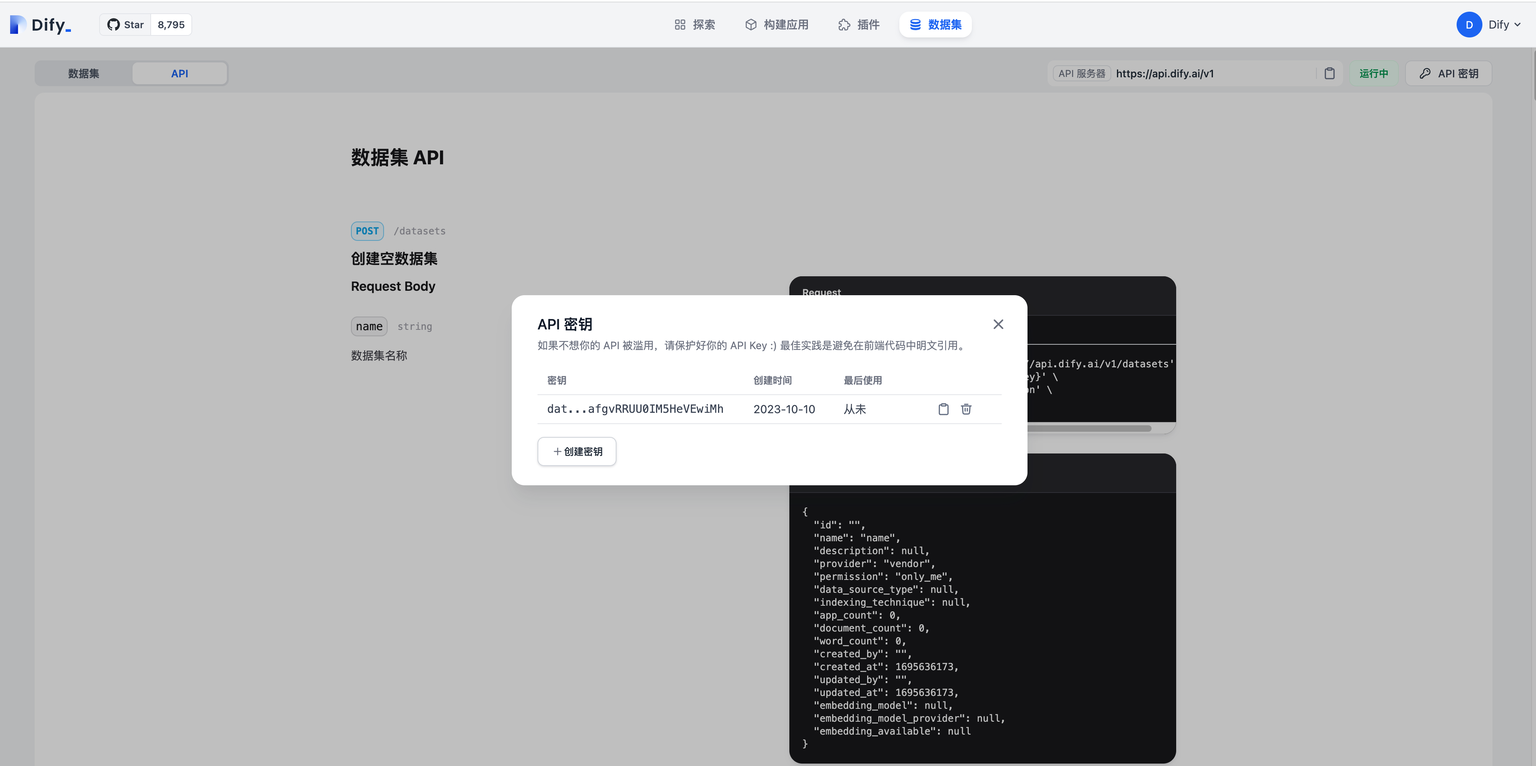
进入知识库页面,在左侧的导航中切换至 **API** 页面。在该页面中你可以查看 Dify 提供的知识库 API 文档,并可以在 **API 密钥** 中管理可访问知识库 API 的凭据。
### API 调用示例
#### 通过文本创建文档
输入示例:
```json theme={null}
curl --location --request POST 'https://api.dify.ai/v1/datasets/{dataset_id}/document/create_by_text' \
--header 'Authorization: Bearer {api_key}' \
--header 'Content-Type: application/json' \
--data-raw '{"name": "text","text": "text","indexing_technique": "high_quality","process_rule": {"mode": "automatic"}}'
```
输出示例:
```json theme={null}
{
"document": {
"id": "",
"position": 1,
"data_source_type": "upload_file",
"data_source_info": {
"upload_file_id": ""
},
"dataset_process_rule_id": "",
"name": "text.txt",
"created_from": "api",
"created_by": "",
"created_at": 1695690280,
"tokens": 0,
"indexing_status": "waiting",
"error": null,
"enabled": true,
"disabled_at": null,
"disabled_by": null,
"archived": false,
"display_status": "queuing",
"word_count": 0,
"hit_count": 0,
"doc_form": "text_model"
},
"batch": ""
}
```
#### 通过文件创建文档
输入示例:
```json theme={null}
curl --location --request POST 'https://api.dify.ai/v1/datasets/{dataset_id}/document/create_by_file' \
--header 'Authorization: Bearer {api_key}' \
--form 'data="{"indexing_technique":"high_quality","process_rule":{"rules":{"pre_processing_rules":[{"id":"remove_extra_spaces","enabled":true},{"id":"remove_urls_emails","enabled":true}],"segmentation":{"separator":"###","max_tokens":500}},"mode":"custom"}}";type=text/plain' \
--form 'file=@"/path/to/file"'
```
输出示例:
```json theme={null}
{
"document": {
"id": "",
"position": 1,
"data_source_type": "upload_file",
"data_source_info": {
"upload_file_id": ""
},
"dataset_process_rule_id": "",
"name": "Dify.txt",
"created_from": "api",
"created_by": "",
"created_at": 1695308667,
"tokens": 0,
"indexing_status": "waiting",
"error": null,
"enabled": true,
"disabled_at": null,
"disabled_by": null,
"archived": false,
"display_status": "queuing",
"word_count": 0,
"hit_count": 0,
"doc_form": "text_model"
},
"batch": ""
}
```
#### **创建空知识库**
仅用来创建空知识库
输入示例:
```bash theme={null}
curl --location --request POST 'https://api.dify.ai/v1/datasets' \
--header 'Authorization: Bearer {api_key}' \
--header 'Content-Type: application/json' \
--data-raw '{"name": "name", "permission": "only_me"}'
```
输出示例:
```json theme={null}
{
"id": "",
"name": "name",
"description": null,
"provider": "vendor",
"permission": "only_me",
"data_source_type": null,
"indexing_technique": null,
"app_count": 0,
"document_count": 0,
"word_count": 0,
"created_by": "",
"created_at": 1695636173,
"updated_by": "",
"updated_at": 1695636173,
"embedding_model": null,
"embedding_model_provider": null,
"embedding_available": null
}
```
#### **知识库列表**
输入示例:
```bash theme={null}
curl --location --request GET 'https://api.dify.ai/v1/datasets?page=1&limit=20' \
--header 'Authorization: Bearer {api_key}'
```
输出示例:
```json theme={null}
{
"data": [
{
"id": "",
"name": "知识库名称",
"description": "描述信息",
"permission": "only_me",
"data_source_type": "upload_file",
"indexing_technique": "",
"app_count": 2,
"document_count": 10,
"word_count": 1200,
"created_by": "",
"created_at": "",
"updated_by": "",
"updated_at": ""
},
...
],
"has_more": true,
"limit": 20,
"total": 50,
"page": 1
}
```
#### 删除知识库
输入示例:
```json theme={null}
curl --location --request DELETE 'https://api.dify.ai/v1/datasets/{dataset_id}' \
--header 'Authorization: Bearer {api_key}'
```
输出示例:
```json theme={null}
204 No Content
```
#### 通过文本更新文档
此接口基于已存在知识库,在此知识库的基础上通过文本更新文档
输入示例:
```bash theme={null}
curl --location --request POST 'https://api.dify.ai/v1/datasets/{dataset_id}/documents/{document_id}/update_by_text' \
--header 'Authorization: Bearer {api_key}' \
--header 'Content-Type: application/json' \
--data-raw '{"name": "name","text": "text"}'
```
输出示例:
```json theme={null}
{
"document": {
"id": "",
"position": 1,
"data_source_type": "upload_file",
"data_source_info": {
"upload_file_id": ""
},
"dataset_process_rule_id": "",
"name": "name.txt",
"created_from": "api",
"created_by": "",
"created_at": 1695308667,
"tokens": 0,
"indexing_status": "waiting",
"error": null,
"enabled": true,
"disabled_at": null,
"disabled_by": null,
"archived": false,
"display_status": "queuing",
"word_count": 0,
"hit_count": 0,
"doc_form": "text_model"
},
"batch": ""
}
```
#### 通过文件更新文档
此接口基于已存在知识库,在此知识库的基础上通过文件更新文档的操作。
输入示例:
```bash theme={null}
curl --location --request POST 'https://api.dify.ai/v1/datasets/{dataset_id}/documents/{document_id}/update_by_file' \
--header 'Authorization: Bearer {api_key}' \
--form 'data="{"name":"Dify","indexing_technique":"high_quality","process_rule":{"rules":{"pre_processing_rules":[{"id":"remove_extra_spaces","enabled":true},{"id":"remove_urls_emails","enabled":true}],"segmentation":{"separator":"###","max_tokens":500}},"mode":"custom"}}";type=text/plain' \
--form 'file=@"/path/to/file"'
```
输出示例:
```json theme={null}
{
"document": {
"id": "",
"position": 1,
"data_source_type": "upload_file",
"data_source_info": {
"upload_file_id": ""
},
"dataset_process_rule_id": "",
"name": "Dify.txt",
"created_from": "api",
"created_by": "",
"created_at": 1695308667,
"tokens": 0,
"indexing_status": "waiting",
"error": null,
"enabled": true,
"disabled_at": null,
"disabled_by": null,
"archived": false,
"display_status": "queuing",
"word_count": 0,
"hit_count": 0,
"doc_form": "text_model"
},
"batch": "20230921150427533684"
}
```
#### **获取文档嵌入状态(进度)**
输入示例:
```bash theme={null}
curl --location --request GET 'https://api.dify.ai/v1/datasets/{dataset_id}/documents/{batch}/indexing-status' \
--header 'Authorization: Bearer {api_key}'
```
输出示例:
```json theme={null}
{
"data":[{
"id": "",
"indexing_status": "indexing",
"processing_started_at": 1681623462.0,
"parsing_completed_at": 1681623462.0,
"cleaning_completed_at": 1681623462.0,
"splitting_completed_at": 1681623462.0,
"completed_at": null,
"paused_at": null,
"error": null,
"stopped_at": null,
"completed_segments": 24,
"total_segments": 100
}]
}
```
#### **删除文档**
输入示例:
```bash theme={null}
curl --location --request DELETE 'https://api.dify.ai/v1/datasets/{dataset_id}/documents/{document_id}' \
--header 'Authorization: Bearer {api_key}'
```
输出示例:
```bash theme={null}
{
"result": "success"
}
```
#### **知识库文档列表**
输入示例:
```bash theme={null}
curl --location --request GET 'https://api.dify.ai/v1/datasets/{dataset_id}/documents' \
--header 'Authorization: Bearer {api_key}'
```
输出示例:
```json theme={null}
{
"data": [
{
"id": "",
"position": 1,
"data_source_type": "file_upload",
"data_source_info": null,
"dataset_process_rule_id": null,
"name": "dify",
"created_from": "",
"created_by": "",
"created_at": 1681623639,
"tokens": 0,
"indexing_status": "waiting",
"error": null,
"enabled": true,
"disabled_at": null,
"disabled_by": null,
"archived": false
},
],
"has_more": false,
"limit": 20,
"total": 9,
"page": 1
}
```
#### **新增分段**
输入示例:
```bash theme={null}
curl --location --request POST 'https://api.dify.ai/v1/datasets/{dataset_id}/documents/{document_id}/segments' \
--header 'Authorization: Bearer {api_key}' \
--header 'Content-Type: application/json' \
--data-raw '{"segments": [{"content": "1","answer": "1","keywords": ["a"]}]}'
```
输出示例:
```json theme={null}
{
"data": [{
"id": "",
"position": 1,
"document_id": "",
"content": "1",
"answer": "1",
"word_count": 25,
"tokens": 0,
"keywords": [
"a"
],
"index_node_id": "",
"index_node_hash": "",
"hit_count": 0,
"enabled": true,
"disabled_at": null,
"disabled_by": null,
"status": "completed",
"created_by": "",
"created_at": 1695312007,
"indexing_at": 1695312007,
"completed_at": 1695312007,
"error": null,
"stopped_at": null
}],
"doc_form": "text_model"
}
```
### 查询文档分段
输入示例:
```bash theme={null}
curl --location --request GET 'https://api.dify.ai/v1/datasets/{dataset_id}/documents/{document_id}/segments' \
--header 'Authorization: Bearer {api_key}' \
--header 'Content-Type: application/json'
```
输出示例:
```bash theme={null}
{
"data": [{
"id": "",
"position": 1,
"document_id": "",
"content": "1",
"answer": "1",
"word_count": 25,
"tokens": 0,
"keywords": [
"a"
],
"index_node_id": "",
"index_node_hash": "",
"hit_count": 0,
"enabled": true,
"disabled_at": null,
"disabled_by": null,
"status": "completed",
"created_by": "",
"created_at": 1695312007,
"indexing_at": 1695312007,
"completed_at": 1695312007,
"error": null,
"stopped_at": null
}],
"doc_form": "text_model"
}
```
### 删除文档分段
输入示例:
```bash theme={null}
curl --location --request DELETE 'https://api.dify.ai/v1/datasets/{dataset_id}/documents/{document_id}/segments/{segment_id}' \
--header 'Authorization: Bearer {api_key}' \
--header 'Content-Type: application/json'
```
输出示例:
```bash theme={null}
{
"result": "success"
}
```
### 更新文档分段
输入示例:
```bash theme={null}
curl --location --request POST 'https://api.dify.ai/v1/datasets/{dataset_id}/documents/{document_id}/segments/{segment_id}' \
--header 'Authorization: Bearer {api_key}' \
--header 'Content-Type: application/json'\
--data-raw '{"segment": {"content": "1","answer": "1", "keywords": ["a"], "enabled": false}}'
```
输出示例:
```bash theme={null}
{
"data": [{
"id": "",
"position": 1,
"document_id": "",
"content": "1",
"answer": "1",
"word_count": 25,
"tokens": 0,
"keywords": [
"a"
],
"index_node_id": "",
"index_node_hash": "",
"hit_count": 0,
"enabled": true,
"disabled_at": null,
"disabled_by": null,
"status": "completed",
"created_by": "",
"created_at": 1695312007,
"indexing_at": 1695312007,
"completed_at": 1695312007,
"error": null,
"stopped_at": null
}],
"doc_form": "text_model"
}
```
#### 新增知识库元数据字段
输入示例:
```bash theme={null}
curl --location 'https://api.dify.ai/v1/datasets/{dataset_id}/metadata' \
--header 'Content-Type: application/json' \
--header 'Authorization: Bearer {api_key}' \
--data '{
"type":"string",
"name":"test"
}'
```
输出示例:
```json theme={null}
{
"id": "9f63c91b-d60e-4142-bb0c-c81a54dc2db5",
"type": "string",
"name": "test"
}
```
#### 修改知识库元数据字段
输入示例:
```bash theme={null}
curl --location --request PATCH 'https://api.dify.ai/v1/datasets/{dataset_id}/metadata/{metadata_id}' \
--header 'Content-Type: application/json' \
--header 'Authorization: Bearer {api_key}' \
--data '{
"name":"test"
}'
```
输出示例:
```json theme={null}
{
"id": "9f63c91b-d60e-4142-bb0c-c81a54dc2db5",
"type": "string",
"name": "test"
}
```
#### 删除知识库元数据字段
输入示例:
```bash theme={null}
curl --location --request DELETE 'https://api.dify.ai/v1/datasets/{dataset_id}/metadata/{metadata_id}' \
--header 'Authorization: Bearer {api_key}'
```
输出示例:
```bash theme={null}
200 success
```
#### 启用/禁用知识库元数据中的内置字段
输入示例:
```bash theme={null}
curl --location --request DELETE 'https://api.dify.ai/v1/datasets/{dataset_id}/metadata/built-in/{action}' \
--header 'Authorization: Bearer {api_key}'
```
输出示例:
```json theme={null}
200 success
```
#### 修改文档的元数据(赋值)
输入示例:
```bash theme={null}
curl --location 'https://api.dify.ai/v1/datasets/{dataset_id}/documents/metadata' \
--header 'Content-Type: application/json' \
--header 'Authorization: Bearer {api_key}'
--data '{
"operation_data":[
{
"document_id": "3e928bc4-65ea-4201-87c8-cbcc5871f525",
"metadata_list": [
{
"id": "1887f5ec-966f-4c93-8c99-5ad386022f46",
"value": "dify",
"name": "test"
}
]
}
]
}'
```
输出示例:
```json theme={null}
200 success
```
#### 数据集的元数据列表
输入示例:
```bash theme={null}
curl --location 'https://api.dify.ai/v1/datasets/{dataset_id}/metadata' \
--header 'Authorization: Bearer {api_key}'
```
输出示例:
```json theme={null}
{
"doc_metadata": [
{
"id": "550e8400-e29b-41d4-a716-446655440000",
"type": "string",
"name": "title",
"use_count": 42
},
{
"id": "6ba7b810-9dad-11d1-80b4-00c04fd430c8",
"type": "number",
"name": "price",
"use_count": 28
},
{
"id": "7ba7b810-9dad-11d1-80b4-00c04fd430c9",
"type": "time",
"name": "created_at",
"use_count": 35
}
],
"built_in_field_enabled": true
}
```
### 错误信息
| 错误信息 | 错误码 | 原因描述 |
| ----------------------------- | --- | ------------------------------------------------------------------------------------------ |
| no\_file\_uploaded | 400 | 请上传你的文件 |
| too\_many\_files | 400 | 只允许上传一个文件 |
| file\_too\_large | 413 | 文件大小超出限制 |
| unsupported\_file\_type | 415 | 不支持的文件类型。目前只支持以下内容格式:`txt`, `markdown`, `md`, `pdf`, `html`, `html`, `xlsx`, `docx`, `csv` |
| high\_quality\_dataset\_only | 400 | 当前操作仅支持"高质量"知识库 |
| dataset\_not\_initialized | 400 | 知识库仍在初始化或索引中。请稍候 |
| archived\_document\_immutable | 403 | 归档文档不可编辑 |
| dataset\_name\_duplicate | 409 | 知识库名称已存在,请修改你的知识库名称 |
| invalid\_action | 400 | 无效操作 |
| document\_already\_finished | 400 | 文档已处理完成。请刷新页面或查看文档详情 |
| document\_indexing | 400 | 文档正在处理中,无法编辑 |
| invalid\_metadata | 400 | 元数据内容不正确。请检查并验证 |
通过直接提交修改来帮助改进文档内容
发现错误或有改进建议?请提交问题反馈